Skip to content
Grav 2.0 is officially stable. Read the announcement →

Community guidelines

Please keep discussions civil and on-topic. Repeated violations may lead to a temporary ban.

Content & Markdown

How to use <div> tag correctly?

Solved by pamtbaau View solution

Started by Junillon 3 years ago · 5 replies · 2128 views
3 years ago

Hi all, I'm facing a strange thing I don't understand.
I want to use div tags in a standard page. I have check all my options like mardown extra:true and markdown=1, I tryed to leave a white line after the tag but I get something funny 🙂 :
the first div is shown correctly, but the second is escaped.

HTML
<div class="row" markdown="1"><div class="cell-2" markdown="1">

    Rouge :

    </div>

    <div class="cell-2" markdown="1">

    Bois :

    </div></div>

What I get is
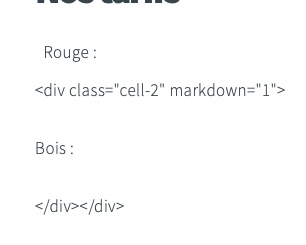
Capture d’écran 2023-05-08 à 12.55.08|306x245

so strange, I tried one tag on a line, one empty line each time etc. Nothing is going right. What am I doing wrong ?
Thanks for any answer.
3 years ago Solution

@Francois, You're using tabs which interfere with formatting. Likewise when using spaces.

See what happens when you insert spaces in regular Markdown. The text might be considered to be a blockquote.

TXT
Used 4 spaces to indent this line

See this Markdown guide HTML Best Practices

3 years ago

Ok thanks for you solution (as usual ;) )
but a last question then. why

HTML
<div class="row" markdown="1"><div class="cell-2" markdown="1">
Rouge :
</div>
<div class="cell-2" markdown="1">
Bois :
</div></div>

is working and

HTML
<div class="row" markdown="1"><div class="cell-2" markdown="1">
Rouge :
</div><div class="cell-2" markdown="1">
Bois :
</div></div>

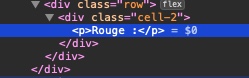
is not showing the second div (not even escape it) ? another rule ?
Capture d’écran 2023-05-08 à 14.16.12|249x78

3 years ago

@Francois, I don't know, but...

When I drop your snippet into Markdown, I get the following generated HTML as output:

HTML
<div class="row" markdown="1"><div class="cell-2" markdown="1">
Rouge :
</div><div class="cell-2" markdown="1">
Bois :
</div></div>

So, I cannot reproduce your output.

3 years ago

@pamtbaau well... I finally found how to but this has non sense for me.
It works if I remove all markdown="1" from the tags or if I unvalid option markdown extra and force it to false.
At this time, I don't need any further markdown inside my div as I'm using class, but is this your configuration ?

last edited 05/08/23 by Junillon
3 years ago

last minute correction, only option "mardown extra" should be forced to false. I kept markdown=1 in tags and it works correctly

Suggested topics

Topic Participants Replies Views Activity
Content & Markdown · by Jochen, 8 months ago
6 97 8 months ago
Content & Markdown · by Ton Haarmans, 1 year ago
10 185 1 year ago
Content & Markdown · by Jan L'Am, 1 year ago
4 148 1 year ago
Content & Markdown · by Leonardo, 1 year ago
3 61 1 year ago
Content & Markdown · by belthasar, 1 year ago
4 255 1 year ago