
I run a lot of Grav sites. There's getgrav.org and Learn, the newsletter, the translations site, kahunacart.com, the KahunaCart demo store, and now gravguard.com. For years, keeping them all current meant the same routine: SSH in, run bin/gpm update, click around to make sure nothing broke, then do the next one. Several of those sites share plugin checkouts that live in a ~/scm folder and are symlinked in, so I had a little shell script that pulled them all. It worked. Until an update broke something at 11pm and I found out the next morning.
WordPress people have had tools for this for over a decade. Grav has had nothing. So we built one, and today Grav Guard is open to everyone at gravguard.com.
What it does
Grav Guard updates your Grav sites, backs them up, watches that they're up, checks their files against known-good copies, and gets one back on its feet when it breaks. You see your whole fleet on one screen, and it tells you what needs a look instead of making you go and find it.
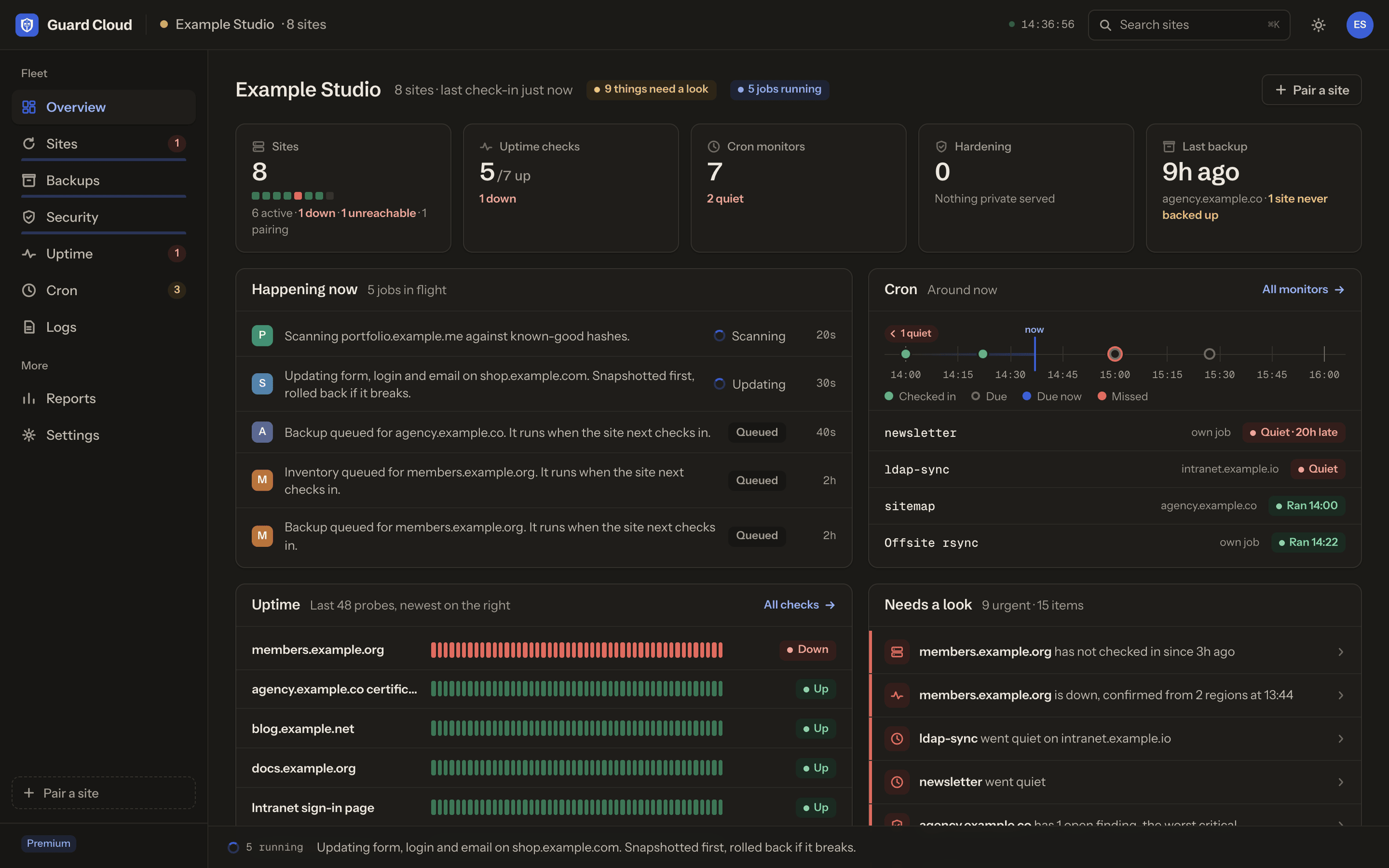
The overview: what's running now, what's down, which cron jobs went quiet, and what needs a look.
It works with Grav 1.7 and Grav 2.0+ sites alike, and like Grav 1.7 itself it only needs PHP 7.3 or newer. Your host doesn't need to open any ports or allow any IP addresses, and you don't need to give us SSH access.
How it works
There are three parts, and only one of them is required on your server.
Guard Cloud
The dashboard at cloud.gravguard.com, hosted in the EU.
- Schedules updates and backups
- Probes uptime from three regions
- Signs every command with that site's own key
Guard Agent
A small open-source PHP app in _guard/, beside Grav.
- Checks every signature before it acts
- Keeps working when Grav is broken
- Updates itself from signed releases
bin/gravYour Grav site
Untouched. Guard drives it from the outside.
- Guard Helper plugin is optional
- It installs and pairs the agent from the admin
- And adds a free vulnerability check
The important decision was making Guard Agent its own little app instead of a Grav plugin. A plugin only runs when Grav runs. When a bad update leaves you with a white screen, the admin is gone too, along with any plugin that was supposed to help. The agent lives in _guard/ next to Grav and never needs Grav to boot, so it can still restore core, roll back the last update and read the logs.
It checks in with Guard Cloud once a minute over ordinary outbound HTTPS. That's all a host has to allow, which on nearly every host is nothing at all.
Updates that undo themselves
This is the part I wanted most. Every update follows the same steps, whether you press Update on one site or schedule forty of them for 2am.
grav.log.git pull --ff-only, and your local edits are kept.That second row matters more than it looks. Plenty of Grav sites aren't installed from GPM. Developers run git checkouts and symlinked plugins, and agencies keep one copy of a plugin linked into a dozen client sites. A tool that blindly downloads a zip over a git checkout makes a mess. Guard records where every package came from on every inventory, and only uses an update method that's safe for it.
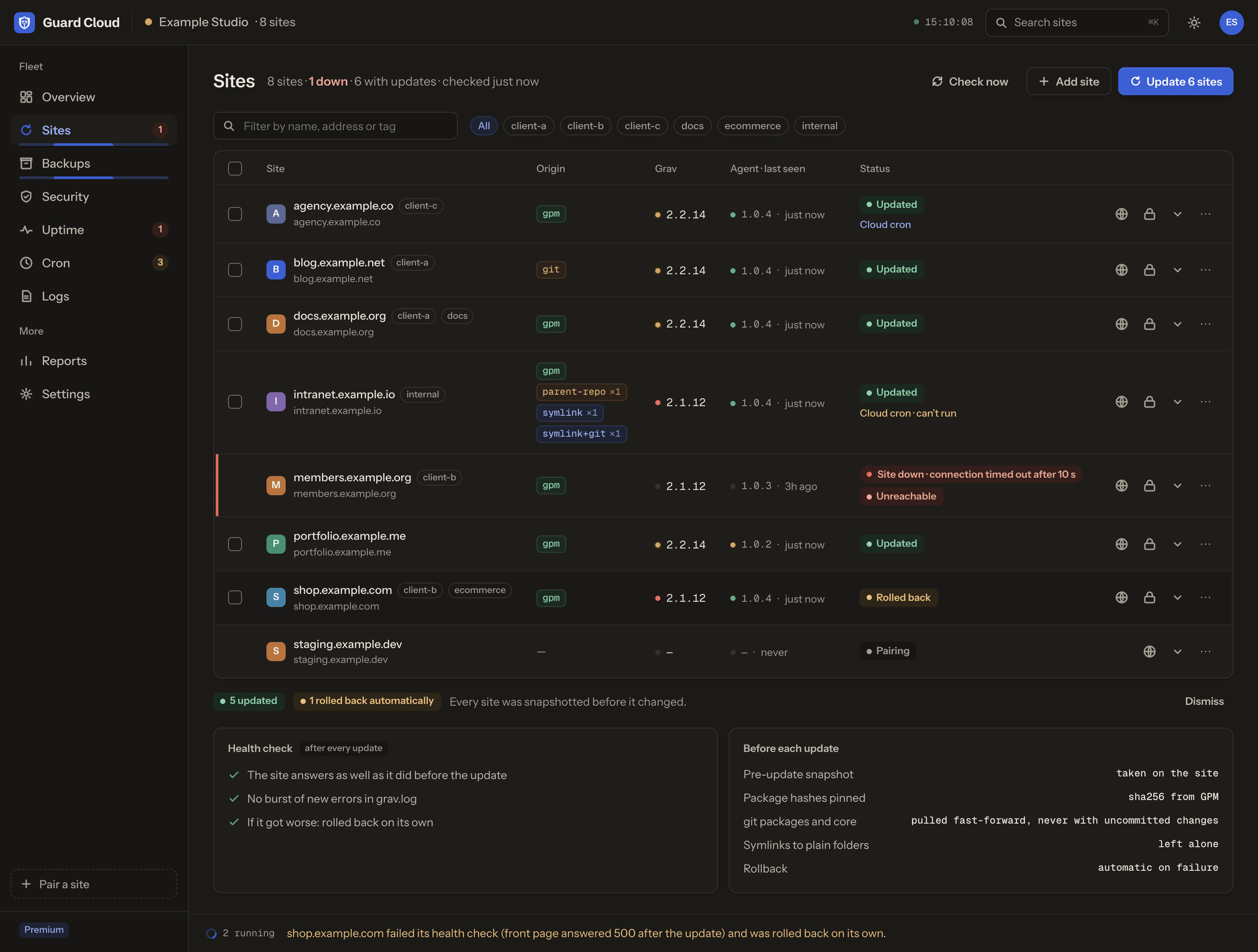
Six sites updated in one go. shop.example.com's front page answered 500 afterwards, so it went back on its own. The other five are done.
On Premium, updates can run on their own. You choose whether that includes Grav core, which hours they're allowed to run in, and whether a new release waits 1 to 7 days to settle before it's installed. A release that fixes a published security advisory for your installed version skips the wait.
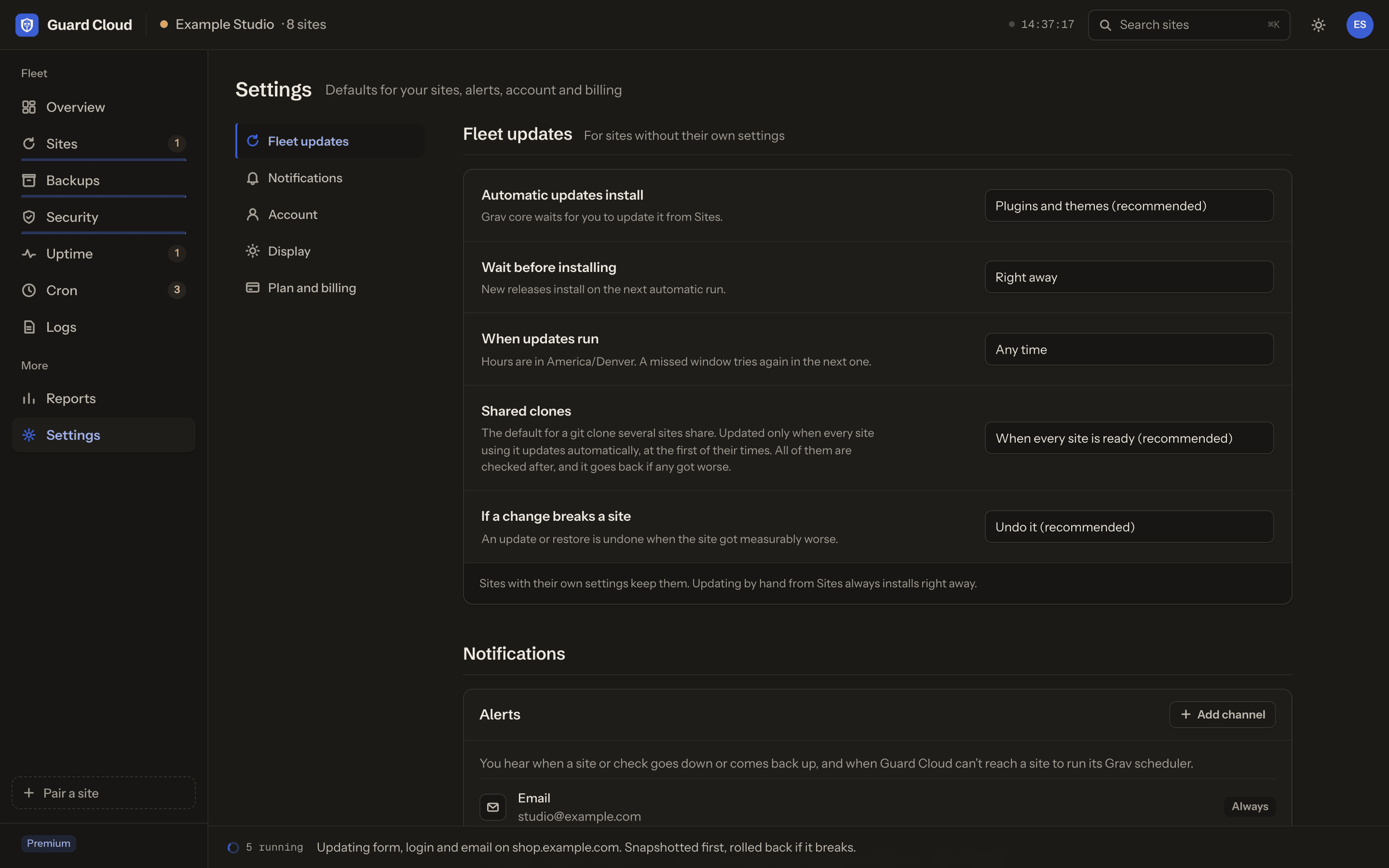
There's also shared clones, which came straight out of my own setup. When one git clone is symlinked into several sites, Guard treats it as one unit: one site pulls, then every site using that clone gets a health check, and if any of them got worse the clone goes back to the commit it was on. That replaced my shell script on the day it shipped.
Backups that only send what changed
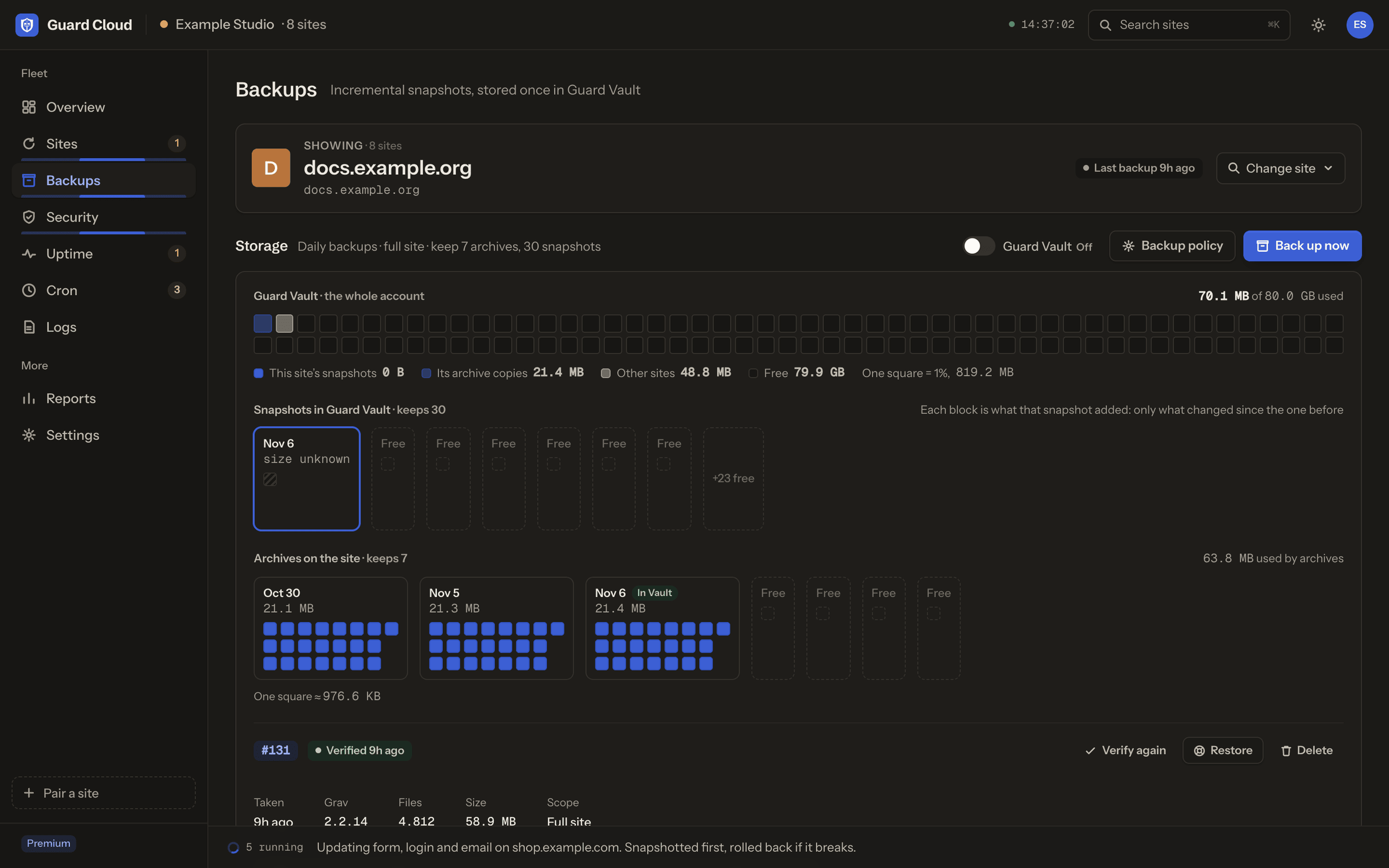
The agent takes scheduled backups of each site. On Premium they also go off-site to Guard Vault, and that's where the clever part is. Files are split into content-addressed chunks, so a nightly snapshot only sends the chunks that changed since the night before. A 2 GB site where you edited a page and updated a plugin sends a megabyte or two.
Every snapshot is still a complete restore point. Restores are checked before they run, they happen as a staged swap so a half-finished restore never leaves you with half a site, and you can watch the progress as it comes back. Big media and zip files are counted too: KahunaCart's own site keeps 7 GB of release zips, and the pre-update backups now leave those out and put them back on restore, so a backup before an update takes seconds instead of six minutes.
Rescue when Grav won't boot
When a site shows "Whoops, something went wrong" and the admin won't load, Guard can still act. Rescue restores Grav core from a verified release, rolls back the last update, or pulls the end of grav.log so you can see what happened, all through the agent with Grav never having to run.
Restore and rescue are off until you switch them on, in the site's own admin or from the command line. They use a separate key that Guard Cloud can offer but can't grant itself. If someone took over our dashboard, they still couldn't overwrite your site.
Every file checked against its release
GravSec is the security side. It has three jobs.
- Integrity scans. Every file in core, plugins and themes is compared with the same file in its released version. We hold 307,867 known-good hashes covering 1,351 releases of 634 packages, and new releases are added as they appear on GPM. A changed file in the login plugin, or a stray
.phpfile inuser/images/, shows up with what to do about it. - Advisories. When a security advisory is published for Grav, a plugin or a theme, Guard matches it against the versions you have installed, so you know which sites are affected and which release fixes them.
- Hardening. Guard checks for debug mode left on in production,
.gitor.envfolders reachable from outside, backups sitting in the webroot, and new admin accounts. It also checks each site from the outside, and fixes most of what it finds in one click.
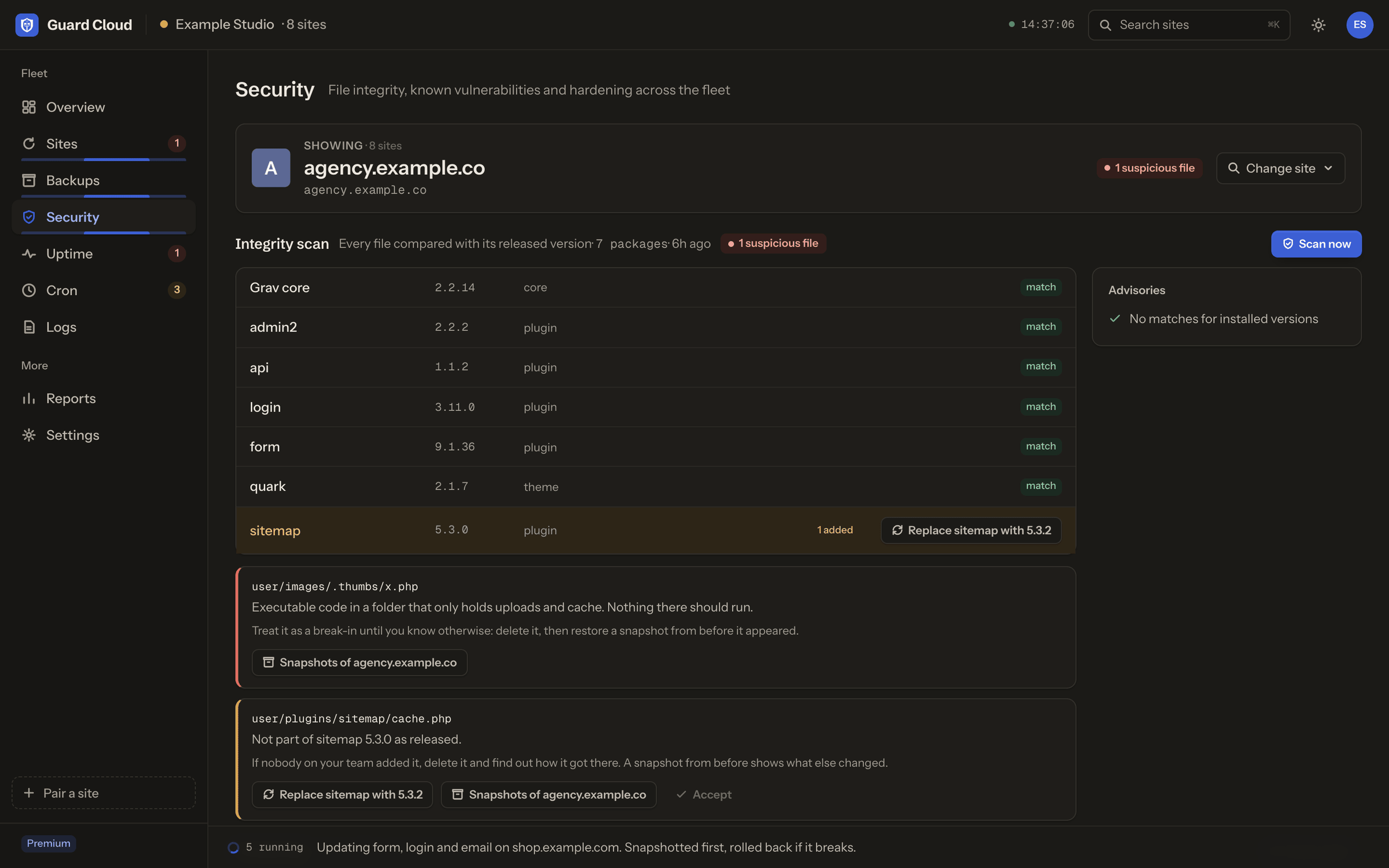
The advisories are public too. They're published as an open feed, and the Guard Helper plugin uses it for a free vulnerability check right in your Grav admin, whether you sign up for Guard or not.
Uptime that's sure before it wakes you
Every paired site gets an uptime check on its own health endpoint. On Premium, when the probe from Germany fails, probes in US East and US West are asked to check too. A flaky route between two data centres doesn't page you at 3am. A real outage does.
Alerts go to email, Slack, Discord, Pushover or a signed webhook of your own, on every plan. And the alerts say what happened, why, and what to do next. Guard also tells a firewall that's blocking us apart from a site that's actually down, which turns out to be a very common false alarm with BitNinja and friends.
Premium adds keyword and SSL certificate checks, probes every 5, 10 or 15 minutes, and three checks of your own per site for any other URL you care about.
Cron, including on hosts without it
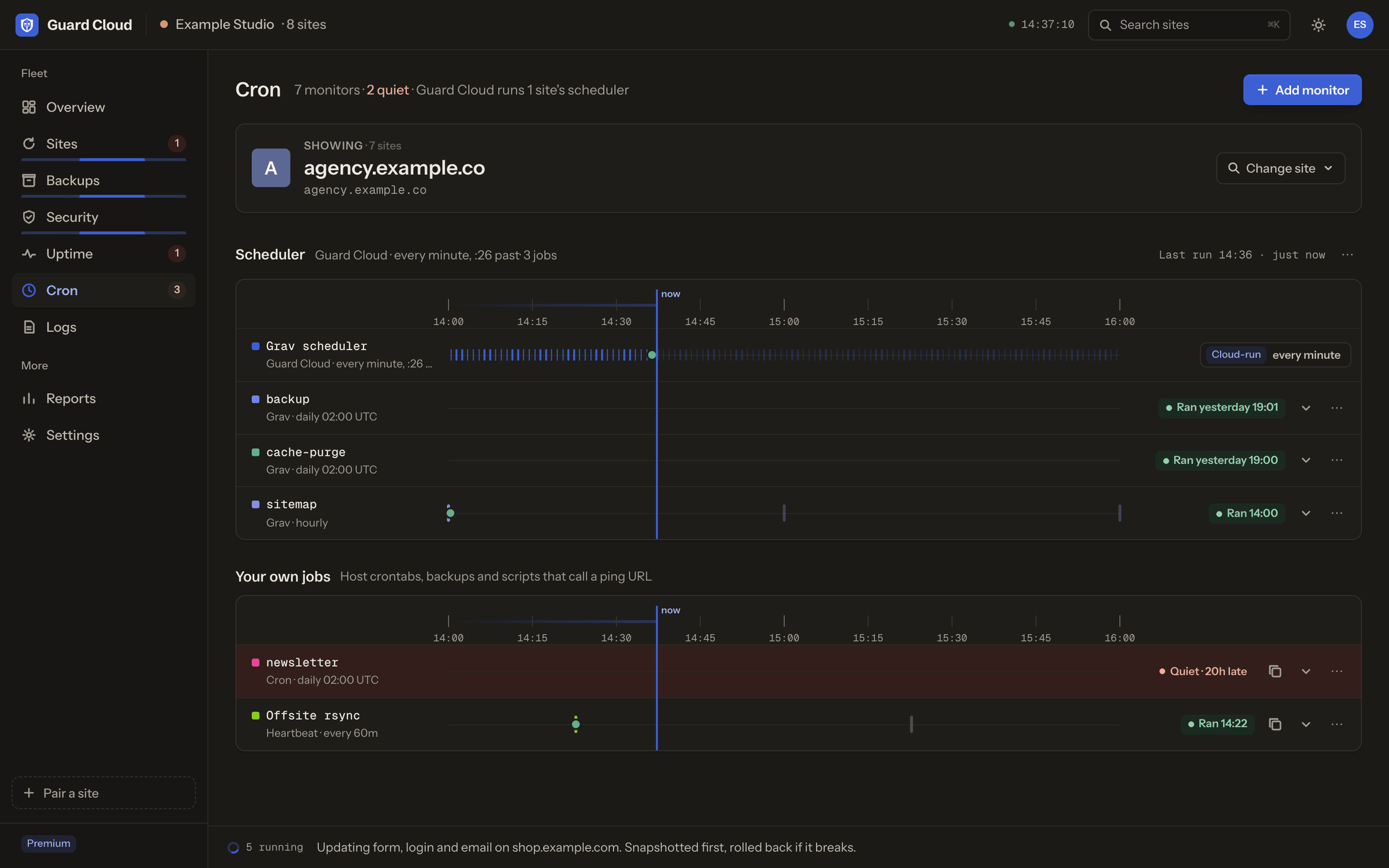
Grav has a scheduler for backups, cache clears, sitemaps and plenty of plugin jobs, and it only runs if something calls it every minute. A lot of shared hosts don't give you a crontab. On those, Guard Cloud runs the scheduler for you, which is where those 31,000+ runs came from during testing.
Guard Cron also finds the jobs Grav and your plugins run, shows when each one is due in the site's own time zone, and lets your own cron jobs and scripts ping a URL. When one goes quiet, you hear about it.
A cloud that can't push code
A tool like this holds the keys to every site you own, so it had better not become the way in. Site-management tools for other platforms have been exactly that over the years, through keys shared between sites, signature checks that could be skipped and weak crypto fallbacks. We designed around every one of them.
Every site has its own Ed25519 key pair, never shared with another site, and Guard Cloud keeps its copies encrypted under a master key that lives outside the database. Every command is signed for one site, and the agent checks the signature before it does anything. Agent updates are signed with an offline release key that Guard Cloud doesn't have, so even a compromised cloud can only pass a release along. It can't make one.
How we use it
Grav Guard has been looking after our own sites during testing: getgrav.org, Learn, the newsletter, the translations site, kahunacart.com, the KahunaCart demo and gravguard.com itself. getgrav.org and Learn share 13 git clones on the same server, which is exactly why shared clones exist. KahunaCart's server allows neither proc_open nor exec, which is why the agent can update core without either. And Paul Hibbitts has been running his skeleton demo sites on it, which turned up the confusing old pricing and a few rough edges in the setup.
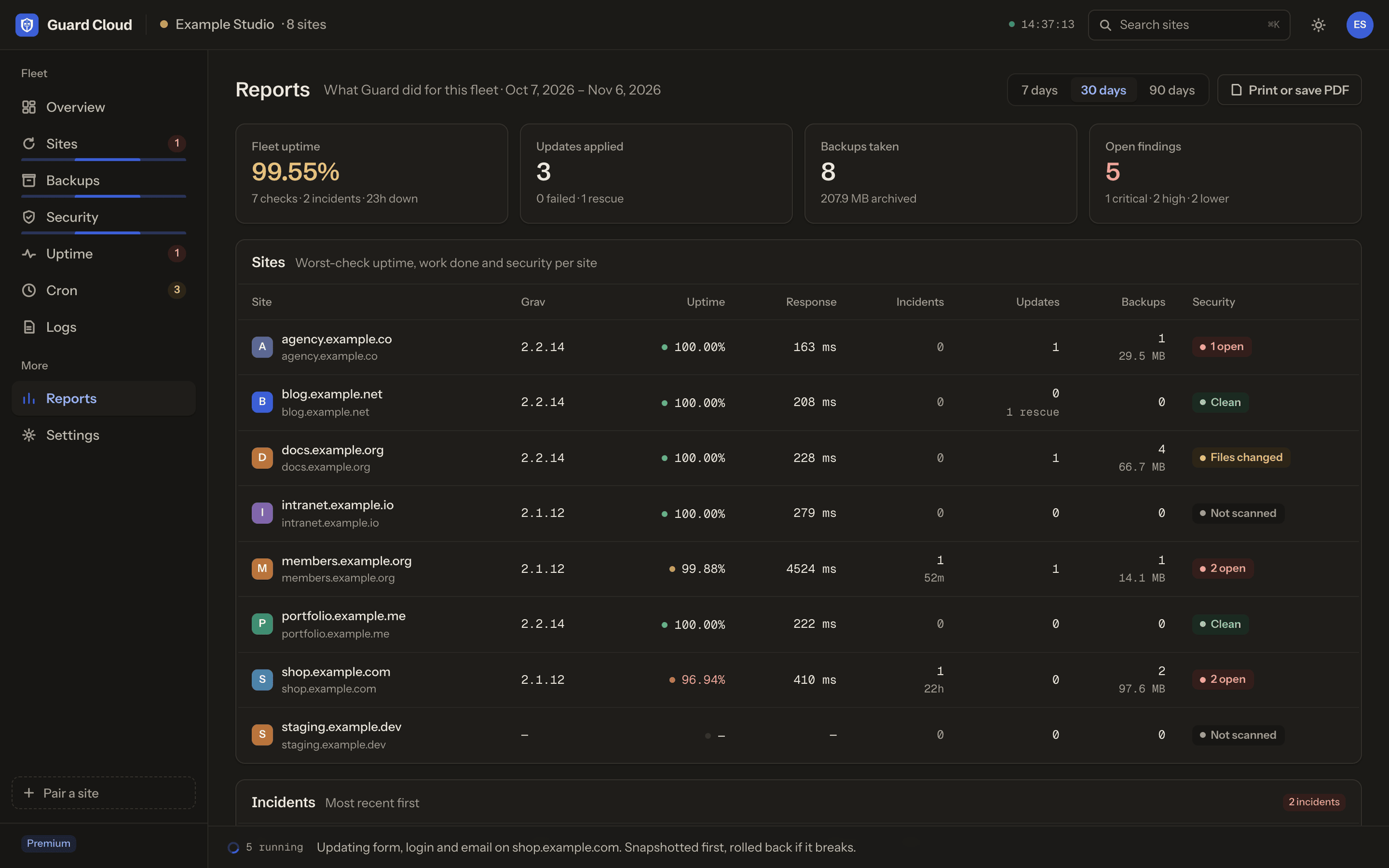
If you build Grav sites for clients, Reports shows per-site and fleet-wide what was updated, backed up, checked and found over 7, 30 or 90 days, and prints to a PDF you can send along with your invoice.
Free for 3 sites, $2 a site after that
I wanted the free plan to be useful on its own, not a demo. If you have a personal site, a blog and a side project, Free covers you and you never have to pay us anything.
Free
- Updates you run yourself, with a snapshot first and an automatic undo
- Backups kept on your own server
- Integrity scans, advisories and hardening
- Guard Cron, and the scheduler run for you on hosts without cron
- Uptime check on each site every 15 minutes
- Alerts by email, Slack, Discord and Pushover
- A weekly digest of what's waiting
- No automatic updates, Vault or rescue
Premium
- Automatic updates, core included if you want it
- Wait 1 to 7 days for a release to settle, in the hours you choose
- Rollback on demand, and rescue for broken sites
- Guard Vault off-site backups, 10 GB per site, pooled
- Uptime confirmed from three regions, every 5, 10 or 15 minutes
- Keyword and SSL checks, plus 3 checks of your own per site
- Shared clones updated and checked as one unit
- A digest every 1 to 7 days, with changelogs
Premium covers every site in your account, so free and paid sites never mix and you never have to remember which is which. The price per site drops as you grow: sites 1 to 10 are $2, sites 11 to 25 are $1.50, and from 26 up they're $1 each. Pay every 6 months for 10% off, or yearly for two months free.
If Premium isn't right for you, ask within 14 days of your first payment and we'll refund it in full. More than 100 sites? Write to [email protected] and we'll work something out.
Getting started
It takes a couple of minutes per site.
- Sign up at gravguard.com. No card needed.
- Install Guard Helper in your Grav admin (or
bin/gpm install guard-helper), open Guard in the sidebar and click Set up Guard Agent. It downloads the agent, checks it against our release key and installs it in_guard/. No shell needed. - Pair it. In Guard Cloud click Add site and enter the pairing code and agent endpoint the Guard page shows you. The site gets its own key, and it's in your fleet a minute later.
Prefer the command line, or no admin on that site? Run this from the site's root instead:
curl -fsSL https://cloud.gravguard.com/install/gi.php | php -- --cloud https://cloud.gravguard.com
It needs PHP 7.3+ with the sodium and zip extensions, and prints the same pairing code and endpoint.
I've wanted this for my own sites for years, and I think a lot of you have too. Pair a site or three and tell me what it gets wrong, or what it should do next. Come find us on chat.getgrav.org, or write to [email protected].
Andy