Hi, I have created a child theme to Quark following the manual guide. But how do I swap to the new theme? It is not displayed in the admin / themes page. Or are child themes not displayed there?
@nwi, If properly defined a child theme shows up in Admin.
I would suggest to use the easier and less error prone CLI version:
BASH
$ bin/gpm install devtools
$ bin/plugin devtools new-theme
  // Choose inheritance when asked for theme type
1 reply
last edited 10/26/21 by pamtbaau
For me the manual way is easier as I don't really understand the CLI way to do it.
Thank you for your advise, pamtbaau.
For me the manual way is easier as I don't really understand the CLI way to do it.
This is what I did:
- Created the folder user/themes/mgb-theme
- Copied the YAML file an added the code as described.
- Copied the blueprints.yaml
- Changed the config/system.yaml.
- Created a new theme Class file.
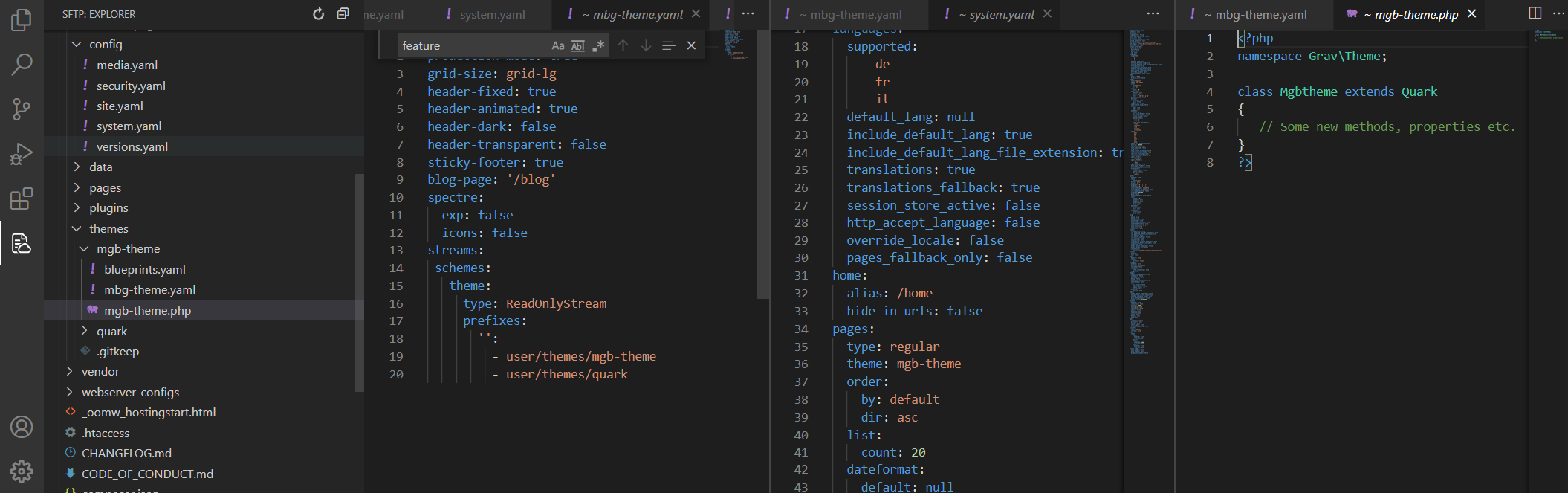
Is there anything obviously wrong? Thanks for any tipps.
@nwi, Have you tried the CLI method to see if that creates a functional child theme?
No, that is much more complicated for me, as I have not installed PHP on my PC to run CLI.
Hi @nwi
In your "mgb-theme.php" file try
PHP
<?php
namespace Grav\Theme;

use Grav\Common\Theme;

class MgbTheme extends Quark
{
    // Access plugin events in this class
}
Note:
- NEW ADD : use Grav\Common\Theme;
- Lowercase letter to uppercase : class Mgbtheme to class MgbTheme
The sub-theme must be visible in the backoff > theme 🙂
Sincerely
Kit
@nwi:
I have not installed PHP on my PC to run CLI
Wait, are you developing on production?
Thanks for the suggestion @Kit , but it did not work. 🤔
It is probably something very obvious, but I'm new to Grav and I have no idea, what could be wrong.
Yes, but that shouldn't be the cause.
@nwi what's in your blueprints.yaml file ?
mbg-theme > blueprints.yaml
<details>
<summary>My blueprints.yaml</summary>
TXT
name: Mbg Theme
slug: mbg-theme
type: theme
version: 0.1.0
description: xxx
icon: rebel
author:
  name: xxx
  email: [email protected]
homepage: https://github.com/xxx/grav-theme-mbg-theme
demo: http://demo.yoursite.com
keywords: grav, theme, etc
bugs: https://github.com/xxx/grav-theme-mbg-theme/issues
readme: https://github.com/xxx/grav-theme-mbg-theme/blob/develop/README.md
license: MIT
dependencies:
  - { name: grav, version: '>=1.6.0' }
</details>
Log in to reply.
Suggested topics
| Topic | Participants | Replies | Views | Activity |
|---|---|---|---|---|
| 4 | 556 | 4 weeks ago | ||
| 1 | 871 | 1 month ago | ||
| 3 | 731 | 2 months ago | ||
| 5 | 751 | 3 months ago | ||
| 1 | 701 | 3 months ago |