This is a website for our small company. It's based on a custom theme and makes intensive use of modular pages for individual content elements. We are working on a French and English version.
Greetings, Peter
This is a website for our small company. It's based on a custom theme and makes intensive use of modular pages for individual content elements. We are working on a French and English version.
Greetings, Peter
@renards, Congrats on your project.
You mention explicitly that the site makes intensive use of modular pages. Often, a modular page is used for "single-page" websites with a menu using internal links to the different child modules.
However, the site you present has very much the look and feel of regular pages. Only the 'Eindrücke" page could be imagined being build by combining multiple pages.
Maybe there is something to learn here. Would you mind sharing:
Thanks for sharing!
Hi @pamtbaau,
thanks a lot for taking the time to look at our website.
We use modular pages as content elements. So every page consists of several modular pages.
Here is a backend screenshot of the page https://www.fuchs-bau.biz/de/terrassen/holzarten-vor-und-nachteile with a few explanations :
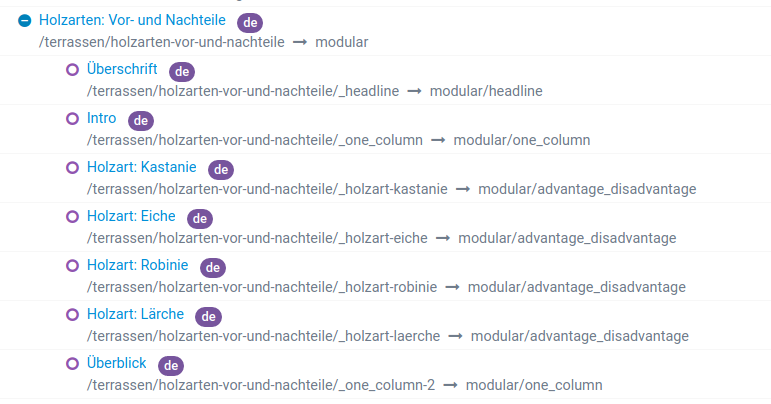
This is a very flexible approach that is easy to implement thanks to blueprints and Twig templates. The editors can move or insert the elements where they want to and they are doing fine with it.
The objective is to create a site-package plugin or basic theme that contains these elements, so that they can be easily transferred to other websites.
@renards, If I understand it correctly...
If this approach appears to be working well for content editors I wonder if it is worth sharing this approach with the community. Maybe in the form of a theme, or a chapter with sample code in the cookbook section of the documentation.
I'm using the same pattern for my own website.
I've created various sections I can reuse to build a page.
Often, a modular page is used for “single-page” websites with a menu using internal links to the different child modules.
I'm not sure where's that coming from ?
@pamtbaau
Using modular pages is meant to give content editors using Admin the ability to split content into smaller sections (= child modules) instead of a single large page. And to order the sections at will.
Exactly, that's a nice summary.
To facilitate this, you have extended the modular page blueprint to allow the user to shuffle the child modules?
Sorting already exists for both normal and modular pages. I only adjusted or extended the blueprints, depending on the content to be displayed.
As I wrote in my last comment, the content elements should be included in a separate plugin or theme. I will be glad to publish that.
@AmauryH and @pamtbaau
Often, a modular page is used for “single-page” websites with a menu using internal links to the different child modules.
I’m not sure where’s that coming from ?
Yep, good question !
For me the possibility to build modular pages, content elements or sections is one of the big benefits of the Grav core to build more flexible and maybe larger websites.
It is almost a pity to use this feature only for single-page websites. 😉
@AmauryH and @renards,
Where this is coming from from...
Often, a modular page is used for “single-page” websites with a menu using internal links to the different child modules.
Before starting with Grav, I was familiar with the concept of 'one-page' websites. Judging from the ones I've seen, I didn't really like the idea of putting everything in one large endless scrolling page. Often pimped with fancy animations, sliding panels etc.. And often slow to load...
So, when reading Grav's docs on modular pages and the docs linking modular pages to 'one-page' websites on multiple occacions, I got the impression that modular pages were designed for building 'single-page' websites. Also samples/skeletons using modular pages are often 'one-page' websites using a single modular page ('One-Page', 'Boxify', 'Agency').
The rationale behind @renards' use of modular pages, is something I haven't considered before. I would really like to play around with a sample implementation of that approach...
@pamtbaau
Thanks for clarifying. It often depends on your background whether you see and implement things one way or another.
Coming from TYPO3 and used to work with modular content elements, I was glad to see that this is possible with Grav and modular pages in a similar way.
Log in to reply.
| Topic | Participants | Replies | Views | Activity |
|---|---|---|---|---|
| 0 | 450 | 7 days ago | ||
| 3 | 738 | 2 weeks ago | ||
| 0 | 492 | 1 month ago | ||
| 3 | 575 | 2 months ago | ||
| 2 | 649 | 2 months ago |