Skip to content
Grav 2.0 is officially stable. Read the announcement →

Community guidelines

Please keep discussions civil and on-topic. Repeated violations may lead to a temporary ban.

General

Implementing Ajax function and sorting with datatables

Solved by pamtbaau View solution

Started by Denis Halbeisen 7 years ago · 4 replies · 3906 views
7 years ago

Hello dear community,

I would like to integrate datatables in my grav page, unfortunately I'm not familiar with javascript. My code look like this:

[datatables paging=false ordering=false info=false searching=false] Firma Name Sitzungszimmer Uhrzeit Datum
Company1 User1 Pilatus 3.OG 13:15 23.11.2019
Company2 User2 Pilatus 3.OG 14:15 24.11.2019

[dt-script]
var table = $(selector).DataTable();
$(selector + ' tbody').on( 'click', 'tr', function () {
if ( $(this).hasClass('selected') ) {
$(this).removeClass('selected');
}
else {
table.$('tr.selected').removeClass('selected');
$(this).addClass('selected');
}
} );
[/dt-script]
[/datatables]

I tried the whole day to implement ajax and a sort function.
I read following article https://datatables.net/reference/option/ajax.dataSrc.
From the description I assumed that I can integrade it like this:
[datatables paging=false ordering=false info=false searching=false ajax:"http://*****.****.ch/BrightSign/datatables.txt"]

any Suggestions ? I tried many things but don't get the point.

7 years ago

@Baluga145, I'm not sure if communities are happy when the exact same question is asked within a few hours in two separate communities... Doesn't seem respectful to peoples time spent. Isn't it?

The forum of datatables.net seems to be the most appropriate place to ask something about... uhh.. datatables.

Your question at datatables.net:

👍 1
last edited 12/02/19 by pamtbaau
7 years ago

Sorry didn't think that disturbed anyone my idea was more that I'm not sure which community was the right. That the same question is answered twice was not my intention.

I hope it will help out other people, if I found a solution I will post it.

7 years ago

Thanks for the help now it works !

last edited 12/05/19 by Denis Halbeisen
7 years ago Solution

@Baluga145, I did some research on datatables.net and couldn't find anything resembling your code. Then I realised you are using the Grav plugin 'datatables' which adds a shortcode to add the jQuery plugin 'datatables' to a page...

The plugin is already a bit dated and I couldn't get it to work out of the box. I needed to alter a Twig template of the plugin.

The following steps will create you a working datatable populated with data from an Ajax request:

  • Create a fresh Grav installation

  • Add the plugins 'datatables' and 'shortcode-core' using:

    BASH
    $ bin/gpm install shortcode-core
    $ bin/gpm install datatables
    
  • Create page '03.datatables/default.md':

    TXT
    /user/pages/
    ├── 01.home
    │   └── default.md
    ├── 02.typography
    │   └── default.md
    ├── 03.datatables
    │   └── default.md
    └── data
      └── data.md
    

    The page '03.datatables/default.md' contains the following:

    HTML
    ---
    title: DataTables
    ---
    [datatables]
    <table id="example" class="display" style="width:100%">
    <thead>
      <tr>
        <th>Firma</th>
        <th>Name</th>
        <th>Sitzungszimmer</th>
        <th>Uhrzeit</th>
        <th>Datum</th>
      </tr>
    </thead>
    </table>
    [dt-script]
    $('#example').DataTable( {
      // Replace the ajax call with your own data source
      ajax: "http://localhost/grav/site-dev/data.json",
      columns: [
        { "data": "Firma" },
        { "data": "Name" },
        { "data": "Sitzungszimmer" },
        { "data": "Uhrzeit" },
        { "data": "Datum" }
      ],
      paging: false,
      ordering: false,
      info: false,
      searching: false
    });
    [/dt-script]
    [/datatables]
    

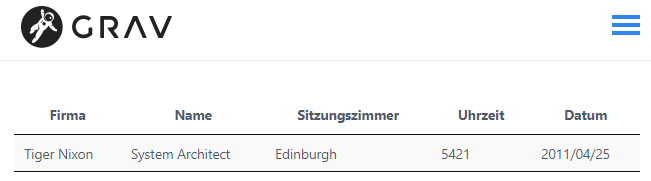
    The page 'data.md' contains the data for my ajax request. The ajax request to http://localhost/grav/site-dev/data.json will return the following json data:

    JSON
    {
    "data": [
      {
        "Firma": "Tiger Nixon",
        "Name": "System Architect",
        "Sitzungszimmer": "Edinburgh",
        "Uhrzeit": "5421",
        "Datum": "2011/04/25"
      }
    ]
    }
    

    Notes:

    • http://assets.bunzl.ch/BrightSign/datatables.txt returns invalid json data. $('#example').DataTable() will fail because of that.
    • If your website is not on the same domain as 'assets.bunzl.ch' you will probably run into 'cross-origin' errors preventing you from accessing the data.
  • As said, I couldn't get the plugin 'datatables' to work out of the box. I had to change its template 'datatables.html.twig'.
    Before you can do this, you will have to create a child theme as described in the documentation on Theme Inheritance

  • In your new child theme (called 'mytheme' hereafter), copy file '/user/plugins/datatables/templates/partials/datatables.html.twig' into 'user/themes/mytheme/templates/partials/'. Replace the content with the following code:
    TWIG
    {{ content }}
    <script>
    $(document).ready( function () {
      {% if snippet %}
        {{ snippet }}
      {% endif %}
    } );
    </script>
    
  • If you now open page 'datatables' in the browser, you should see something similar to this:
    image|651x181

Hope this helps...

👍 1
last edited 12/05/19 by pamtbaau

Suggested topics

Topic Participants Replies Views Activity
General · by Jerry Hunt, 4 days ago
2 85 13 hours ago
General · by pamtbaau, 18 hours ago
1 60 17 hours ago
General · by Andy Miller, 1 day ago
0 47 1 day ago
General · by Marcel, 12 months ago
6 350 5 days ago
General · by Duc , 6 days ago
3 44 5 days ago