Skip to content
Grav 2.0 is officially stable. Read the announcement →

Community guidelines

Please keep discussions civil and on-topic. Repeated violations may lead to a temporary ban.

Content & Markdown

External Media, embedding Twitter, markdown not rendering

media

Solved by pamtbaau View solution

Started by Philipp Ludewig 4 years ago · 7 replies · 849 views
4 years ago

Aloha,

I have a question regarding embedding external media. Do I have to wrap an embedded link to different sites with a short code?

I was adding a twitter link like below to my blog post and after that link none of the short codes worked as well as the formatting. The markdown wasn't rendered any more.

How can I properly embed twitter or other media?

Link to embed: https://publish.twitter.com/?query=https%3A%2F%2Ftwitter.com%2Fsamczsun%2Fstatus%2F1598564871653789696&widget=Tweet

Example:
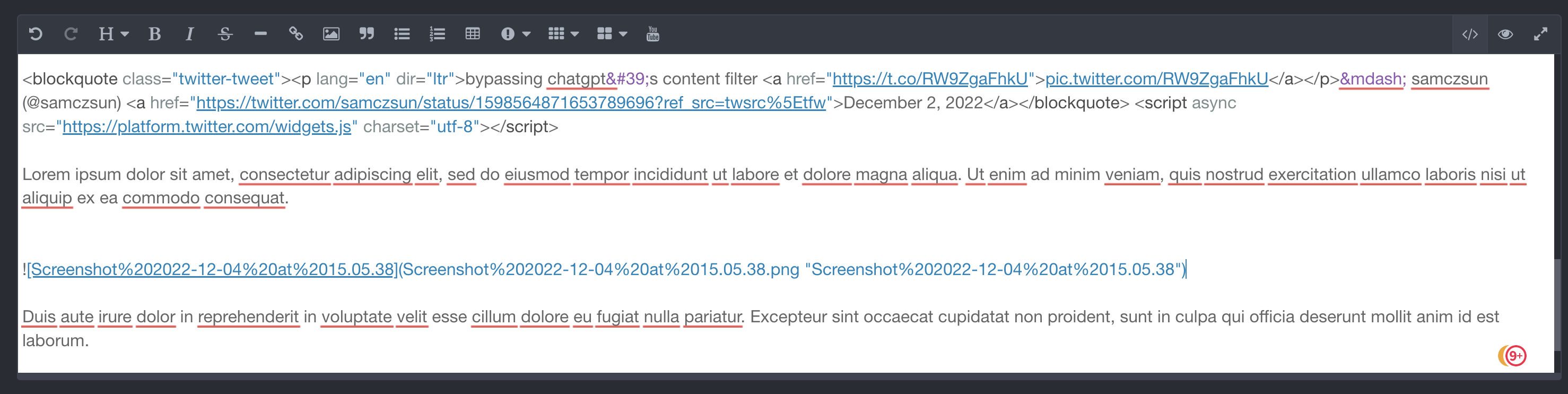
<blockquote class="twitter-tweet"><p lang="en" dir="ltr">bypassing chatgpt's content filter <a href="https://t.co/RW9ZgaFhkU">pic.twitter.com/RW9ZgaFhkU</a></p>— samczsun (@samczsun) <a href="https://twitter.com/samczsun/status/1598564871653789696?ref_src=twsrc%5Etfw">December 2, 2022</a></blockquote> <script async src="https://platform.twitter.com/widgets.js" charset="utf-8"></script>
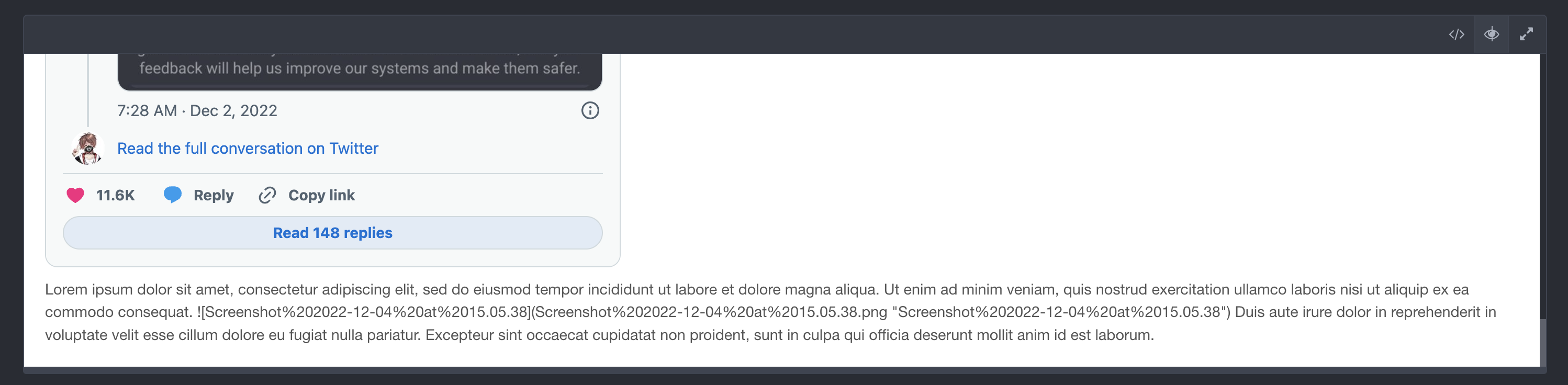
Lorem ipsum dolor sit amet, consectetur adipiscing elit, sed do eiusmod tempor incididunt ut labore et dolore magna aliqua. Ut enim ad minim veniam, quis nostrud exercitation ullamco laboris nisi ut aliquip ex ea commodo consequat. Duis aute irure dolor in reprehenderit in voluptate velit esse cillum dolore eu fugiat nulla pariatur. Excepteur sint occaecat cupidatat non proident, sunt in culpa qui officia deserunt mollit anim id est laborum.
last edited 12/05/22 by Philipp Ludewig
4 years ago

@AlaskaTheBlog:
I was adding a twitter link like below to my blog post

AFAIK links do not break anything. What exactly were you adding and how?

4 years ago

Thanks for the reply.

I added this to the post between some text:

HTML
<blockquote class="twitter-tweet"><p lang="en" dir="ltr">bypassing chatgpt&#39;s content filter <a href="https://t.co/RW9ZgaFhkU">pic.twitter.com/RW9ZgaFhkU</a></p>&mdash; samczsun (@samczsun) <a href="https://twitter.com/samczsun/status/1598564871653789696?ref_src=twsrc%5Etfw">December 2, 2022</a></blockquote> <script async src="https://platform.twitter.com/widgets.js" charset="utf-8"></script>
4 years ago

IIRC HTML is not parsed by default in Markdown content. I think you should enable Twig processing with

YAML
process:
    twig: true

But not sure if this is the way to go

4 years ago

Aloha,
I tried your suggestion by adding it under the expert view to the configuration for the post.
It did not work. :(

Here is an example:
The embed part above some text with the shortcode for an image between the text.
Screenshot 2022-12-05 at 15.37.44|690x173

In the preview window you can see how everything is blobbed together
Screenshot 2022-12-05 at 15.37.56|690x169

4 years ago

What config exactly did you add? Looks like you turned off markdown processing

4 years ago Solution

@AlaskaTheBlog, I can confirm that Markdown is no longer correctly parsed beyond the embedded Twitter code string.

I guess Markdown is getting confused by parsing the string. To prevent Markdown from parsing a string, wrap the string inside a block-element like <div>twitter embed</div> or <p>twitter embed</p>.

See Markdown specs:

Note that Markdown formatting syntax is not processed within block-level HTML tags.

👍 2
last edited 12/05/22 by pamtbaau

Suggested topics

Topic Participants Replies Views Activity
Content & Markdown · by Jochen, 8 months ago
6 94 8 months ago
Content & Markdown · by Ton Haarmans, 1 year ago
10 184 1 year ago
Content & Markdown · by Jan L'Am, 1 year ago
4 146 1 year ago
Content & Markdown · by Leonardo, 1 year ago
3 60 1 year ago
Content & Markdown · by belthasar, 1 year ago
4 254 1 year ago