Skip to content
Grav 2.0 is officially stable. Read the announcement →

Community guidelines

Please keep discussions civil and on-topic. Repeated violations may lead to a temporary ban.

Themes & Styling

How to change the display of a blog item

Solved by pamtbaau View solution

Started by Vince42 4 years ago · 4 replies · 898 views
4 years ago

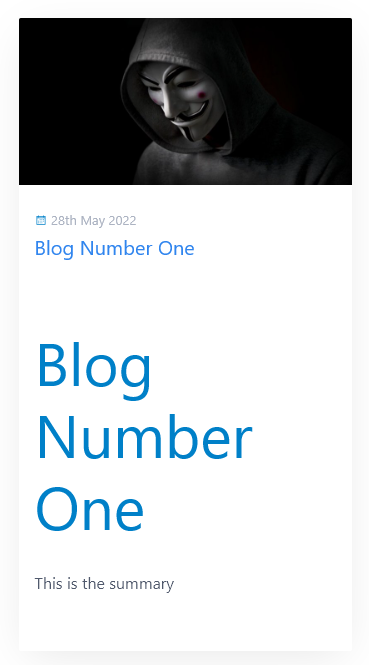
Blog items are displayed in the Quark theme like this:
image|277x500

I usually start my blog entries with a level 1 heading, followed by the summary and by the blog entry content itself. This leads to this ugly form of display, as the level 1 heading is popping out.

I already read about tricks to "cut out" the summary, but I wondered, whether thre is a better way to just have the real summary in the blog item display.

Or how is a blog entry supposed to be written? Maybe I missed something obvious. ;)

4 years ago

Is there any specific use case where you need to duplicate title as a heading? Even in your screenshot you can see title is already there, so what's the point of this heading in the content?

4 years ago

If I do not enter a heading in the blog post itself, it looks like
image|690x255

The blog post itself does by default not render the title of the blog post, therefore the user does not know what the blog post is about, if he just has the link. That "forced" me to write down the title of the article.

Maybe the inventors of the Quark theme did not find it necessary to inform the reader about the title—but I had a lot of complaints when I first omitted the titles in the blog posts.

How do you solve this problem?

4 years ago Solution

@Vince42, It is important to realise that a page's Markdown (+ frontmatter) and the page's template are working in tandem to generate a desired output.

In other words, If you change the Markdown layout (by adding a title to the summary), you might need to change the template and visa versa.

In the case of Quark's blog functionality, by design, the summary section in Markdown is expected not to contain a title. The title (and optional subtitle) should be provided in the frontmatter of the page using title and subtitle.

Looking at the online demo of the Blog skeleton, both the blog item list card and the blog item page are looking good to me and both show a title.

Note that the blog item (item.md) does not contain a title inside the summery section of the Markdown.

The blog post itself does by default not render the title of the blog post

I don't understand this comment and the screenshot of the blog item. It seems you have edited the hero block in item.html.twig.
Again, when looking the the online Blog demo, the title (from the frontmatter) is clearly shown in both layouts.

Maybe the inventors of the Quark theme did not find it necessary to inform the reader about the title

I don't think any sarcasm is justified here. I have the impression that the inventors of the Quark theme are highly experienced and know what they are doing. Also I don't recall having seen a similar complaint before.

but I had a lot of complaints

Maybe the inventor of your site... ;-)
last edited 05/29/22 by pamtbaau
4 years ago

@pamtbaau:
I don’t understand this comment and the screenshot of the blog item. It seems you have edited the hero block in item.html.twig .
Again, when looking the the online Blog demo, the title (from the frontmatter) is clearly shown in both layouts.

You gave the right thought! I reactivated the plain Quark theme and still had no title or subtitle shown when displaying the blog item page, but this led to the fundamental problem: The display template was "Blog" and not "Item".

@pamtbaau:
I don’t think any sarcasm is justified here. I have the impression that the inventors of the Quark theme are highly experienced and know what they are doing. Also I don’t recall having seen a similar complaint before.

I didn't mean to be sarcastic in any way; if the impression arose, I am sorry. I just could not understand, why the basic information were not displayed, but now it is quite obvious, why they weren't.

@pamtbaau:
Maybe the inventor of your site… 😉

It is as alwas: error in front of the keyboard. 🙂

I will now try to find out why the graphics is not displayed, but at least this fundamental problem (which never has a problem as it seems) is now solved. Thank you!

Suggested topics

Topic Participants Replies Views Activity
Themes & Styling · by Pedro M, 2 months ago
4 198 2 months ago
Themes & Styling · by Ian, 2 months ago
3 94 2 months ago
Themes & Styling · by Norbert, 2 years ago
11 455 3 months ago
Themes & Styling · by Lukáš Findeis, 3 months ago
0 48 3 months ago
Themes & Styling · by Sebadamus, 4 months ago
5 128 3 months ago