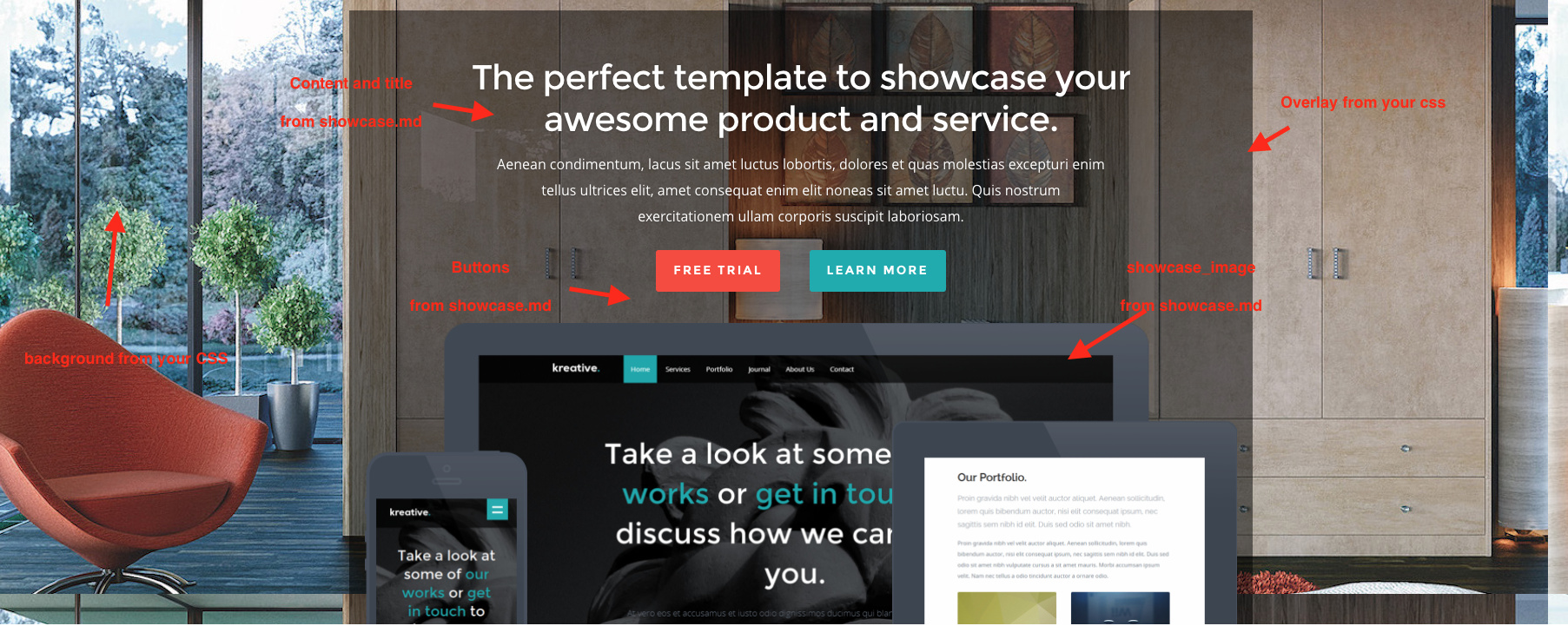
Hi! I'm trying to add an overlay to the showcase image(theme: Woo) however my attempts are futile.
Basically, i'd like to display the hero-text and button in the centre of the image, rather than above(or beneath), while also adding a mostly transparent box behind it so that it stays readable.
replace img/hero-bg.png with your hero img url add height style for instance height: 600px;
do the same with img/[email protected] but adjust height and maybe alternate version of your hero image
CSS
/* ------------------------------------------------------------------ *//* c. Hero Section
/* ------------------------------------------------------------------ */#hero{padding-top:66px;background:#23292furl(img/hero-bg.png);overflow:hidden;}/* For high-res devices */@media(-webkit-min-device-pixel-ratio:2),(min-resolution:192dpi){#hero{background:#23292furl(img/[email protected]);background-size:200px200px;}}
See in action !
of course you don't need the showcase_image (the one with phone, tablet and laptop), but adjust your height according to your needs.
To add an overlay
CSS
#hero.twelve{background-color:rgba(0,0,0,0.8);}
In a second time you can change the blueprint from showcasemodular : for instance add a color field for overlay, and a media field to change the hero background etc Everything is possible with Grav.
The best way is to use theme inheritance to do your changes without modify original theme