Skip to content
Grav 2.0 is officially stable. Read the announcement →

Community guidelines

Please keep discussions civil and on-topic. Repeated violations may lead to a temporary ban.

Support

Solved - Empty Modular Page

first-time solved theme

Solved by pamtbaau View solution

Started by Noah 3 years ago · 4 replies · 480 views
3 years ago

I created a Modular Page as Home Page, but the Frontend page stays empty. No elements are created in the HTML section. I created and tried every page type and every one works, except the modular pages.
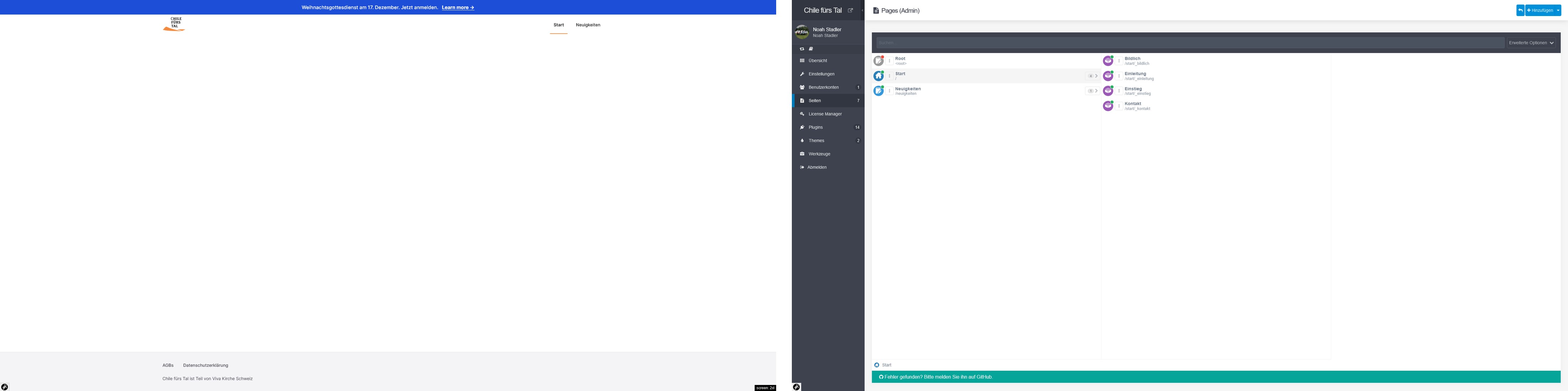
Frontend and page overview in admin panel|690x172
Frontend and page overview in admin panel

Theme is Typhoon. Following Plugins are installed:

  • Admin Panel v1.10.43
  • Color Tools v1.1.1
  • Email v4.0.4
  • Error v1.8.0
  • Flex Objects v1.3.6
  • Form v7.2.1
  • License Manager v1.0.2
  • Lightbox Gallery Premium v1.0.6
  • Login v3.7.6
  • Markdown Notices v1.1.0
  • Problems v2.1.1
  • Quick Tray Links v1.1.1
  • Shortcode Core v5.1.3
  • SVG Icons Premium v2.5.0
3 years ago

@nido, When having issues with pages it's usually a good habit to share the header/frontmatter of the page. I guess that's where the root of the problem lies.

Please read the docs on:

Also please consider not using images of folders, code, frontmatter, etc. Images are often hard to read, especially for the visually impaired and/or people using screen readers. Also, images of code snippets cannot be copy/pasted.

👍 1
3 years ago

Thx for your correction on my request. From what I read on the article on modular pages, the modules should appear as folders on the webserver. My folder structure looks as follows:

TXT
pages
  01.start
    _header
    _introduction
    _some-text
    _contact
  02.news
    hello-world

The modular.md file of the modular page "start" should contain various information on its modules. But it doesn't. This is the whole content of the file:

YAML
---
title: Start
---

Can the file be regenerated? Or can I fix it manually by copying the code example from the wiki page and renaming the modules?

3 years ago Solution

@nido, the collection of a modular does not get generated magically by Admin... You'll have to define it yourself using a file editor (eg. vscode) or in "Expert" mode of Admin.

3 years ago

Thank you for your help 🙂
I didn't think, that I had to add module collection on the parent module page, since I think it could be pulled from there...
But I added it and now it works.

Suggested topics

Topic Participants Replies Views Activity
Support · by Thomas, 1 week ago
2 54 12 hours ago
Support · by Anna, 3 days ago
2 60 14 hours ago
Support · by Justin Young, 15 hours ago
1 30 15 hours ago
Support · by Duc , 1 week ago
2 65 5 days ago
Support · by Colin Hume, 1 week ago
2 57 5 days ago