Skip to content
Grav 2.0 is officially stable. Read the announcement →

Community guidelines

Please keep discussions civil and on-topic. Repeated violations may lead to a temporary ban.

Support

Sliders doesnt work anymore - but why is the question

first-time

Started by Jonas Bertschinger 2 years ago · 5 replies · 151 views
2 years ago

Good evening, unfortunately we still have a small construction site on our site. Unfortunately I can't figure out why it suddenly doesn't work anymore. Our homepage creator installed the image slider for us, which ran without any problems.
I've already searched the forum for photo sliders.
I don't see why this doesn't work.
Thanks for any help.
A wonderful evening.

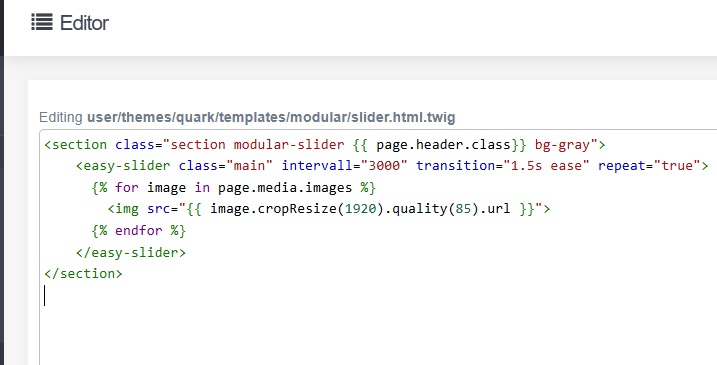
i found the script under slider.html.twig

<section class="section modular-slider {{ page.header.class}} bg-gray">
<easy-slider class="main" intervall="3000" transition="1.5s ease" repeat="true">
{% for image in page.media.images %}
<img src="{{ image.cropResize(1920).quality(85).url }}">
{% endfor %}
</easy-slider>
</section>

At the Page "Our Team" i found the following text:

Unser Team für Sie!

Die innovativen Bearbeitungstechniken wären nichts ohne ein großartiges Team, das die Ansprüche unserer Kunden erfüllt.
Um unseren Kunden die einfachste und persönlichste Leistung zu bieten, ziehen wir alle an einem Strang: Von der Geschäftsführung über den Vertrieb bis hin zur Werkstatt, flache Hierarchie ist für uns mehr, als nur ein Buzzword.

[Team kennenlernen] (/ueber-uns? classes=btn, btn-primary, btn-lg)
(Without spaces between the sentence)

And all pictures are uploaded. But only the first picture i can see - the other doesnt come.
https://www.lsb-wb.de/#team

Best regards
last edited 12/17/24 by Jonas Bertschinger
1 year ago

Hi.
What Grav theme and plugin or JavaScript library for slider are you using?

1 year ago

Sorry i didnt saw your message.

I guess its a "twig" script?

here the script (slider.html.twig)

hp|690x351

here i found propably the wrong line:
{% block javascripts %}
{% do assets.addJs('jquery', 101) %}
{% do assets.addJs('theme://js/jquery.treemenu.js', {group:'bottom'}) %}
{% do assets.addJs('theme://js/site.js', {group:'bottom'}) %}
{% do assets.addJs('//kevinsieger.de/cdn/easy-slider.min.js', 101) %}
{% do assets.addJs('theme://js/scroll-trigger.js', 101) %}

"kevinsieger.de......." this is from the old homepage creator.. so i guess here is anywhere the problem.

last edited 04/07/25 by Jonas Bertschinger
1 year ago

@Hansfisch, Have a look at the "console" tab in the Developer Console of your browser:

TXT
easy-slider.min.js:1 
 GET https://cdn.polyfill.io/v2/polyfill.min.js net::ERR_NAME_NOT_RESOLVED
t   @   easy-slider.min.js:1
(anonymous) @   easy-slider.min.js:1

Ask Kevin Sieger to fix it...

1 year ago

okay, we not have anymore contact with kevinsieger, so i will try to fix it :)

1 year ago

Hello @Hansfisch I made a post, in which I had to explain how I inserted LightSlider in Quark blog template.

Please look the whole post specially point 2.- lightslider.html.twig on this post. Hope this can help:
/forum/themes-styling/css-in-frontmatter-in-mache-theme-works-but-no-in-quark-theme-t8045

Suggested topics

Topic Participants Replies Views Activity
Support · by Thomas, 1 week ago
2 54 12 hours ago
Support · by Anna, 3 days ago
2 60 15 hours ago
Support · by Justin Young, 16 hours ago
1 30 15 hours ago
Support · by Duc , 1 week ago
2 65 5 days ago
Support · by Colin Hume, 1 week ago
2 57 5 days ago