Skip to content
Grav 2.0 is officially stable. Read the announcement →

Community guidelines

Please keep discussions civil and on-topic. Repeated violations may lead to a temporary ban.

Plugins

Reading progress bar in Grav CMS

Solved by pamtbaau View solution

Started by Denys 4 years ago · 5 replies · 684 views
4 years ago

Hi there! I am looking for solution of reading progress bar in grav cms. I found only plugin for wordpress article is here

As I understood we are haven't ready plugin on the official site. So is it possible use only html and css for that?
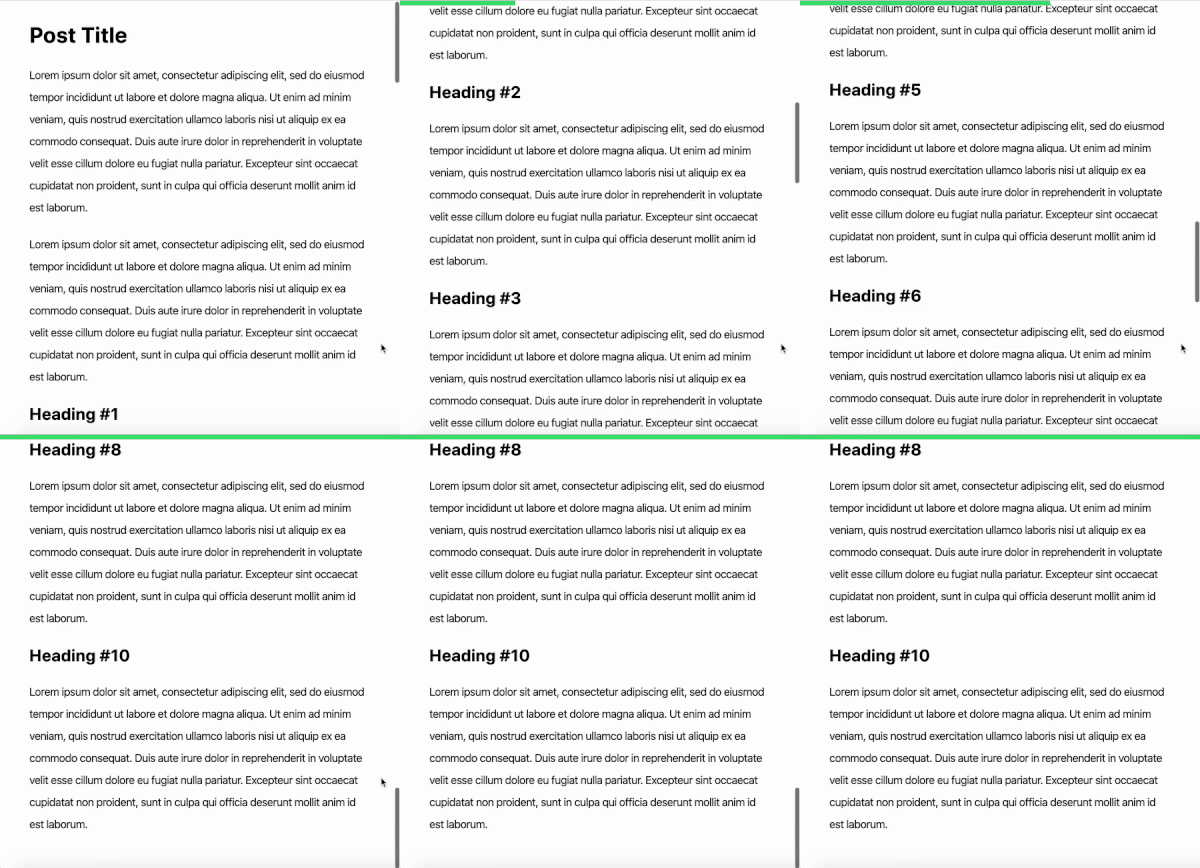
final_demo|400x434

I saw many examples with percentage progress bar etc. But I need at least something similar bar on the top. The rest I can customize through css. Somebody knows how it is will work in Grav CMS?

4 years ago

Thanks for reply. Yes this is similar, I want to use this one https://www.cssscript.com/track-how-far-scrolling/

But how it works in Grav CMS. I connect this script through CDN, but what next. As I understand it should be something like container <div> </div> put in post.html.twig and customize using css.

What to do with the following which is mentioned on the library's website?

Initialize the scrolld library and done.

var scrolld = new Scrolld();

You might need to track the scroll position in a specific container. E.g. article.

var scrolld = new Scrolld(document.querySelector('#article'));

Get the current scroll position.

scrolld.percent();

I only understand this is javascripts, but where I should to put this code?

last edited 05/13/22 by pamtbaau
4 years ago

It seems the missing piece in your understanding here is how to add external and inline JS (and CSS).

Basically you need to add them into a twig template, probably the base one that includes the other assets.

Have a look at:

Hope that helps.

4 years ago Solution

@alfabuster, Maybe a DIY approach with a step-by-step tutorial might help...

Google is your friend... Search the web using keywords like "js page scroll progress example".

Pick the first response and after reading it, try the following using the default Quark theme:

  • Copy css from the tutorial and the complete javasscript, into the end of block 'bottom' in page /user/themes/quark/templates/partials/base.html.twig.
    TWIG
    {% block bottom %}
    {{ assets.js('bottom')|raw }}
    {% endblock %}
    
  • The script checks the scrolled position of an element on the page. This must be an element at the top, right below <body>. In Quark this is element with id "#page-wrapper".

    In the copied script, replace
    const section = document.querySelector('section');
    with
    const section = document.querySelector('#page-wrapper');

  • Add an element showing the progress by copying the element from the tutorial (<div class="progressBar"></div>) right above the script you just inserted.
  • The end result should look like:

    JS
    {% block bottom %}
    {{ assets.js('bottom')|raw }}
    
    <div class="progressBar"></div>
    
    <script>
      const progressBar = document.querySelector('.progressBar');
      const section = document.querySelector('#page-wrapper');
    
      const scrollProgressBar = () => {
          let scrollDistance = -(section.getBoundingClientRect().top);
          let progressPercentage =
              (scrollDistance /
                  (section.getBoundingClientRect().height - 
                      document.documentElement.clientHeight)) * 100;
    
          let val = Math.floor(progressPercentage);
          progressBar.style.width = val + '%';
    
          if (val < 0) {
              progressBar.style.width = '0%';
          }
      };
    
      window.addEventListener('scroll', scrollProgressBar);
    </script>
    
    <style>
      .progressBar {
        position: fixed;
        top: 0;
        left: 0;
        height: 8px;
        background: linear-gradient(to right, #ff5f6d, #ffc371);
        width: 0;
        z-index: 100;
        transition: width 0.2s ease-out;
      }
    </style>
    
    {% endblock %}
    
  • That's it folks!
  • Open your website and shed tears of joy... Or despair...

Notes:

  • Adapt the code for your own theme. You might need to change the #page-wrapper with an id/class/tag of another element.
  • Adjust css to your liking.
  • By adding the code to base.html.twig, each and every page will show the progress bar. You might choose to add the code to only certain templates.
👍 1
4 years ago

hughbris, pamtbaau thanks for reply.

With your's short tutorial now it works perfect.

Before create this topic I read 2-3 tutorials, but I can't get success, probably I put code in the wrong place, I use Mediator theme.

Suggested topics

Topic Participants Replies Views Activity
Plugins · by Rene, 1 week ago
2 47 1 week ago
Plugins · by Xavier, 4 weeks ago
2 56 4 weeks ago
Plugins · by Luka Prinčič, 7 years ago
3 1182 1 month ago
Plugins · by Sebastian van de Meer, 1 month ago
1 50 1 month ago
Plugins · by PIERROT Alain, 2 months ago
3 74 2 months ago