Skip to content
Grav 2.0 is officially stable. Read the announcement →

Community guidelines

Please keep discussions civil and on-topic. Repeated violations may lead to a temporary ban.

Plugins

How to install a slider between two sections of an existing modular page

first-time

Solved by pamtbaau View solution

Started by jean-françois 5 years ago · 1 replies · 583 views
5 years ago

Hello, here is what I implemented to install a slider on the page " 01.home " between " _pricing " and " _callout " of the Woo skeleton, its folder is named " 05._sliderial " and I gave it a page " sliderial.md ":

1/I created the folder in " 01.home " :
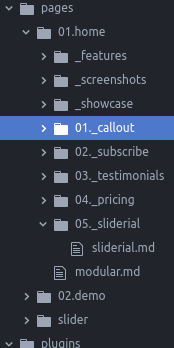
image|174x348, 75%

image|185x99, 75%
2/ I created the "slider" folder in "pages" with its images and lightslider.md file inside (copied and pasted from Shop).

3/ I modified the "modular.md" file in "01.home" and added "- _sliderial".
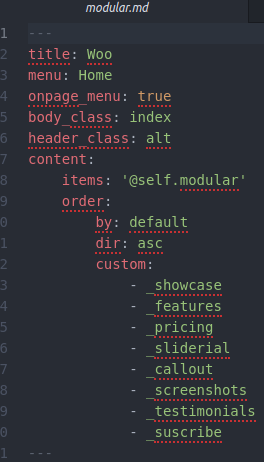
image|264x462, 50%
3/ I pasted in " /user/plugins " the lightslider folder (copied from the skeleton Shop).

4/ I added a file " sliderial.html.twig " in /woo/templates/modular with this inside :

image|690x98, 75%

5/ the slider is in the right place but not well arranged:

image|529x460, 50%
I'd love some feedback on what I've forgotten, and thank you in advance for your help. jef

5 years ago Solution

@jefrey, Plugin Lightslider is designed for modular pages.

In your previous attempt to add plugin Lightslider to skeleton Shop, you had to use a trick to inject Lightslider into non-modular pages because skeleton Shop does not use modular pages.

Now you have switched to skeleton Woo, which does use modular pages. You should now use Lightslider as a module the way it was build to be used.

After adding Lightslider the correct way as module, you will notice the slider is not working and the slides are shown vertically.

Have a look at the developer console in the browser. You'll notice an error:

Uncaught ReferenceError: $ is not defined at (index):419

This is typically an issue of jQuery being loaded too late. In Woo, jQuery is loaded at the bottom of the page, while the script for Lightslider is run earlier.

Fix:

  • Copy file user/plugins/lightslider/templates/modular/lightslider.html.twig into your own child theme: user/themes/mywoo/templates/modular/lightslider.html.twig
  • In the copied template change <script>...</script> into:
    JS
    <script type="text/javascript">
    document.addEventListener("DOMContentLoaded",  () => {
       --- insert original javascript here ---
    });
    </script>
    

The code document.addEventListener("DOMContentLoaded", () => { --original script-- }) will cause the original script to be executed when the entire page (and also jQuery) has been loaded.

last edited 11/18/21 by pamtbaau

Suggested topics

Topic Participants Replies Views Activity
Plugins · by Rene, 1 week ago
2 47 1 week ago
Plugins · by Xavier, 4 weeks ago
2 56 4 weeks ago
Plugins · by Luka Prinčič, 7 years ago
3 1182 1 month ago
Plugins · by Sebastian van de Meer, 1 month ago
1 50 1 month ago
Plugins · by PIERROT Alain, 2 months ago
3 74 2 months ago