Skip to content
Grav 2.0 is officially stable. Read the announcement →

Community guidelines

Please keep discussions civil and on-topic. Repeated violations may lead to a temporary ban.

Plugins

Git sync button not disappearing

Started by matteo 7 years ago · 12 replies · 946 views
7 years ago

Hi all,

small problem with Quark Open Publishing (awesome) theme. I've activated the "Simple search" plugin and set it up as described in the main readme. It is working super fine.

The only problem I'm facing is that, only in the search page, the git sync button of the git sync plugin appears.

The plugin is disabled, in the theme options the git display is set to None (see image) and in all the other pages the git button is not there.
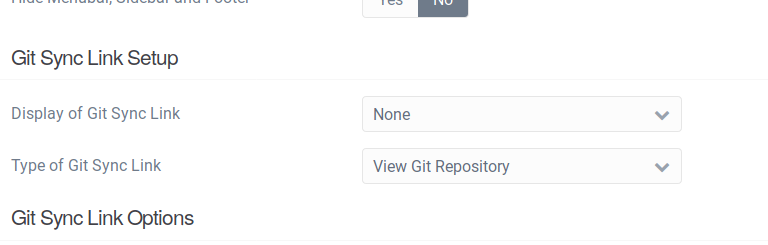
2019-03-22_08-27|690x220

Some suggestions on how to worldwide disable the git button from all the pages of the whole website?

Cheers and thanks

Matteo

👍 1
7 years ago

Hi @ghtmtt, in the SimpleSearch Plugin folder look for the file: pages/simplesearch.md and add the following to the page frontmatter:

TXT
hide_git_sync_repo_link: true

Please let me know if that results in what you are looking for.
Paul

7 years ago

@paulhibbitts:
hide_git_sync_repo_link: true

Paul, forget it, sorry :) I get what you said. Within the plugin folder... One last question: by editing the simplesearch.md file in the plugin folder, isn't it overwritten by a plugin update?

👍 1
7 years ago

Hi @ghtmtt, it might be but not likely due to the simple nature of that page. If it happended you would need to make the above change again though.

Please let me know if this works for you.

7 years ago

yep, working now, thanks!

👍 1
7 years ago

great, thanks again for the support!

👍 1
6 years ago

I'm facing the same issue: Setup Git Sync appears on all pages of my blog using the Quark Open Publishing (2.1.2) theme. The option Display Git Sync Link is set to No on all pages.

And checking the *.md files of the pages I find in the frontmatter section:

YAML
title: Blog
hide_git_sync_repo_link: true
body_classes: 'header-dark header-transparent header-fixed header-animated'

The parameter hide_git_sync_repo_link is set to true.

last edited 05/03/20 by Michael Steidl
6 years ago

Hi @nitmiwist, did you set the active theme option "Location of Git Sync Link" to "None? Here is a little video showing that option:

2020-05-03_16-04-39 (1)|600x440

Please let me know if you get it going, Paul.

6 years ago

Hi @paulhibbitts your advice worked, no link is shown anymore.

But it also raises questions:

  • Usually settings of a page override general settings. This is not the case with Display Git Sync Link in the settings of a page - am I right?
  • What is the purpose of this Git Sync Link? It is shown to everybody and linked on my site to the Git Sync plug user interface of this site. Or is the goal of this link to refer to the Git(hub) repository holding the synchronized data? What needs to be done to achieve that - defining the URL of the repository in the Git Sync plugin settings?
6 years ago

The per-page settings should over-ride the global settings, not sure what the issue might be but I will test with the most recent release.

The purpose of the link (and a key purpose of the theme itself) is to make it easier for Grav users to sync their content to a public (or private) Git repository. Did you start with the Open Publishing Skeleton? If not, it might also be helpful to try that out to see the theme in use etc. This documentation might also be helpful: https://learn.hibbittsdesign.org/openpublishingspace

Suggested topics

Topic Participants Replies Views Activity
Plugins · by Rene, 1 week ago
2 49 1 week ago
Plugins · by Xavier, 4 weeks ago
2 57 4 weeks ago
Plugins · by Luka Prinčič, 7 years ago
3 1184 1 month ago
Plugins · by Sebastian van de Meer, 1 month ago
1 50 1 month ago
Plugins · by PIERROT Alain, 2 months ago
3 75 2 months ago