Skip to content
Grav 2.0 is officially stable. Read the announcement →

Community guidelines

Please keep discussions civil and on-topic. Repeated violations may lead to a temporary ban.

Installation & Hosting

Still struggling to get Grav to work: 0 - syntax error, unexpected token "match"

first-time theme

Started by Nemanja Stabic 5 years ago · 5 replies · 2632 views
5 years ago

Hi,

I have managed to get php v8 working and my URL Rewrites working (I think) on my Grav site on Windows 10 IIS 10.0

I downloaded a skeleton, and extracted the files into my wwwroot folder.
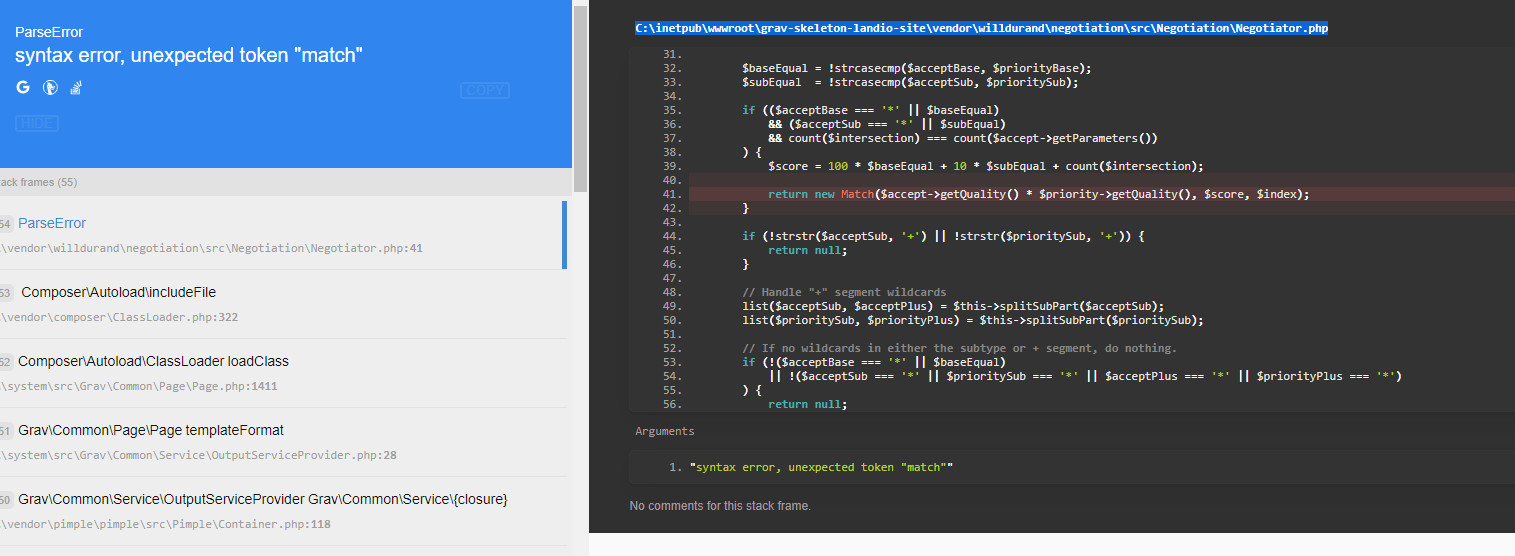
When I browse to the site I get the following error: 0 - syntax error, unexpected token "match"

I turned on full backtrace for error logging and the issue seems to lie in the C:\inetpub\wwwroot\grav-skeleton-landio-site\vendor\willdurand\negotiation\src\Negotiation\Negotiator.php file:
image|690x253

I have tried this with two skeletons, and the error is the same.

Any ideas?

5 years ago

Hi Nemza,

I've got the same error " unexpected token "match"", with a different skeleton (kb).
I'm on WIndows 10 and using php directly.

Did you figure out how to fix this error ?

Thanks for your help.
Raphaël.

5 years ago

I just registed to reply because I had the same problem. The issue is that in php8 the Match word used in willdurand/negotiation is reserved so it fails. You have to use +3.0.0 version.

Edit your composer.json and replace something like:

"willdurand/negotiation": "^2.3"

with:

"willdurand/negotiation": "^3.0"

Then reinstall composer dependencies and it should work.

Reference:
https://github.com/willdurand/Negotiation/pull/106

👍 1
5 years ago

@phproberto, I think you have indeed pinpointed the issue, but... I'm not sure your proposed solution is the best way to go.

It appears that skeleton Landio and others are installed with Grav 1.6.28 and not the latest Grav 1.7.+.

Grav 1.6.28 requires "willdurand/negotiation": "2.x-dev", while Grav 1.7.+ requires "willdurand/negotiation": "^3.0",.

My suggestion would be to upgrade Grav to 1.7.+ and upgrade the themes/plugins using:

  • Upgrade Grav: $ bin/gpm selfupgrade
  • Upgrade themes/plugins: $ bin/gpm update
👍 3
last edited 02/14/21 by pamtbaau
5 years ago

Thanks @pamtbaau ! You are right. It's always bettter to upgrade Grav. I use Grav ocasionally and I didn't knew there was a new version shipping v3.0 of the negotiation library.

Thank you for taking the time for writing this. I'm sure it will help other users.

5 years ago

Thanks for the responses everyone!
I’ve been AFK, and will try to upgrade everything as suggested when I get a chance. Appreciate that the community is so active.

Suggested topics

Topic Participants Replies Views Activity
Installation & Hosting · by antoinep, 22 hours ago
7 73 4 hours ago
Installation & Hosting · by Jürgen Dietrich, 7 months ago
0 65 7 months ago
Installation & Hosting · by rappluk, 8 months ago
0 65 8 months ago
Installation & Hosting · by N, 12 months ago
3 76 12 months ago
Installation & Hosting · by Youle, 1 year ago
1 65 1 year ago