Skip to content
● Meet Grav Guard: keep every Grav site you run secure and up to date, all from one place. Free for up to 3 sites. Read more →

Cron job for Scheduler on shared web hosting (IONOS)

Started by DrPen 2 days ago · 4 replies · 70 views
2 days ago

I need some help with cron jobs to get Scheduler working. My recent post was removed due to personal info in it (sorry, and thanks for deleting).

Im trying to get Scheduler working, but with no success. Grav v1.7.53.5, Scheduler is fresh install.

Im on IONOS shared web hosting, and it's usually fairly easy to set up a cron job. Ive tried various things, but nothing works. I need new ideas.

MARKDOWN
# original script provided - did not work
(crontab -l; echo "* * * * * cd /homepages/X/XXXXXX/htdocs/grav;/usr/lib/cgi-bin/php8.4-cli bin/grav scheduler 1>> /dev/null 2>&1") | crontab -

# ways Ive tried using the standard IONOS method to write cronjobs (adding php8.v-cli at beginning, followed by full path), with different configurations

* * * * * usr/bin/php8.4-cli /kunden/homepages/X/XXXXXX/htdocs/grav/usr/lib/cgi-bin/php8.4-cli bin/grav scheduler 1>> /dev/null 2>&1

* * * * * usr/bin/php8.4-cli /kunden/homepages/X/XXXXXX/htdocs/grav/ bin/grav scheduler 1>> /dev/null 2>&1  

* * * * * usr/bin/php8.4-cli /kunden/homepages/X/XXXXXX/htdocs/grav/php8.4-cli bin/grav scheduler 1>> /dev/null 2>&1  

* * * * * usr/bin/php8.4-cli/kunden/homepages/X/XXXXXX/htdocs/grav/scheduler/webhook /dev/null 2>&1

* * * * * usr/bin/php8.4-cli /homepages/X/XXXXXX/htdocs/grav/scheduler/webhook /dev/null 2>&1

# or tried wget

* * * * * wget -qO- https://domain/ > php8.4-cli bin/grav scheduler 1>> /dev/null 2>&1

* * * * * wget -qO- https://domain/scheduler/webhook > /dev/null 2>&1

# ===

# curl script provided - throws "error": "Invalid authorization token" 

curl -X POST "https://grav.local/scheduler/webhook" \
  -H "Authorization: Bearer <token>"

# curl script with new way to call the token (from another forum post). this hangs. the admin page states its ran, but nothing happens (eg no back is generated)

curl -X POST "https://grav.local/scheduler/webhook" \
  -H "X-Webhook-Token: <token>" 

If Im in the grav folder I run the php8.4-cli bin/grav scheduler and it fires Scheduler, again stating on admin page that it ran, but it hasnt, nothing happens.

Visiting the https://domain/sheduler/webhook webpage give me this
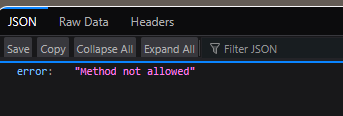
image.png

Ill keep trying, but any suggestions welcome.

2 days ago

Update on progress (partially noted for benefit of other readers). Checked out the Scheduler Github README and ran the command bin/grav scheduler --run from inside the grav folder. Sure enough this does run the plugin, generates the listed backup and clears the caches.

2 days ago

Sure enough this does run the plugin, generates the listed backup and clears the caches.

Sounds like your issue has been solved. If so, please mark your post as solved by ticking the "Solution" icon in the lower right corner of your own reply.

2 days ago

Sounds like your issue has been solved. If so, please mark your post as solved by ticking the "Solution" icon in the lower right corner of your own reply.

No it only works like this if I manually call the trigger - so it shows the plugin is working, but the cron isnt working, and the webhook isnt working either.

9 hours ago

Update 2. Unfortunately, I have tried multiple ways to get this to automate, but nothing works.

Ive been testing using curl only, as cron seems a lost cause.

I know the plugin works, as if I trigger a job manually (eg backup) using curl, it generates.

I know curl is there, I tested the curl -version

I did a complete uninstall/reinstall of scheduler-webhook, using bin/gpm install scheduler-webhook

Removed scheduler.yaml from user/config. The freshly generfated scheduler has this at the top:

user/config/scheduler.yaml has this:

YAML
  cache-purge: enabled
  cache-clear: enabled
  default-site-backup: enabled

I have changed the clear cache and purge cache times in system.yaml so I can check it connects to the admin interface, and to test easily.

YAML
cache:
  enabled: true
  check:
    method: file
  driver: auto
  prefix: g
  # purge_at: '0 4 * * *'
  # clear_at: '0 3 * * *'
  purge_at: '*/35 * * * *'
  clear_at: '*/30 * * * *'
  clear_job_type: standard
  clear_images_by_default: false
  cli_compatibility: true
  lifetime: 604800
  purge_max_age_days: 30

Since I did the fresh install of the plugin and yaml files, using curl either script will run, but does nothing

BASH
curl -X POST "https://domain/scheduler/webhook" \
  -H "X-Webhook-Token: <token>"

OR

 curl -X POST "https://domain/scheduler/webhook" \
  -H "Authorization: Bearer <token>"

They do not automate, they only seem to trigger it once, and no upcoming jobs are triggered.

TXT
 "success": true,
    "message": "Scheduler executed (due jobs only)",
    "jobs_run": 0,
    "timestamp": "2026-11-27T11:36:18+01:00"

There are no errors shown, and it shows the jobs have never run.

JS
 php8.4-cli bin/grav scheduler -d

Job Details
===========
┌─────────────────────┬──────────┬──────────────────┬────────┐
│ Job ID              │ Last Run │ Next Run         │ Errors │
├─────────────────────┼──────────┼──────────────────┼────────┤
│ default-site-backup │ Never    │ 2026-11-29 03:00 │ None   │
│ cache-purge         │ Never    │ 2026-11-27 09:00 │ None   │
│ cache-clear         │ Never    │ 2026-11-27 09:00 │ None   │
└─────────────────────┴──────────┴──────────────────┴────────┘

Health is fine

JSON
{
    "status": "healthy",
    "last_run": "2026-11-27 11:36:18",
    "last_run_age": 97,
    "queue_size": 0,
    "failed_jobs_24h": 0,
    "scheduled_jobs": 3,
    "jobs_due": 0,
    "webhook_enabled": true,
    "health_check_enabled": true,
    "timestamp": "2026-11-27T11:37:55+01:00",
    "message": "No jobs currently due"
}

I list the jobs, this is what I get -

JS
 php8.4-cli bin/grav scheduler -j

Scheduler Jobs Listing
======================
┌─────────────────────┬────────────────────────────────────┬──────────────┬────────┬──────────┬─────────┐
│ Job ID              │ Command                            │ Run At       │ Status │ Last Run │ State   │
├─────────────────────┼────────────────────────────────────┼──────────────┼────────┼──────────┼─────────┤
│ default-site-backup │ Grav\Common\Backup\Backups::backup │ 0 3 * * 7    │ Ready  │ Never    │ Enabled │
│ cache-purge         │ Grav\Common\Cache::purgeJob        │ */35 * * * * │ Ready  │ Never    │ Enabled │
│ cache-clear         │ Grav\Common\Cache::clearJob        │ */30 * * * * │ Ready  │ Never    │ Enabled │
└─────────────────────┴────────────────────────────────────┴──────────────┴────────┴──────────┴─────────┘

So, neither curl script or cron work, as far as I can tell. There must be something else I need to do that is not made clear anywhere.

I will give up for the time being. Ive spent a lot of time and feel Im hitting a brick wall that I do not know about - either something in a script elsewhere that is preventing this working, or some other file or script I need to configure. I know it isnt the server.

Suggested topics

Topic Participants Replies Views Activity
Installation & Hosting · by vollstock, 2 weeks ago
3 206 2 weeks ago
Installation & Hosting · by David, 7 years ago
3 3484 4 weeks ago
Installation & Hosting · by David Meissner, 1 month ago
3 329 4 weeks ago
Installation & Hosting · by David Meissner, 1 month ago
0 248 1 month ago
Installation & Hosting · by Anthony J Cervo, 1 month ago
3 310 1 month ago