Skip to content
Grav 2.0 is officially stable. Read the announcement →

Community guidelines

Please keep discussions civil and on-topic. Repeated violations may lead to a temporary ban.

General

Transform boolean data to text in Twig Template

Solved by Pedro M View solution

Started by Pedro M 6 years ago · 5 replies · 5641 views
6 years ago

Hello there.

In Deliver Theme there are some code lines, in showcase.html.twig that use an script to slide some pictures in the top of page. This script use values between quotation marks, like 'true' or 'false' (i.e, arrows: {{ theme_config.carousel_options.arrows }}).
I've been trying to customize the admin blueprint for theme, and I've already configured like this (in this case, to enable or disable arrows in slides):

YAML
carousel_options.arrows:
                    type: toggle
                    highlight: 1
                    default: false
                    label: Arrows
                    highlight: 1
                    options:
                        true: PLUGIN_ADMIN.YES
                        false: PLUGIN_ADMIN.NO
                    validate:
                        type: bool

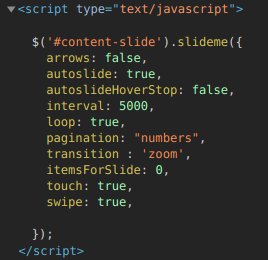
In the .yaml file of theme, the value saved is: arrows: true, without quotation marks. This theme doesn't work if the true or false values are without quotation marks. In the Chrome Inspector you can see the following:

Selection_031|228x45

The arrow value is showed in browser like a number. For that reason it doesn't work.

What can I do to use toggle field and save as true or false with quotation marks??

Thanks in advance.
6 years ago

Hello there.

Finally I managed to solve this issue adding the replace twig filter, in twig template, the following:

TWIG
arrows: {{ theme_config.carousel_options.arrows|replace({'1':"true",'0':"false"}) }}

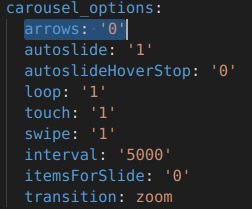
For example, if you have in blueprint.yaml, arrows: '1', in carousel of Deliver Theme, this value must be true, therefore you have to convert 1 to true.

I think this is the perfect solution for these cases.
I hope I've helped.

Some screenshots:

theme_blueprint.yaml
html code in Chrome Inspector
html_code

last edited 12/28/20 by Pedro M
5 years ago

@pmoreno,

To turn a boolean value into a string you could use the following more straightforward solution:

TWIG
arrows: {{ site.header_options.arrows ? 'true' : 'false'}},

To prevent the above required conversion, you could define the blueprint field such that it saves data as a string:

YAML
carousel_options.arrows:
    type: toggle
    highlight: 1
    default: 'false'
    label: Arrows
    options:
        'true': PLUGIN_ADMIN.YES
        'false': PLUGIN_ADMIN.NO
    validate:
        type: string

last edited 12/30/20 by pamtbaau
5 years ago

Hi @pamtbaau.

Thanks for your suggestions, although I can't get the values to transform correctly, according to your instructions.
Based on the change you suggest in the twig file (arrows: {{ site.header_options.arrows ? 'true' : 'false'}},), the value is always true, even if I choose false in the theme's blueprint file.

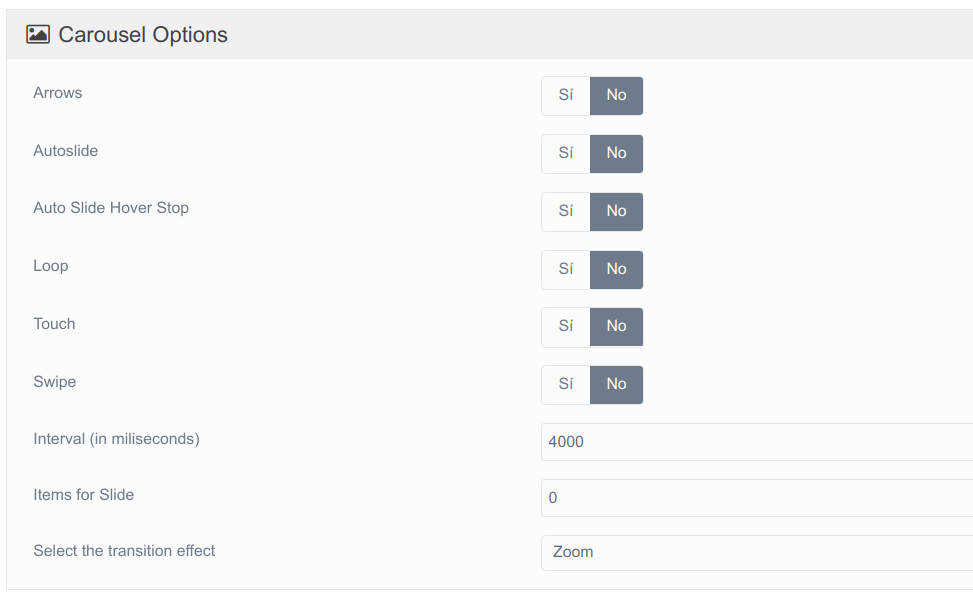
I attach some screenshots:

In this image you can see all values to false...
Selection_040|690x433

These are the values in Chrome Inspector:

TXT

$('#content-slide').slideme({
  arrows: true,
  autoslide: true,
  autoslideHoverStop: true,
  interval: 4000,
  loop: true,
  pagination: "numbers",
  transition : 'zoom',
  itemsForSlide: 0,
  touch: true,
  swipe: true,

});

As you can see, even if all the fields are set to false, they appear as true.

Is there something wrong with this code?

Thanks so much.

5 years ago Solution

Hello again.

I've tried removing ? ‘true’ : ‘false’, and everything works fine now.

Finally, this is the code for the showcase twig template (for Deliver Theme):

TWIG
<script type="text/javascript">

$('#content-slide').slideme({
  arrows: {{ theme_config.carousel_options.arrows}},
  autoslide: {{ theme_config.carousel_options.autoslide }},
  autoslideHoverStop: {{ theme_config.carousel_options.autoslideHoverStop}},
  interval: {{ theme_config.carousel_options.interval}},
  loop: {{ theme_config.carousel_options.loop }},
  pagination: "numbers",
  transition : '{{ theme_config.carousel_options.transition }}',
  itemsForSlide: {{ theme_config.carousel_options.itemsForSlide }},
  touch: {{ theme_config.carousel_options.touch}},
  swipe: {{ theme_config.carousel_options.swipe}}

});
</script>

Thanks for your suggestions @pamtbaau, this solution is easier than mine.

5 years ago

@pmoreno, If you updated the blueprint as shown above, than theme_config.carousel_options.arrows will have the string value 'true' or 'false'.

And non-empty strings always evaluate to true. Hence the expression {{ site.header_options.arrows ? 'true' : 'false'}} will therefor always print true.

To prevent the above required conversion, you could define the blueprint field such that it saves data as a string:

As I said, sorry for not being clear enough, if you update the blueprint, you don't need the conversion.

last edited 12/30/20 by pamtbaau

Suggested topics

Topic Participants Replies Views Activity
General · by Jerry Hunt, 4 days ago
2 104 18 hours ago
General · by pamtbaau, 23 hours ago
1 88 22 hours ago
General · by Andy Miller, 1 day ago
0 53 1 day ago
General · by Marcel, 12 months ago
6 381 5 days ago
General · by Duc , 6 days ago
3 69 6 days ago