Skip to content
Grav 2.0 is officially stable. Read the announcement →

Community guidelines

Please keep discussions civil and on-topic. Repeated violations may lead to a temporary ban.

General

Theme tutorial problem

Started by rohan sharma 8 years ago · 9 replies · 813 views
8 years ago

Hi, I followed almost all the steps in theme tutorial lecture in the learn section of grav.
but i am unable to get final output as in the tutorial.

The only process i din't follow was in the tut, they used pure blank to create new theme but I used inheritance method to inherit from a base theme . Everything works well except the custom.css part.

https://learn.getgrav.org/themes/theme-tutorial
I copied the step-6: Theme CSS code in my custom.css file but no changes were reflected in my site. But, when I just put a single line code like : body a { color: red; } , the changes are made to my site.
8 years ago

When you look at your-new-theme.yaml, do you see your theme and child theme in this order?

YAML
         - user/themes/your-new-theme
         - user/themes/antimatter

If you used devtools as in the tutorial, there was a bug not so long ago that mixed up the order. I expect that is no longer in the current repository though. Worth checking!

8 years ago

My theme.yaml contains :

YAML
streams:
 schemes:
   theme:
     type: ReadOnlyStream
     prefixes:
       '':
         - user/themes/my-theme
         - user/themes/antimatter

Also, I just realized : user/themes/my-theme/templates , the template folder is empty. maybe this had to do something with it . And , yeah i used devtools

last edited 06/03/18 by rohan sharma
8 years ago

Thanks. Looks like that bug is no longer in the repository, which is great but doesn't resolve your problem.

Sorry. I can't imagine a cause and I doubt an empty child theme templates folder will cause it. I suspect you've already tested that yourself. All I can suggest is to go through the inherited theme creation process again in case you did something wrong, and maybe examine the results more closely as you go this time. The other thing is that maybe if you paste more relevant details here (theme folder structures, yamls), someone will see the problem.

One more thing: when you use the browser inspector on a link element, do you see the rule you created (color: red) crossed out? There may be a more specific rule in the theme CSS.

8 years ago

Thanks for the reply . I created a new theme using inheritance again but the same issue .
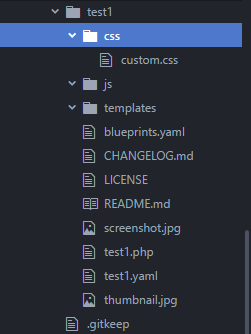
folder structure of the child theme :
Untitled|251x334

8 years ago

What's the pure.css method?

8 years ago

i think i understood it now .. the inheritance method only makes a child theme of the antimatter theme and the step 6 is not usable in the inheritance method .. the tutorial is for only the pue blank method. Am I right ?

8 years ago

No, editing custom.css in your inherited theme should work fine.

Suggested topics

Topic Participants Replies Views Activity
General · by Jerry Hunt, 4 days ago
2 85 13 hours ago
General · by pamtbaau, 18 hours ago
1 60 18 hours ago
General · by Andy Miller, 1 day ago
0 47 1 day ago
General · by Marcel, 12 months ago
6 350 5 days ago
General · by Duc , 6 days ago
3 44 5 days ago