Skip to content
Grav 2.0 is officially stable. Read the announcement →

Community guidelines

Please keep discussions civil and on-topic. Repeated violations may lead to a temporary ban.

General

The form reset doesn't work

form

Solved by pamtbaau View solution

Started by 01K 4 years ago · 14 replies · 1096 views
4 years ago

Hello everyone!
I want to improve my form submission.

Once the form is submitted - the thank you message appears below the submit button.
That's OK, but after submission, I want to clear the form.
Unfortunately, this doesn't help:

TXT
process:
    - reset: true

Maybe it doesn't work together with thank you message or with a dropdown.js...

Contact form is placed in modular page:

YAML
form: 
  buttons: 
    submit: 
      type: submit
      value: Submit
  fields:    
    message: 
      type: textarea
  name: contact
  process:   
    message: "thank you message"
    refresh_prevention: true
    reset: true
last edited 02/14/22 by 01K
4 years ago

@01K, Please make sure the code you show is working. If I copy your code, the throws:

Error: Invalid Frontmatter
Path: /www/grav/site-modular/user/pages/01.home/05._contact/form.md
Failed to read /www/grav/site-modular/user/pages/01.home/05._contact/form.md: A YAML file cannot contain tabs as indentation at line 42 (near " - ")

Also please when showing code, trim it down to a bare relevant minimum while still shows the behaviour described. E.g remove fields, buttons, actions which are not relevant. This will make it easier for the reader.

4 years ago

Hmm, that's strange. I've copied it straight from md. I'll check it

4 years ago

@pamtbaau please check the edited.
The online YAML editors displays YAML IS VALID message

4 years ago

@01K,

  • Site yamllint.com throws error

    (<unknown>): found character that cannot start any token while scanning for the next token at line 27 column 10

  • $ bin/grav yamllinter also throws error

    /user/pages/01.home/05._contact/form.md - Failed to read /www/grav/site-modular/user/pages/01.home/05._contact/form.md: A YAML file cannot contain tabs as indentation at line 50 (near " ").

Tabs are being used in multiple location, while tabs are not allowed in Yaml: http://yaml.org/faq.html

Please also note my previous request on shared code snippets: Trim down the snippet to the bare minimum while still exhibiting the issue.

last edited 02/12/22 by pamtbaau
4 years ago

ah, I see now where the problem lied. Now I've formatted code. No errors in yamllint.com

4 years ago

@01K, Ok, I know, I'm nagging....

Did you actually run the current form definition? It throws an error...

  • Fields without names do not work well
  • Also, you are mixing field definitions using yaml sequences with yaml mappings.
    See the captcha field. You probably copied the captcha definition straight from the docs.
last edited 02/13/22 by pamtbaau
4 years ago

Yes, it does run on my localhost...
I've updated the first post with name definitions. Does it run now in your environment?

Also, you are mixing field definitions using yaml sequences with yaml mappings.
See the captcha field. You probably copied the captcha definition straight from the docs.

Yes, I've copied it from docs. So, that's not right in my example?

4 years ago

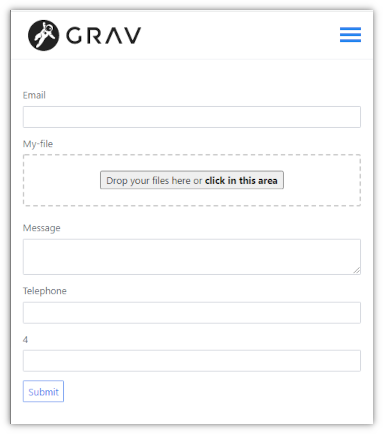
@01K, Wondering how your form looks like...

On my site, using your definition, the form looks as follows:

Untitled|383x434

As you can see, there is a 5th field visible. This the captcha field, which however should be invisible...

4 years ago

That's strange. For a debug purposes I've unpublished my previous working form and created this shortened (test) example. While the folder with unpublished working form was physically available in pages folder - the test form was displayed exactly the same as the first one. That have confused me.

Now I've removed the working form pages folder and I get the same view as yours (only without telephone input). The captcha field is not displayed corretcly
Still searching for a problem 😕

last edited 02/19/22 by 01K
4 years ago

With updated code it's loading, but if I set captcha: true after submission page is reloaded and I get Captcha not valid! error

4 years ago

@01K, Please don't take the following as insulting or rude. It is meant to improve the art of asking questions... Which comes down to helping the community help you.

This post is about the reset function of the form. However,

  • The first 5 replies were about invalid Yaml
  • Then the following 5 replies were about an invalid definition of the recaptcha field.
  • The last reply is again about recaptcha and probably caused by an ill configured recaptcha.
    • Check your keys and
    • check if localhost, or the domain you are using on your local machine, is added to the recaptcha console.

In my first reply and later again, I kindly asked to trim down the code snippet to the bare minimum while still showing the behaviour described. Trimming it down to a single field, leaving out the recaptcha field and removing the recaptcha and email action would probably be enough to show the reset behaviour you are experiencing.

That would have saved you and me a lot of time and effort...

You also have another post about recaptcha. For this post, I would like to suggest we focus again on the reset function of the form.

Please update the initial post again with a proper minimal form and tell us about what you are expecting from the reset function and what behaviour you are experiencing instead.

last edited 02/14/22 by pamtbaau
4 years ago

Sorry, such things happen when I work mostly 24hours a day 😃
I've mixed up two topics.
Yes, this relates to the refresh form data question.
I've edited code form to the bare minimum.

What I want: is that after successful submission (data sent to email) the form fields should be clear and "thank you message should appear".

Before any modifications the form had following behaviour: after data submission I've received a "Thank you message" but fields were prepolulated with submitted data.

After

YAML
    refresh_prevention: true
    reset: true

it behaves not well.
After the submission the form fields are clear, "thank you message" appears, but the whole page refreshes.

I hope that now provided code works :D

4 years ago Solution

@01K,

Sorry, such things happen when I work mostly 24hours a day

Not sure if others should be bothered because of that...

refresh_prevention: true is not an action, but a property of the form. Also, this property is not needed in your case, because the the form is cleared after submit.

but the whole page refreshes.

Yes that is what happens when a form is submitted to the server. If you don't want the page to refresh, you should use an ajax request.

After the submission the form fields are clear

Looking at the title of this post "The form reset does not work", what is not working with the 'reset'?

4 years ago

@pamtbaau:
use an ajax request.

Thank you, I will try reset:true with AJAX. Will see what will happen.

last edited 03/01/22 by 01K

Suggested topics

Topic Participants Replies Views Activity
General · by Jerry Hunt, 4 days ago
2 104 18 hours ago
General · by pamtbaau, 23 hours ago
1 88 22 hours ago
General · by Andy Miller, 1 day ago
0 53 1 day ago
General · by Marcel, 12 months ago
6 381 5 days ago
General · by Duc , 6 days ago
3 69 6 days ago