@ozfiddler, You have already picked an answer, but I wonder if that is what your want to achieve.
The answer you got on Discord is correct as a workaround for the problem you presented: Setting the collection using a blueprint.
However, the answer should depend on what you desire to achieve...
- Hardcoded:
Do you always only want to display the direct children of the "list" page, with same ordering and other params? Then the provided solution is fine.
- Flexible:
- Could it be that different list pages use different items in its collection? Eg. based on categories, descendants, ...
- Could it be that different list pages use different collection properties, like ordering by price, or popularity instead of the default ordering by folder name?
If you want to provide flexibility you should go for frontmatter.
A collection can be defined in a blueprint. The following is added to the default.yaml blueprint of Quark:
collection:
  type: tab
  title: Collection Items

  fields:
    header.content.items:
      type: text
      label: Items in collection
      default: s[email protected]
    header.content.order.by:
      type: select
      label: Order by
      options:
        date: Date
        title: Title
        header.price: Price
Note: Above code should be indented so that 'collection' exactly aligns with 'advanced'.
Above definition will give the following page in Admin:
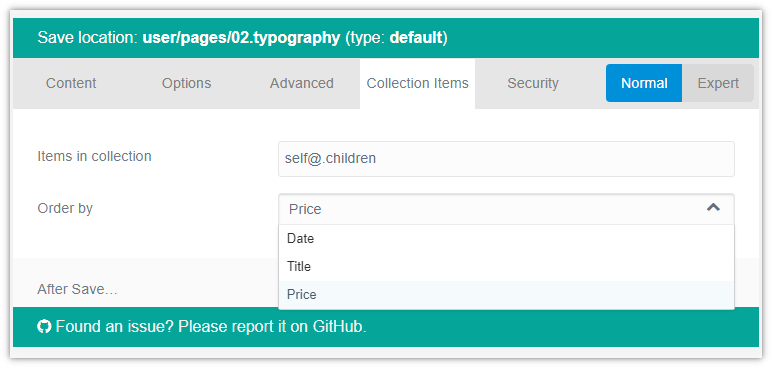
The following frontmatter will be generated when 'Price' is selected:
And of course, you should now use {% for child in page.collection %} in the Twig template.