Skip to content
Grav 2.0 is officially stable. Read the announcement →

Community guidelines

Please keep discussions civil and on-topic. Repeated violations may lead to a temporary ban.

General

Page field extending

admin theme

Solved by pamtbaau View solution

Started by Daniel Dobiášovský 3 years ago · 1 replies · 343 views
3 years ago

I don't know what to do anymore.

Please help, work according to this procedure:

https://learn.getgrav.org/17/admin-panel/extending

My goal is this, nothing more:
https://learn.getgrav.org/user/pages/05.admin-panel/08.extending/myPage-customField.jpg
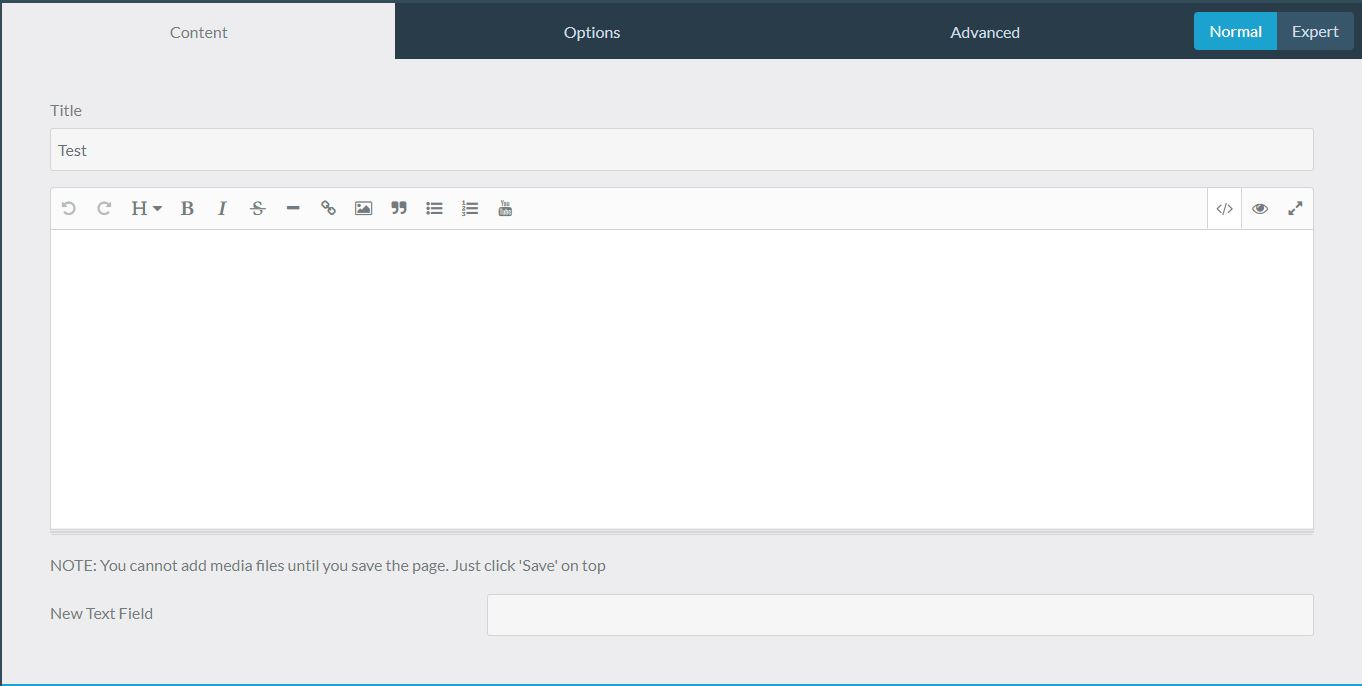
I created page.html.twig with the settings according to the instructions, then in the blueprint folder I created page.yaml again with the appropriate content to add a field: New Text Field

And I can't get the new field to be added.

I also tried to implement the whole process only in the file item.html.twig and therefore item.yaml, but the result is the same, the field is not displayed in the administration when creating a new page as an item.

Please what am I doing wrong? Is there anything else that needs to be implemented?

Thank you for your help.

3 years ago Solution

@Deight, You know that Grav caches a lot of stuff?

With that in mind, try the following:

  • After creating your new page template and page blueprint
    • First run: $ bin/grav cache
    • Then logout of Admin and login again.
  • Further changes to the new blueprint might now be available immediately. If it doesn't, fallback to above procedure.
👍 1

Suggested topics

Topic Participants Replies Views Activity
General · by Jerry Hunt, 4 days ago
2 82 12 hours ago
General · by pamtbaau, 17 hours ago
1 55 17 hours ago
General · by Andy Miller, 1 day ago
0 45 1 day ago
General · by Marcel, 12 months ago
6 348 5 days ago
General · by Duc , 6 days ago
3 43 5 days ago