Skip to content
Grav 2.0 is officially stable. Read the announcement →

Community guidelines

Please keep discussions civil and on-topic. Repeated violations may lead to a temporary ban.

General

Make folder available to website visitor

Solved by pamtbaau View solution

Started by Sebastian Gonzato 6 years ago · 4 replies · 581 views
6 years ago

I have a really hard time framing this in another way. Basically I just have a folder user/pages/03.music/Gobs which has music I have made inside of it. I would like to make this folder available to people if they go to www.gobs.eu/music, so they can browse through my "albums" and download stuff if they want.

I feel like this is fairly easy with a purely HTML website - just put a link to that folder. How can I do this on grav?
6 years ago

Grav has built in features to handle media (pictures, videos, audio...) quite easy.
did you read the Media Docs ?

6 years ago

Yes, but that's not quite what I want. I would like to just have a link on my website which just points to a folder with all the music I make. I don't want to make a page and then have to manually link all of my music like this:

MD
![Hal 9000: I'm Sorry Dave](hal9000.mp3)

Currently I have a folder in /user/pages/03.music/Gobs which has all of this music, but if I link to that by writing the following html I get a 404 page not found. (I know you can use markdown btw, and I do in general with grav.)

HTML
<h2 class="centred"><a href="03.music/Gobs" style="text-decoration:none">All Music</a></h2>

When I had a pure html website, linking such a folder would have produced a very rudimentary file browsing system. I would basically like to have that, but if this is weird / complicated I'll just share a Nextcloud drive link I guess.

6 years ago Solution

@gobs, I'm not sure if granting access to a folder is a smart thing to do. I even don't know how... But I'm not really versed in infrastructures and security.

I would opt for a more elegant solution (imho) using the HTML 5 download attribute for the anchor:

Prompts the user to save the linked URL instead of navigating to it

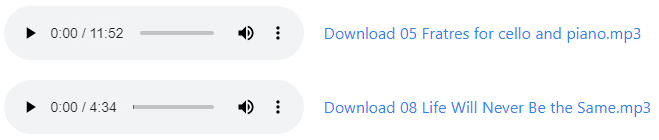
The following snippet will show a list of all audio files in a page's folder with audio player controls and a download link:

TWIG
{% for media in page.media.audios %}
<div class="audio">
  {{ media.html }}
  <a href="{{ media.url }}" download>Download {{ media.filename }}</a>
</div>
{% endfor %}

Which, with a dash of css, will yield something like:
image|659x140

Hope this helps....

👍 1
6 years ago

@gobs - yes, I was thinking more about a proposal like @pamtbaau outlined, which will create links to the media files automatically, not manually.
and for the simple solution of a link to the (physical) folder that does not have an index.html or index.php file: that depends mainly on the security policy of your hoster (most hosters will not allow this nowadays for good reasons).

Suggested topics

Topic Participants Replies Views Activity
General · by Jerry Hunt, 4 days ago
2 95 14 hours ago
General · by pamtbaau, 20 hours ago
1 61 19 hours ago
General · by Andy Miller, 1 day ago
0 47 1 day ago
General · by Marcel, 12 months ago
6 356 5 days ago
General · by Duc , 6 days ago
3 44 6 days ago