Hi all,
I've looked for a a code plugin with syntax highlight and copy button. cf /forum/general/copy-code-to-clipboard-button-t2919
the one last thing I am missing is line-wrap that
Hi all,
I've looked for a a code plugin with syntax highlight and copy button. cf /forum/general/copy-code-to-clipboard-button-t2919
the one last thing I am missing is line-wrap that
Does this help you out ... ?
How to make prism.js word-wrap and avoid the horizontal scrollbar (peterdaugaardrasmussen.com)
Thanks @spamhater -
I changed path/user/plugins/prism-highlight/css/prism.css and modified
code[class*="language-"],
pre[class*="language-"] {
    color: black;
    background: none;
    font-family: Consolas, Monaco, 'Andale Mono', 'Ubuntu Mono', monospace;
    font-size: 1em;
    text-align: left;
    white-space: pre;
    word-spacing: normal;
    word-break: normal;
    word-break: normal;
    /* word-wrap: normal; */
    word-wrap: break-word !important;
    line-height: 1.5;

    -moz-tab-size: 4;
    -o-tab-size: 4;
    tab-size: 4;

    -webkit-hyphens: none;
    -moz-hyphens: none;
    -ms-hyphens: none;
    hyphens: none;
}
I checked browser dev tool and it comes back properly, but doesn't change it on the screen.
Some other file must be taking precedence.
Any idea which one?
is the site live ? can I look at the page your looking at and see what you are visual trying to accomplish please.
https://github.com/PrismJS/prism/issues/1237

Is it frontend or backend the issue occurs ?

maybe to force the css to overwrite be a priority use the !important

so based on your code provided
code[class*="language-"], pre[class*="language-"]  !important; {
white-space: normal !important;
word-break: break-word !important;
}
https://twig-extensions.readthedocs.io/en/latest/text.html#installation
https://github.com/Perlkonig/grav-plugin-twig-extensions
https://www.perlkonig.com/demos/twig-extensions
Or if you are using twig and wanting to alter the display
'https://twig.symfony.com/doc/1.x/filters/split.html'
Sorry all this is looking at a problem whilst blind, there is no real visualization or what / how you are expecting it to work. Maybe do a screen capture or screen video of the issue and what you are expecting.
Maybe with more info and what you are trying to replicate, I can try and recreate it and see what possibilities there are. With prism seeming to in reduced support and conflicts on some of the updates, it may not be possible.
:)
@antineutrinos
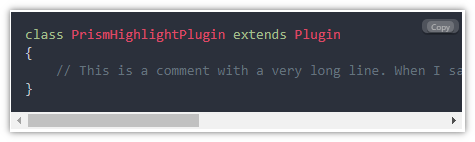
To test a solution to fix line-wrapping in prism, I'm using a PHP code snippet leading to the following result:
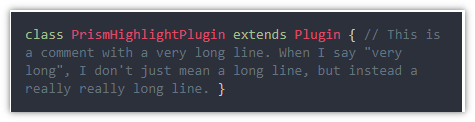
When Googling on "prism line wrap":
The first hit points to https://peterdaugaardrasmussen.com/2020/09/12/how-to-make-prism-js-word-wrap-code-snippets/. Which is also mentioned above.
However, when you try it, you'll see it wraps all lines into one.
The second hit points to Enable Line Break · Issue #1237 · PrismJS/prism · GitHub, where a reply suggests to use white-space: pre-wrap.
Adding only that to 'user/plugins/prism-highlight/css/prism.css/' seems to provide a better solution for line-wrapping.
code[class*="language-"],
pre[class*="language-"] {
white-space: pre-wrap !important;
...
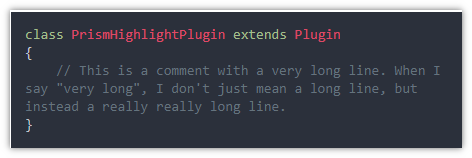
Note:
white-space: pre-wrap will make these wrap.Log in to reply.
| Topic | Participants | Replies | Views | Activity |
|---|---|---|---|---|
| 0 | 117 | 7 days ago | ||
| 3 | 444 | 2 weeks ago | ||
| 7 | 562 | 2 weeks ago | ||
| 0 | 162 | 2 weeks ago | ||
| 2 | 309 | 4 weeks ago |