Skip to content
Grav 2.0 is officially stable. Read the announcement →

Community guidelines

Please keep discussions civil and on-topic. Repeated violations may lead to a temporary ban.

General

Get values from checkboxes with Switch Function

Solved by Vadym View solution

Started by Pedro M 3 years ago · 4 replies · 394 views
3 years ago

Hi there.

How do I get in twig, the data saved via checkboxes, using switch function?

Blueprint example:

YAML
header.shareicons:
   type: checkboxes
   label: Social Icons
   default:
      facebook: true
      twitter: true
   options:
      facebook: Facebook
      twitter: Twitter
   use: keys

Example of .md file:

YAML
shareicons:
   facebook:true
   twitter: true

Thanks in advance

3 years ago

@pmoreno i don't think you should use swich tag here, after all the output is just a boolean (TRUE/FALSE). You might consider using something like this:

TWIG
{% set shareicons = header_var('shareicons')|defined({'facebook': true, 'twitter': true}) %}

and then

TWIG
{% if shareicons.twitter %}
    {# link to share on twitter #}
{% endif %}
{% if shareicons.facebook %}
    {# link to share on facebook #}
{% endif %}

or just

TWIG
{% if page.header.shareicons.facebook|defined(true) %}
    {# link to share on facebook #}
{% endif %}

Also, it might be better to place this configuration in the theme's blueprint? and take a look at share.html.twig partial of the Cacti theme.
P.S. Just noticed you are the author of the Futura2021 theme 😅

3 years ago

Hello @b.da.
Indeed, I am currently developing the Future2021 theme (Future fork) and I try to improve it a little more every day.

Currently, the theme has social media icons both in the left sidebar and in the footer, as well as in each blog post.
The icons on the left side are defined globally in the theme (as in the Cacti theme and others) and are used to direct the user to the social networks of the page author.

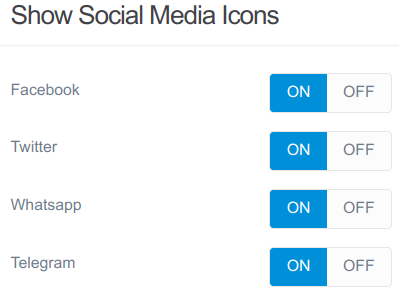
I want to use the blog article icons to share that particular article on social media. I currently have code with if statements and variables defined on the page (as you propose in your answer), and it works great:

In administration:
social_icons1|399x305, 75%

And in blog_item.html.twig this code:

TWIG
{% if header_var('facebook')|defined(true) %}
       <li><a class="icon brands fa-facebook" target="_blank" href="https://www.facebook.com/sharer/sharer.php?u={{ page.url(true)|e }}" ariba-label="Facebook" title="Facebook"></a></li>
{% endif %}
{% if header_var('twitter')|defined(true) %}
       <li><a class="icon brands fa-twitter" target="_blank" href="https://twitter.com/intent/tweet?text={{ page.title|raw }}&amp;url={ { page.url(true)|e }}" ariba-label="Twitter" title="Twitter"></a></li>
{% endif %}
{% if header_var('whatsapp')|defined(true) %}
       <li><a class="icon brands fa-whatsapp" target="_blank" href="https://wa.me/?text={{ page.title|raw }}. {{ page.url(true )|e}}" data-action="share/whatsapp/share" aria-label="Whatsapp" title="Whatsapp"></a></li>
{% endif %}
{% if header_var('telegram')|defined(true) %}
       <li><a class="icon brands fa-telegram" target="_blank" href="https://t.me/share/url?url={{ page.url(true)|e }}&amp; text={{ page.title|raw }}" aria-label="Telegram" title="Telegram"></a></li>
{% endif %}

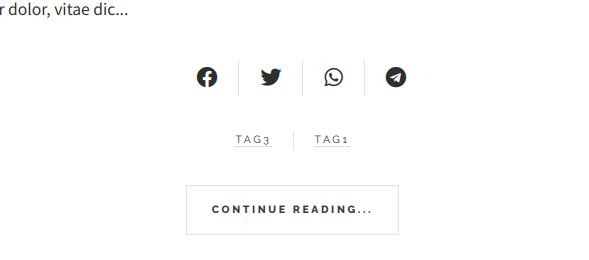
The result is:

Desktop mode

social_share2|690x72, 75%

Mobile mode

social_share3|589x260, 75%

In this case, I cannot use a For loop, because each link to a social network requires different parameters.

I just wanted to know if I could simplify the selection of these icons with a Switch statement and checkboxes.

last edited 02/13/23 by Pedro M
3 years ago Solution

Hi, @pmoreno, basic example in this case

<details>
<summary>of using switch tag</summary>

TWIG
{% for network, enabled in shareicons %}
    {% if enabled is same as(true) %}
        {% switch network %}
            {% case 'twitter' %}
                {# share link #}
            {% case 'facebook' %}
                {# share link #}
            {% case 'whatsapp' %}
                {# share link #}
            {% case 'telegram' %}
                {# share link #}
        {% endswitch %}
    {% endif %}
{% endfor %}

</details>

Not saying that this is a simplification :) but if change it a bit, you can use the same particle for two cases.

TWIG
{% set share = [
    { 'name': 'facebook', 'icon': 'fa-facebook', 'enabled': header_var('shareicons.facebook')|defined(true), 'url': 'https://www.facebook.com/sharer/sharer.php?', 'params': {'u': page.url(true)} },
    { 'name': 'twitter', 'icon': 'fa-twitter', 'enabled': header_var('shareicons.twitter')|defined(true), 'url': 'https://twitter.com/intent/tweet?', 'params': {'text': page.title, 'url': page.url(true)} },
    { 'name': 'whatsapp', 'icon': 'fa-whatsapp', 'enabled': header_var('shareicons.whatsapp')|defined(true), 'url': 'https://wa.me/?', 'params': {'text': page.title ~ '. ' ~ page.url(true)}, 'action': 'share/whatsapp/share' },
    { 'name': 'telegram', 'icon': 'fa-telegram', 'enabled': header_var('shareicons.telegram')|defined(true), 'url': 'https://t.me/share/url?', 'params': {'url': page.url(true), 'text': page.title} },
] %}
{% for item in share %}
    {% if item.enabled|defined(true) %}
        <li><a class="icon brands {{ item.icon }}" target="_blank" href="{{- item.url -}}{{- item.params|url_encode-}}" {% if item.action is defined %}data-action="{{ item.action }}"{% endif %} aria-label="{{ item.name|capitalize }}" title="{{ item.name|capitalize }}"></a></li>
    {% endif %}
{% endfor %}
👍 1
3 years ago

@b.da, your solution, apart from working very well, is elegant, just what I was looking for. I will incorporate these improvements into the next version of the Future2021 theme.

Thanks again for your help.

👍 1

Suggested topics

Topic Participants Replies Views Activity
General · by Jerry Hunt, 4 days ago
2 80 10 hours ago
General · by pamtbaau, 15 hours ago
1 51 15 hours ago
General · by Andy Miller, 1 day ago
0 45 1 day ago
General · by Marcel, 12 months ago
6 346 5 days ago
General · by Duc , 5 days ago
3 40 5 days ago