As you may observe - Grav is putting all of my page titles across the top of every page ... and they run off the right edge ... https://sun2save.com/cms/
I will definitely have to read those doc-pages several times before the many details to begin to stick. Thanks for the links!
I didn't notice anything that explains why all of the links to the other pages are automatically displayed at the top of every page (and why they don't auto-wrap), nor how to specify that only "home" (the /mypage menu) should be displayed.
OK, wait ... /user/pages doesn't show up in the GUI Menu interface but I see it in cpanel at bluehost. (It probably should be visible in grav.) Anyhow, should I be structuring things so that all of my pages are under /02.resources (instead of /02.blog) rather than each with a numbered prefix of its own?
@nginxgrav, Please do not add multiple questions to a single post. A post can be marked as solved only once for a topic. Nested topics wil get buried and lost for people searching for a similar question.
Create a new topic with a descriptive title for your conceptual question about "local resources". Thanks.
If no number is provided as a prefix of the folder name, the page is considered to be invisible , and will not show up in the navigation. An example of this would be the error page in the above folder-structure.
This can actually be overridden in the page itself by setting the visible parameter in the headers.
By default, a page is visible in the navigation if the surrounding folder has a numerical prefix, i.e. /01.home is visible, while /error is not visible . This behavior can be overwritten by setting the visible variable in the header. Valid values are true or false .
@nginxgrav:
all of my pages are under /02.resources (instead of /02.blog) rather than each with a numbered prefix of its own
So, the answer is Yes to my suggested solution "all of my pages are under /02.resources (instead of /02.blog) rather than each with a numbered prefix of its own". Cool.
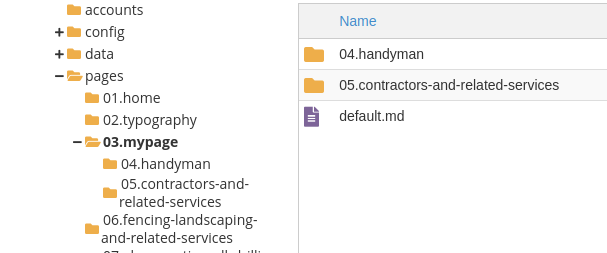
I'm thinking, after reading a bunch of doc pages, that this is what things should look like ... a parent page and the rest child pages. (I just changed the "parent" for two of the 20+ existing pages, so far.) Am I correct, please? Thanks!