Note that Markdown formatting syntax is not processed within block-level HTML tags. E.g., you can’t use Markdown-style *emphasis* inside an HTML block.
Span-level HTML tags — e.g. <span>, <cite>, or <del> — can be used anywhere in a Markdown paragraph, list item, or header. If you want, you can even use HTML tags instead of Markdown formatting; e.g. if you’d prefer to use HTML <a> or <img> tags instead of Markdown’s link or image syntax, go right ahead.
Unlike block-level HTML tags, Markdown syntax is processed within span-level tags.
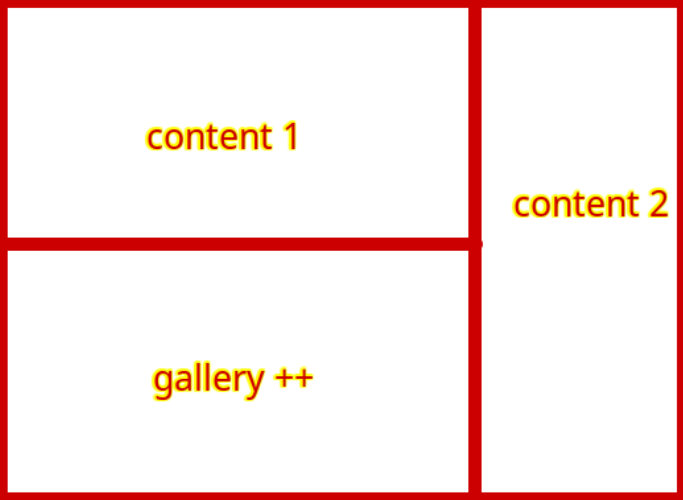
I wanted to make sure the "content 2" length does not interfere "gallery++" area - hence my attempt to fit the "gallery++" under "content 1" using <div>
Reminder: I'm very new to self-hosting/programming :)
Although the post you're referring to hasn't got to do with processing Markdown inside <div>s, it does remind me of the existing option of using Markdown Extra...
Set pages:markdown:extra: true in /user/config/system.yaml
Do more pages need such layouts that needs <div>s?
What are those different contents?
Good questions. For me from the beginning this sounds like it should be solved in the theme with a separate template. Adding HTML to the content should be the last resort
Set pages:markdown:extra: true in /user/config/system.yaml
Add gallery++ as follows to your page:
Tried, didn't work
@pamtbaau:
Do more pages need such layouts that needs <div>s?
What are those different contents?
@Karmalakas:
Good questions. For me from the beginning this sounds like it should be solved in the theme with a separate template. Adding HTML to the content should be the last resort
Yes, other layouts will follow the similar compartments.
The contents 1/2 will differ based on the page.
Now, after these searches and reading what you guys said, I came to the conculusion that my original approach isn't the ideal method.
I will spend some time learning twig and try to create/modify a template and see where it gets me.
Chances are I'll have more questions.
Thank you for helping me to understand 🙂
I won't, but did you even try to replace all <divs>s and css display: block?
Tried, didn’t work
"Didn't work" is meaningless information...
Again, how did you try it? Please show the relevant snippet of markdown and the page settings in user/config/system.yaml.
Reminder: I’m very new to self-hosting/programming 🙂
If you are not satisfied what Grav and one of the themes provide you out of the box, you will have a hard time if you don't have minimal knowledge on Markdown, HTML, css/scss, Twig...
@pamtbaau:
I won’t, but did you even try to replace all <divs>s and css display: block?
I did not; I didn't know I was supposed replace all of them.
However,
@pamtbaau:
“Didn’t work” is meaningless information…
Again, how did you try it? Please show the relevant snippet of markdown and the page settings in user/config/system.yaml.
This was a good point as it helped me to see my problem.
Whilst trying to take a screenshot, I learned that the problem was with indentation.
Removing indentation parsed the gallery++ within <div markdown="1">
A side question, I can't seem to shift+tab indent on Grav - is there a shortcut to this?
@pamtbaau:
If you are not satisfied what Grav and one of the themes provide you out of the box, you will have a hard time if you don’t have minimal knowledge on Markdown, HTML, css/scss, Twig…
True and I'm learning - we all have to start somewhere!
For now I'm glad I've found a solution - thank you.
This was a good point as it helped me to see my problem.
That was exactly the problem I was expecting considering the Markdown snippet you shared earlier. Indentation in Markdown has a meaning...
Without sharing code snippets, we cannot see what you have been doing and hence cannot see what is going wrong.
A side question, I can’t seem to shift+tab indent on Grav - is there a shortcut to this?
Please do not ask extra unrelated questions in the same topic. The topic is about Gallery++ and that has been answered.
Having said that, tab and shift+tab work as expected using the Markdown editor in the Markdown field in the Content tab in Grav Admin.
@pamtbaau:
That was exactly the problem I was expecting considering the Markdown snippet you shared earlier. Indentation in Markdown has a meaning…
Without sharing code snippets, we cannot see what you have been doing and hence cannot see what is going wrong.
Indeed, thank you again for taking time to address all of my issues.
@pamtbaau:
Having said that, tab and shift+tab work as expected using the Markdown editor in the Markdown field in the Content tab in Grav Admin.
I will make a new topic for this as shift+tab never worked from my end.