Skip to content
Grav 2.0 is officially stable. Read the announcement →

Community guidelines

Please keep discussions civil and on-topic. Repeated violations may lead to a temporary ban.

Support

Composer error on new version of Grav

Solved by Jan Plechtý View solution

Started by Jan Plechtý 5 years ago · 12 replies · 2155 views
5 years ago

It is not so much here to describe the problem...
I just have installed Grav 1.7.6.

I know my permissions are badly set (777) but I guess that is not the problem.
File path bellow: ./vendor/twig/twig/src/Loader/ArrayLoader.php

|The error|
Just after installation I went into the installation directory and wrote composer.
It showed me this:

TXT
In ArrayLoader.php line 44:

Error URL (Can not place it here - too many characters for upload)

I do not really know what is happening and did not find any same or similar problem.
5 years ago

@Junek

Question:

  • Presuming you downloaded a zip of Grav, is there any reason why you would want to run any composer command after installation?

Note:

  • Command composer should not throw an error but should show a help page with options and arguments.
5 years ago

Well yes. I have downloaded it via zip.
I want to create a plugin so when I follow the tutorial I get into the second part (bin/plugin devtools new-plugin).

Then i fill all the informations they asking me to and after the plugin is successfully created console prints run composer update.

From now on Admin page is not working.
But the composer error is showing even before those steps.

last edited 02/22/21 by Jan Plechtý
5 years ago

@Junek, After $ bin/plugin devtools new-plugin you should run:

  • $ cd user/plugins/<your plugin>
  • $ composer update
5 years ago

Okay, sure, thank you. I really did not see that but that does not solve the problem 😂

5 years ago

Okay... I did what you said and I am able to use composer in other than root directories. In root directory it is showing me still the same error and after installation of new own plugin admin page shows error 500.

When I typed composer update in directory grav/user/plugins/test it wrote:

root@server: .../user/plugins/test# composer update
Do not run Composer as root/super user! See https://getcomposer.org/root for details
Loading composer repositories with package information
Warning from https://packagist.org: You are using an outdated version of Composer. Composer 2.0 is now available and you should upgrade. See https://getcomposer.org/2
Updating dependencies (including require-dev)

In RuleSetGenerator.php line 286:

"continue" targeting switch is equivalent to "break". Did you mean to use "continue 2"?

update [--prefer-source] [--prefer-dist] [--dry-run] [--dev] [--no-dev] [--lock] [--no-custom-installers] [--no-autoloader] [--no-scripts] [--no-progress] [--no-suggest] [--with-dependencies] [-v|vv|vvv|--verbose] [-o|--optimize-autoloader] [-a|--classmap-authoritative] [--ignore-platform-reqs] [--prefer-stable] [--prefer-lowest] [-i|--interactive] [--root-reqs] [--] [<packages>]...

So as I can see I am using an outdated version of Composer. Is not it making problems?

5 years ago

After installation of Grav 1.7.7 problem still occurs.
The only change is when I navigate myself into the new plugin directory and use a command composer update, composer works normally. BUT admin site still has a problem with autoload after that.

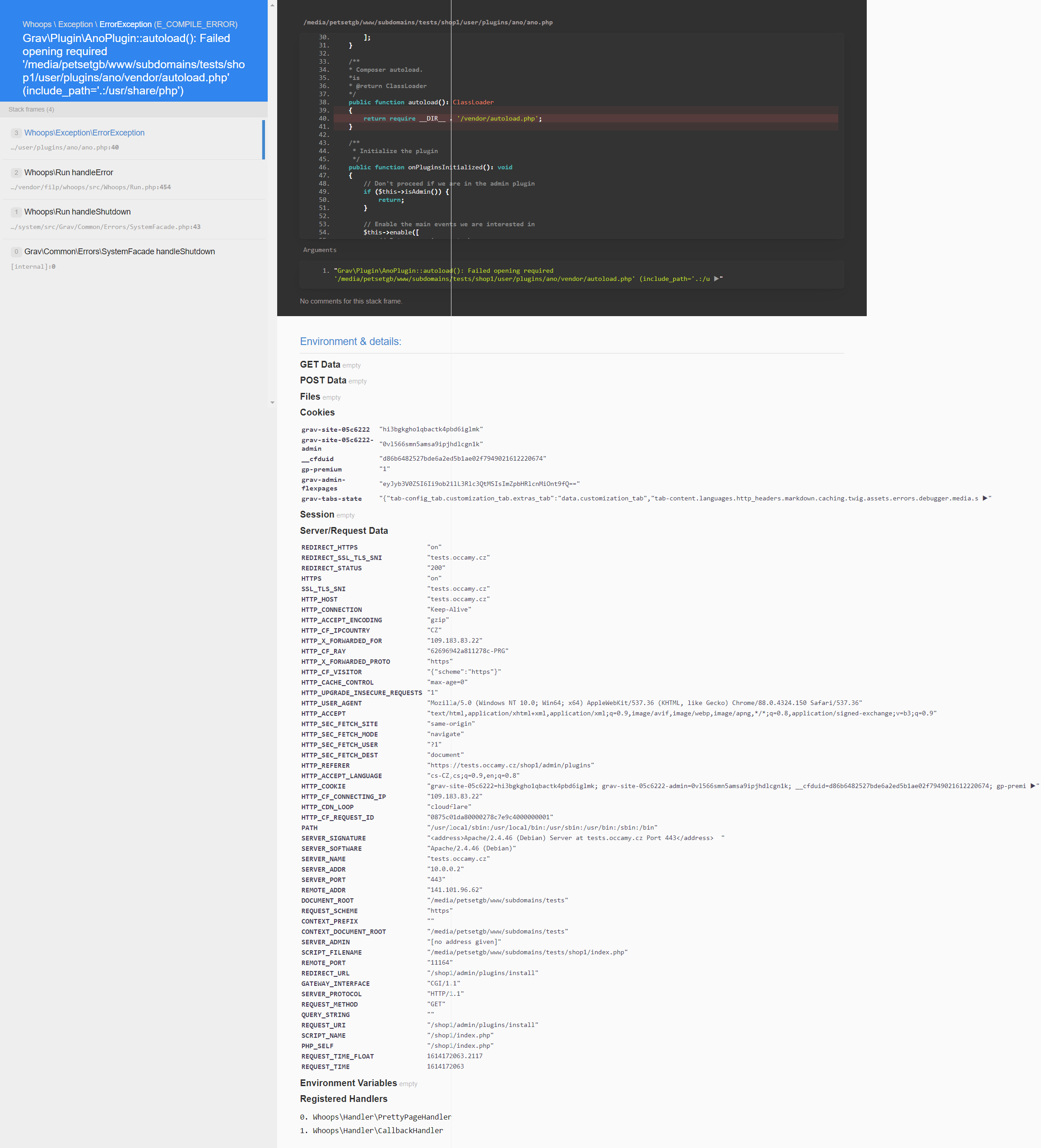
Picture:
screencapture-tests-occamy-cz-shop1-admin-plugins-install-2021-02-24-14_07_46|453x500, 100%

Edit: The picture is unreadable so I am uploading a pdf on this link: https://occamy.cz/user/themes/bootgrav/images/screencapture-tests-occamy-cz-shop1-admin-plugins-install-2021-02-24-14_07_46.pdf

last edited 02/24/21 by Jan Plechtý
5 years ago

did you check if the vendor/autoload.php created by composer is there ?
another hint: you seem to run composer as root, which is bad.
if you do so, you should do chown -R www-data * afterwards (and maybe even flx file/dir permissions).
plus, did you update composer ?
(run composer selfupdate)

5 years ago

did you check if the vendor/autoload.php created by composer is there ?

Yep, it exists in the right directory.

you should do chown -R www-data *

I know.. I would like to deal with it later because.. It won't make those errors, would it?

run composer selfupdate

Well, that's the problem I'm dealing with... I cannot run any commands (even only composer) in the root directory of grav. The error is written up.

5 years ago

Is there any possibility that plugin devtools could work on an outdated version of some of the plugins in graf? For example with Forms?

It's still crashing...

5 years ago

I came across this thread whilst setting up grav and starting to look at writing a blueprint / plugin .

I installed the latest current version 1.7.6 and the devtools plugin.

I had the same issue on how it broke the site after running devtools new-plugin ...

vendor / autoload.php had not been created, so I try to run the composer update and saw the error about running it in the plugin directory ( fails due to can only be run from grav root )

Again composer selfupdate didnt work, so I went to the composer site and downloaded and updated the composer (working on windows) and viola it finally ran and configured the plugin and stopped the error.

So the error seems to be because of composer incompatibility, so possibility it may need to checked out by the dev team.

Which way is the correct way to run composer update , I am not sure as advised in the post, running it from the plugin directory or not, I am not that clever to say lol !

HTH

👍 2
5 years ago Solution

I followed your steps and find out that my composer is corrupted.

I am using debian 9.

This helped.

BASH
sudo apt-get remove composer
sudo apt autoremove 
sudo curl -s https://getcomposer.org/installer | php
sudo mv composer.phar /usr/local/bin/composer

Thanks to your steps I found out what's going on.
Thank you all for your help!

Solved

3 years ago

Thanks, Just to let anyone looking for this issue that I still had to do the same with Grav v1.7.41.2 in Windows for creating a new plugin.

👍 1

Suggested topics

Topic Participants Replies Views Activity
Support · by Thomas, 1 week ago
2 56 13 hours ago
Support · by Anna, 3 days ago
2 61 16 hours ago
Support · by Justin Young, 17 hours ago
1 32 17 hours ago
Support · by Duc , 1 week ago
2 66 5 days ago
Support · by Colin Hume, 1 week ago
2 59 5 days ago