Skip to content
Grav 2.0 is officially stable. Read the announcement →

Community guidelines

Please keep discussions civil and on-topic. Repeated violations may lead to a temporary ban.

Plugins

Theme Akazie-Wood: No tinymce editor in modules

Solved by pamtbaau View solution

Started by speeendo 2 years ago · 7 replies · 418 views
2 years ago

Hello!

I am about to start a website with grav for a friend. As they are not very tech savvy, I installed the tinymce plugin.

However, I experience a strange behavior: the tinymce editor is only reliably active in "Expert" mode but not in "Normal" mode.

E.g. I cannot make tinymce work in modular pages (in the modules) in normal mode

I already tried to play with some blueprints but I cannot seem to figure out what I am doing wrong.

Can you help me?

Thank you in advance!

last edited 03/09/24 by speeendo
2 years ago

@speendo, I cannot reproduce the issue...

  • Downloaded the One-Page Site skeleton
  • Installed TinyMCE Editor plugin using: $ bin/gpm install tinymce-editor
  • No further changes.
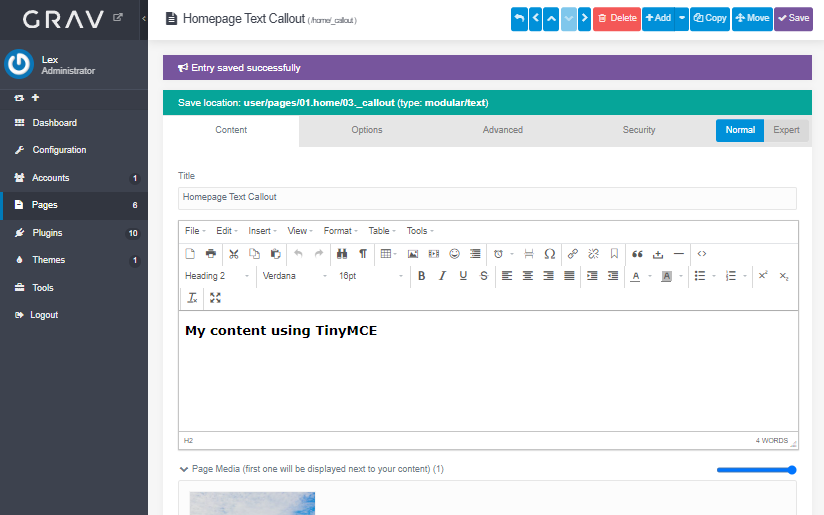
  • Opened Admin / Pages / Home / _callout module in normal mode and edited the content:

    image|690x431

Now its your turn to show us a reproducible case in which a module cannot be edited using TinyMCE in normal mode.

2 years ago

Thank you @pamtbaau for helping me!

Actually, I wanted to add some images in my first post, but I don't have the permissions yet.

So instead, I link the images: https://imgur.com/a/JkoWw9W

I should also mention that I use the theme "Akazie Wood" (https://github.com/AkazieIT/grav-theme-akazie-wood) - maybe the reason is to be found in the theme's blueprints?

I searched and found the key

TXT
type: editor

a couple of times in the blueprints but I wasn't able to change that key to make tinymce work.

Thank you once more for your help.

2 years ago

It seems like I found the reason:

There are a couple of blueprints in the theme folder specifying the editor with

YAML
content:
  type: section
  title: THEME_AKAZIEWOOD.ADMIN.SECTION.CONTENT
  underline: true
  fields:
    content:
      type: markdown
      validate:
        type: textarea

Is there a way to override those blueprints without changing the actual theme?

2 years ago Solution

@speendo, Blueprints can indeed be extended to add/replace/remove fields. See Advanced Blueprint Features

Try the following to override blueprint /themes/akazie-wood/blueprints/modular/text.yaml:

  • Create child theme of Akazie-wood
    • $ bin/gpm install devtools
    • $ bin/plugin devtools new-theme
      Let's call it myakazie
      Follow the wizard and when asked, select 'inheritance' and 'akazie-wood'
    • In user/config/system.yaml set theme: myakazie
  • Create file /user/themes/myakazie/blueprints/modular/text.yaml. And add:

    YAML
    extends@:
    type: text
    context: blueprints://pages/modular
    
    form:
    fields:
      tabs:
        fields:
          inhalt:
            fields:
              content:
                fields:
                  content:
                    type: tinymce
    

Admin should now show TinyMCE as editor for modules using file text.md

👍 1
last edited 03/12/24 by pamtbaau
2 years ago

Thank you @pamtbaau!

Your solution works perfectly.

Just out of curiosity: How would it be possible to remove the field type: markdown in the override without replacing it with type: tinymce.

I ask because my inherited theme is now dependent on the tinymce plugin. I would prefer that it uses the default editor (tinymce when it is installed, otherwise fall back to markdown).

2 years ago

@speendo, Try the following to conditionally set the type of editor to be used:

Update blueprint /user/themes/myakazie/blueprints/modular/text.yaml:

YAML
extends@:
  type: text
  context: blueprints://pages/modular

form:
  fields:
    tabs:
      fields:
        inhalt:
          fields:
            content:
              fields:
                content:
                  data-type@: '\Grav\Theme\Myakazie::getEditorType'

Add the following to the class in /user/themes/myakazie/myakazie.php:

PHP
  public static function getEditorType(): string {
    /** @var Config */
    $config = Grav::instance()['config'];
    $useMceEditor = $config->get('plugins.tinymce-editor.enabled', false);

    return $useMceEditor ? 'tinymce' : 'markdown';
  }

See Using Function Calls (data-*@)

👍 1
last edited 03/17/24 by pamtbaau

Suggested topics

Topic Participants Replies Views Activity
Plugins · by Rene, 1 week ago
2 47 1 week ago
Plugins · by Xavier, 4 weeks ago
2 56 4 weeks ago
Plugins · by Luka Prinčič, 7 years ago
3 1183 1 month ago
Plugins · by Sebastian van de Meer, 1 month ago
1 50 1 month ago
Plugins · by PIERROT Alain, 2 months ago
3 74 2 months ago