Skip to content
● Grav 2.2 is out: 2x faster cold starts and 96% less memory on big sites. Read the announcement →

Template from Plugin not usable in Admin

Solved by Werner Joss View solution

Started by Werner Joss 6 years ago · 2 replies · 620 views
6 years ago

I'm currently stumbling over an IMHO strange behaviour when trying to use a template from my plugin in the admin backend.
I followed the official docs and then created calendar.html.twig in my plugin's template directory.
now when I create a new page, I thought it would be possible to select this template as Page Template, but it does not work.
I can, however, create a file calendar.md in a new page folder, an then, in the admin, it looks like this:
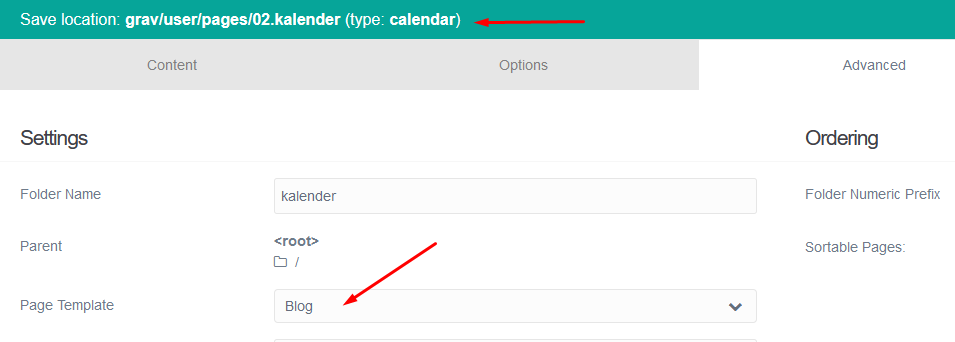
grafik|690x247

  • note that the type calendar is correctly displayed, and I can also see that the template is actually used when I look at the page, but: I can't select the correct template in the dropdown - my custom type is just not displayed there, so, saving the page in the admin is not possible, because it will be of a wrong type.
    did I miss something here ?
6 years ago Solution

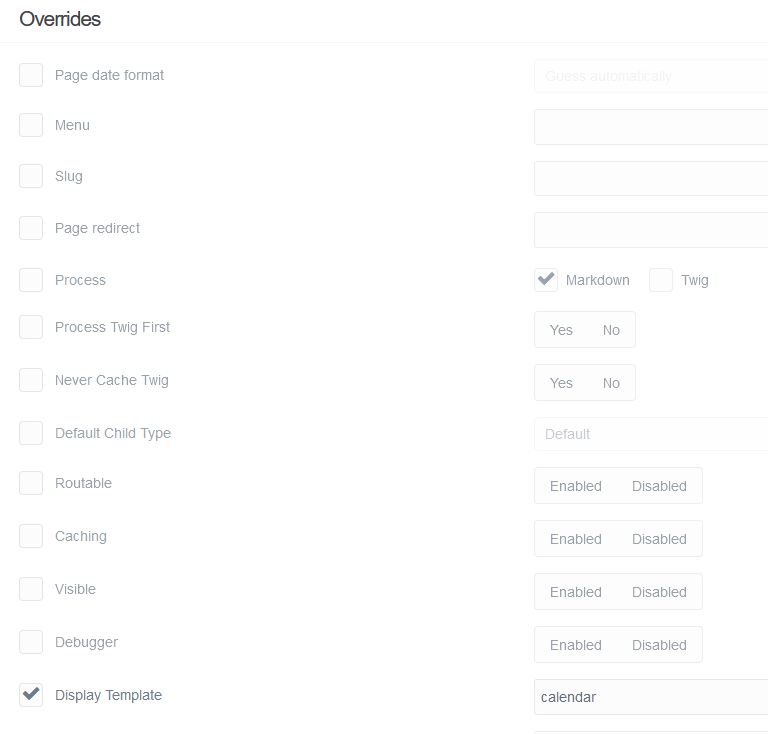
ok, the solution seems to be simple, I had to use the Override Option for Display templates:
grafik|523x499
so, as a conclusion, page save in admin does work and preserve the correct page type,
but that ist not selectable in the dropdown, where only the templates from the theme will be shown.

👍 1
6 years ago

just to complete this issue, after some more investigation, I found a much more elegant solution here, which actually allows direct selection of plugin-provided templates in the admin.
this is now also implemented in the latest version of my fullcalendar plugin.

Suggested topics

Topic Participants Replies Views Activity
Plugins · by renedebaaij, 2 days ago
0 39 2 days ago
Plugins · by complanar, 3 weeks ago
6 392 2 weeks ago
Plugins · by BenLaKnet, 2 weeks ago
1 209 2 weeks ago
Plugins · by complanar, 1 month ago
2 484 4 weeks ago
Plugins · by Vladimir Novak, 2 months ago
3 763 2 months ago