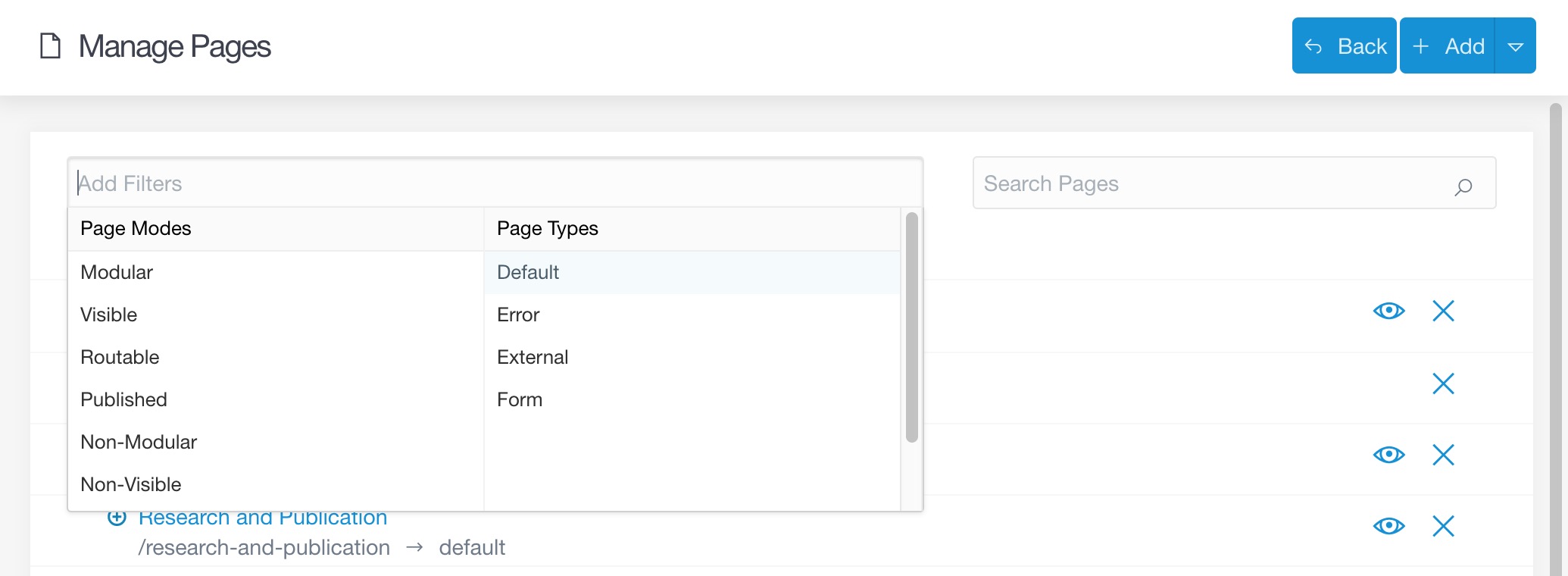
I'm trying to build a site that has multiple blogs as well as standard content pages. In the admin the standard "pages" list is quickly going to become difficult to navigate if it also includes every type of page & post - even with the filter control at the top of the list.
Does anyone have a mechanism where I could add a new item to the navigation on the left which would only show content of a specific type? That way I could have a left navigation showing "Pages", "Blogs", "News" etc.
Thanks @gnat - yes - I'm using the latest admin plugin. The problem is that there's going to be a couple of hundred blog posts under two different pages. Over time that's going to get really unwieldy to navigate.
What I'd like to do is have a navigation item on the left that shows only the blog posts - effectively a link that pre-selects filters from those dropdowns at the top of the pages list. Does that make sense?
However, the list is filtered using JS and the plugin does not have a way to reach a filtered list of pages directly. You could however create custom secured pages that show you a filtered list along with relevant edit links.
You can also try asking at the Admin plugin's Github repo Github: Grav Admin
Hey Christiana 👋 - I didn't I'm afraid. I spent some time investigating, but didn't ultimately come up with a solution. We're up to 864 content items now - so it's definitely still an issue. Would be great to hear if you find an answer!
@parkersweb for my issues i wrote an own filter by extending an own written admin plugin. that filter is autonomous and independent of the existing grav filter.
I wrote an blueprint for my searchform. Than I overwrite the "admin/themes/grav/templates/pages.html.twig" in my own plugin by adding the filter boxes as an partial:
In my modified "admin/themes/grav/templates/pages.html.twig" i filter the pages outpout via twig variables
TWIG
{# if filter params set in url#}{%ifuri.query()%}{# if filter params set in url #}{%setfilter_last_modified_by=uri.query('last_modified_by')?uri.query('last_modified_by'):''%}{%setfilter_assignee=uri.query('assignee')?uri.query('assignee'):''%}{%setfilter_status=uri.query('status')?uri.query('status'):''%}{%ifuri.query('last_modified_by')oruri.query('assignee')oruri.query('status')%}{%setfilter_on=true%}{# show last modified by #}{%iffilter_last_modified_by!=''andfilter_last_modified_by!=last_modified_by%}{%setfilter_show_item=false%}{%endif%}{# show assignee #}{%iffilter_assignee!=''andfilter_assignee!=assignee%}{%setfilter_show_item=false%}{%endif%}{# show drafts #}{%iffilter_status=="draft"andp.header.draft==NULL%}{%setfilter_show_item=false%}{%endif%}{# show reviews #}{%iffilter_status=="review"andtransition!="review"%}{%setfilter_show_item=false%}{%endif%}{# show original #}{%iffilter_status=="original"%}{%iftransition=="review"orp.header.draft!=NULLorp.published%}{%setfilter_show_item=false%}{%endif%}{%endif%}{%endif%}{%endif%}
For the filtered list I use an own if part
TWIG
{# if filter is on #}{%iffilter_on%}{%iffilter_show_item%}<divclass="row page-item__row"> //[...]
</div>{%endif%}{%ifp.children().count >0%}{{self.loop(p, depth+1, twig_vars)}}{%endif%}{# else if filter is not on #}