Skip to content
Grav 2.0 is officially stable. Read the announcement →

Community guidelines

Please keep discussions civil and on-topic. Repeated violations may lead to a temporary ban.

Plugins

Featherlight plugin: Styling the thumbnails

Solved by Duc View solution

Started by Duc 8 years ago · 2 replies · 948 views
8 years ago

I am using the Gravcart and have install the featherlight plugin. The thumbnail border isn't coming out the way I want it as you can see from the image below. The horizontal border is missing as depicted by the arrows. Where is the file to adjust this?
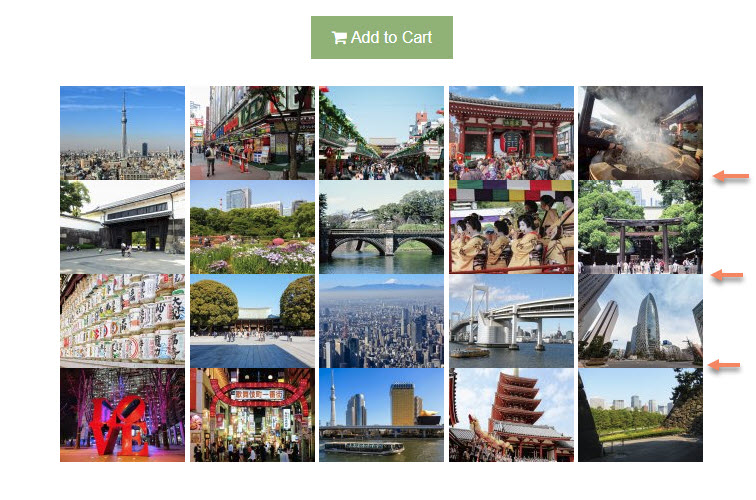

featherlight-thumbnail-border|690x456

8 years ago

Is there any opportunity that you may share the URL to the site?

8 years ago Solution

This is on a local server. I have figure it out the best way I know how.

CSS

CSS
.lightbox img {margin-bottom: 5px;}

twig

TWIG
<div class="lightbox">
    {% for images in page.media.images %}
    {{ images.lightbox(1024,768).cropResize(120,120).html( images.filename|replace({'-': " "}), images.filename|replace({'-': " "})) }}
    {% endfor %}
</div>

gravcart-featherlight-plugin-style|661x470

Suggested topics

Topic Participants Replies Views Activity
Plugins · by Rene, 1 week ago
2 47 1 week ago
Plugins · by Xavier, 4 weeks ago
2 56 4 weeks ago
Plugins · by Luka Prinčič, 7 years ago
3 1182 1 month ago
Plugins · by Sebastian van de Meer, 1 month ago
1 50 1 month ago
Plugins · by PIERROT Alain, 2 months ago
3 74 2 months ago