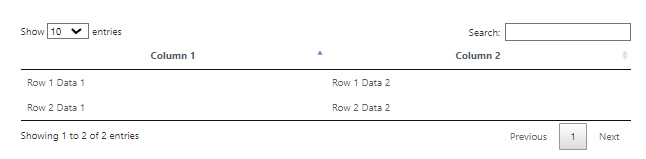
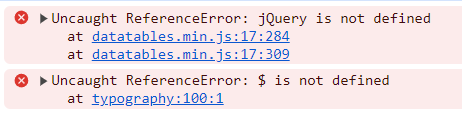
Hi,
I've recently installed Grav and am trying to get to grips with it. Having problems with the Datatables plugin which looks ideal for some of the content that I want to use.
As a test I created a page with...
HTML
[datatables]
<table><thead><tr><th>Column 1</th><th>Column 2</th></tr></thead><tbody><tr><td>Row 1 Data 1</td><td>Row 1 Data 2</td></tr><tr><td>Row 2 Data 1</td><td>Row 2 Data 2</td></tr></tbody></table>[/datatables]
in the content field but all I get on the page when it is rendered on the website is the HTML code as a long string not the nice DataTables table I was expecting.
The datatables plugin in definately enabled and I don't get the [datatables] shortcode in the rendered page so it seems to be doing something but not what I expect.
According the README of the plugin, you need to install plugin shortcode-core
NOTE: This plugin is a modular component for Grav which requires Grav and the Error, Problems and ShortcodeCore to operate.
The datatables plugin hasn't been updated in the last 6 years, and hence hasn't been upgraded to Grav v1.7.
It lacks the now required |raw filter in its Twig template. It should use: {{ content | raw }}
Note the plugin also comes with js and css files of the jQuery plugin that are 6 years old... You might consider updating these files too.
Btw. instead of an HTML <table> element you could also use a Markdown table.
The following works fine when following the docs and required fixes...
TXT
  [datatables]
  | Month    | Savings |
  | -------- | ------- |
  | January  | $250    |
  | February | $80     |
  | March    | $420    |
  [/datatables]
Thank you. It was the {{ content|raw }} that was causing the problem. I had checked that Error, Problems and ShortcodeCore were installed and they all seemed to be there by default on my installation.
The thing is all I get now is a normal looking table, the same as would normally be rendered by Markdown, not a DataTables table with paging and search etc. I'm guessing I need to use [dt-script] to achieve that.
The HTML table / Markdown table was only a starting point. Eventually I want to pull a large table out of a database with [sql-table]...
TXT
[datatables]
  [sql-table]
    SELECT * FROM ringingrecords
  [/sql-table]
[/datatables]
The thing is all I get now is a normal looking table, the same as would normally be rendered by Markdown, not a DataTables table with paging and search etc.
I cannot reproduce this issue. My example and your example are working fine.
Check if any errors have been thrown in the DevConsole.
Ok thanks, I see. No there are no errors in the browser development tools as far as I can see. The browser is just seeing a normal html table.
I'm wondering if it is the out of date JQuery plugin js or css files that you mentioned but again, I can't see a JQuery plugin either installed on my system or available to add. How do I update it?
There is a jquery-3.x.min.js file in system/assets with
TXT
/*! jQuery v3.6.4 | (c) OpenJS Foundation and other contributors | jquery.org/license */
on the first line. v3.6.4 seems to be from March 2023.
Yes I'm sorry. I don't use the Dev Console very much so I'm not that familiar with it. I was probably looking in the wrong place. I'll know better next time. Thanks.