Skip to content
Grav 2.0 is officially stable. Read the announcement →
Plugins

Cascade Plugin Question

Started by Frag le Fameux 6 years ago · 5 replies · 651 views
6 years ago

Hi all !
I'm totally new to grav, and webdesign in general.
I managed to install grav on my Raspberry pi, and i'm only using the plugin admin to create my website.
Basically i'm creating a website for a LAN party to share the games :

  • the main page with pictures of each games.
  • one page per game with the install instructions.

Up to that i'm okay, the admin plugin is pretty simple for such a basic website (i guess).

But i would love to have some filters for the games on the main page but i can't succeed to install the cascade plugin.

I put 2 taxonomy type in "Configuration > site" (Genre and max players)
And i put some tags on each pages of each games.

After that i'm not sure where to put the code of the cascade plugin, found in the "usage" section on the github page.

Here is a sample of my website so far :
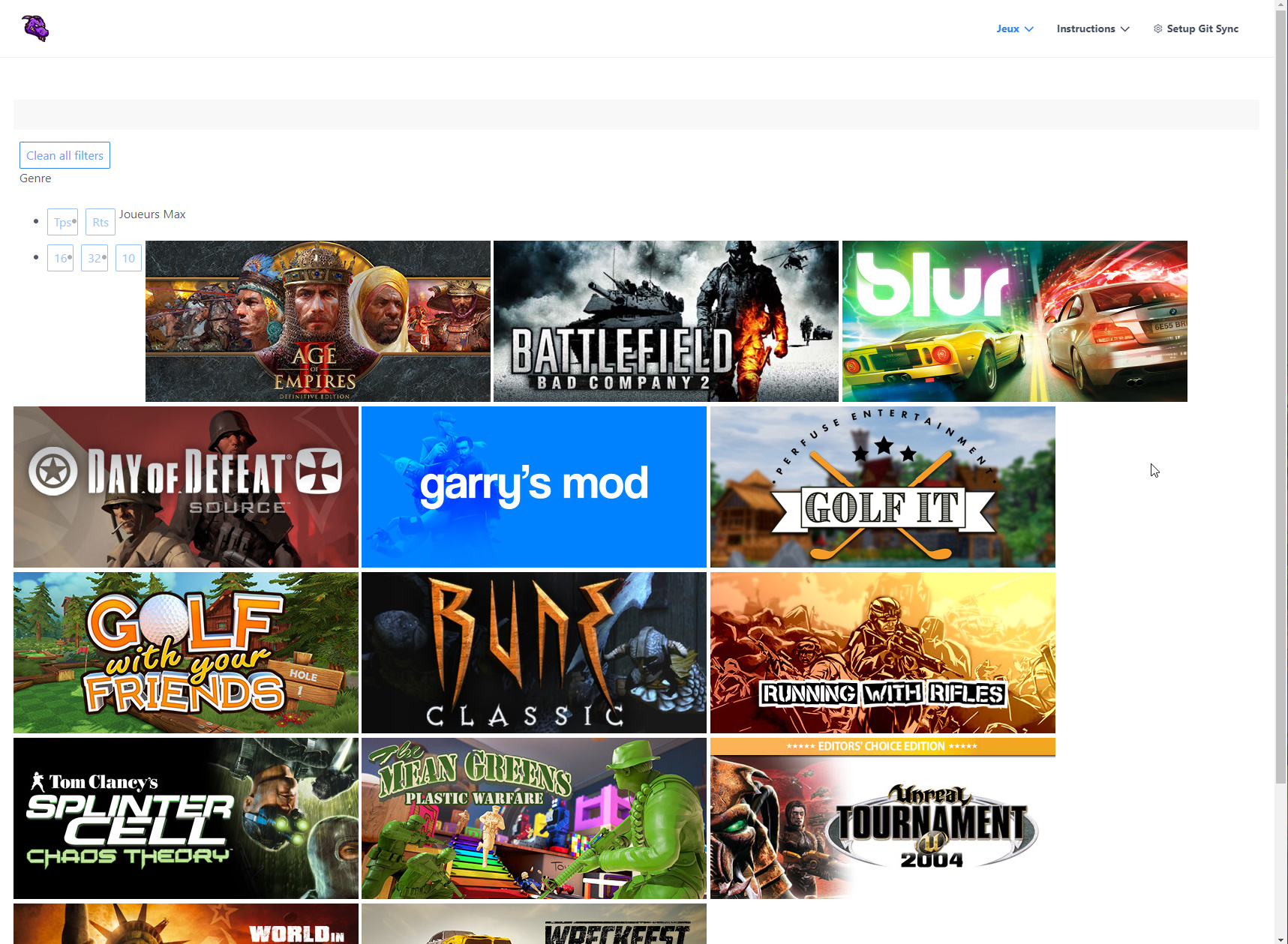
2020-07-04 00_18_34-Window|681x500
My goal would be to hide games depending on selected filters with the cascade plugins.

If someone could point me in the right direction, i would be thankful.

6 years ago

@FragleFameux, Welcome to the forum!

  • Which theme are you using?
  • How did you build the list of games in the main page? Did you use a page collection?
  • Which page templates are you using for parent and child pages? For example: 'default.md', 'blog.md', 'item.md'?
last edited 07/04/20 by pamtbaau
6 years ago

Thank you =)

  • Quark Open Publishing.
    But if there is one which is better for the task, i'm good to change.
    I mainly picked it because i thought it looked simple.

  • I simply put images as link to each game page, so no, no collection.

here is a pastebin from my home page :
https://pastebin.com/SMWdtED3

  • I'm using the default template, didn't spot that parameter in the advanced tab.
    Do i need to tinker with these *.md files directly ?
last edited 07/04/20 by Frag le Fameux
6 years ago

@FragleFameux, I would suggest to use theme Quark. It is the default theme and is already installed when installing Grav.

Theme Open Publishing is based on Quark, but adds a lot of features I expect you won't need. That would make it only more complex.

Please note that building your website requires more than getting 'Cascade Filters' plugin to work. I will however limit myself to the Grav aspects of it and will leave you with a working site as starting point. Styling and changes in layout will be up to you.

Based on the image you shared, I presume:

  • The plugin has been installed
  • /user/config/plugins/cascade-filters.yaml has been properly configured
  • Taxonomies have been configured in site.yaml.
  • Taxonomies have been added to each page describing a game.

The steps to create a list of games:

  • To prevent you from losing your changes when a new version of Quark gets released, create an inherited theme based on Quark.
    In the following steps, replace 'mytheme' with the name of your theme.
  • Copy /user/themes/quark/templates/partials/sidebar.html.twig to /user/themes/mytheme/templates/partials
  • In the copied file, create an empty line above line 4 and insert the following snippet:
    TWIG
    {% if config.plugins['cascade-filters'].enabled %}
    <div class="sidebar-content">
      {# 1st snippet of cascade filters #}
    </div>
    {% endif %}
    
  • Below '{# 1st snippet of cascade filters #}' copy the first snippet from section 'Usage' from the plugin.
  • Copy file /user/themes/quark/templates/blog.html.twig to folder /user/themes/mytheme/templates and rename the file to jeux.html.twig.
  • Copy the second snippet from the plugin in the new template file at line 9, just above {% block stylesheets %}
  • Rename file /user/pages/01.jeux/default.md' tojeux.md. This will tell Grav to use templatejeux.html.twig`.
  • Replace the contents of jeux.md with the following:
    YAML
    ---
    title: Jeux
    content:
      items: '@self.children'
    ---
    # Les jeux disponibles
    

    This will create a collection containing all pages below /01.jeux. Plugin 'Cascade Filters' uses this collection to filter.

  • Rename the child pages from default.md to item.md
  • Copy the image of a game into the folder for that game

If you now browse to page Jeux, you will hopefully see a working plugin at the right side of the page.

last edited 07/07/20 by pamtbaau
6 years ago

@FragleFameux,

I think it might be broken, since the buttons doesn’t work

I can reproduce this when using Grav 1.7. It seems to be an issue from Grav itself. The query string generated by the plugin contains a leading '/' in front of the query string (e.g. domain/typography/?a=b) . When Grav 1.7 removes the leading '/' the query string gets dropped (domain/typography). This will not occur with the home page, since its trailing '/' is not being removed.

Fix: Remove leading '/' from generated querystring

  • Copy /user/plugins/cascade-filters/templates/partials/cascade-filters.html.twig into folder /user/themes/mytheme/templates/partials/
    This copy will override the template provided by the plugin.
  • In the copied template, line 12, replace:
    TWIG
    href="{{ url }}/?{{ queries|url_encode }}"
    

    with:

    TWIG
    href="{{ url }}?{{ queries|url_encode }}"
    

the buttons are not correctly align

The plugin does not come with any css and must be provided yourself to create the required layout.
To add your own css, you can do the following:

  • Create file /user/themes/mytheme/css/custom.css
    This css file is added to the page by theme Quark and overridden by your inherited theme.
  • Add your own css to custom.css

    You will probably also need to adapt the snippet you copied into /user/themes/mytheme/templates/partials/sidebar.html.twig to add extra divs and/or classes.

last edited 07/13/20 by pamtbaau

Suggested topics

Topic Participants Replies Views Activity
Plugins · by Rene, 1 week ago
2 86 1 week ago
Plugins · by Xavier, 4 weeks ago
2 86 4 weeks ago
Plugins · by Luka Prinčič, 7 years ago
3 1211 1 month ago
Plugins · by Sebastian van de Meer, 1 month ago
1 78 1 month ago
Plugins · by PIERROT Alain, 2 months ago
3 105 2 months ago