Skip to content
Grav 2.0 is officially stable. Read the announcement →

Community guidelines

Please keep discussions civil and on-topic. Repeated violations may lead to a temporary ban.

General

Two additional <p> tags generated in content

Solved by Karmalakas View solution

Started by Pedro M 5 years ago · 13 replies · 958 views
5 years ago

Hi.

Why does Grav generate two additional \<p> tags in the HTML output of the page.
Example:

TWIG
<p>{{page.content|raw}}</p>

Output (you can see it in the attached image):

HTML
<p></p>
<p>Lorem ipsum pain sit amet, consectetur adipiscing elit.</p>
<p></p>
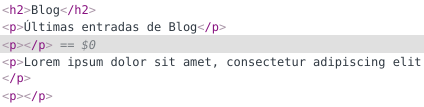
Screenshot from 2021-12-09 09-25-11|424x107

The code in the Twig template is as follows:

TWIG
<h2> {{page.title}} </h2>
<p> {{page.header.subtitle}} </p>
<p> {{content|raw}} </p>

If I disable Process Markdown in Admin, it doesn't add them.
Why is this happening?

Thanks.

5 years ago

I assume, because your page.content already has <p>Content</p>

If you were to look at the proper source instead of inspector, I'd bet you will see something like <p><p>Content</p></p>. Inspector/Browser closes tags for you, that's why you see <p></p><p>Content</p><p></p>, because <p> is not allowed inside another <p>

👍 1
last edited 12/09/21 by Karmalakas
5 years ago

HI @Karmalakas

This is my code in twig:

TWIG
{% block content %}
    <div class="wrapper">
          <section class="container">
            <header class="major">
              <h2>{{page.title}}</h2>
              <p>{{page.header.subtitle}}</p>
              <p>{{ content|raw }}</p>
            </header>
            <div class="row features">
              {% for child in collection %}
                  {% include 'partials/blog_list.html.twig' with {blog: page, page: child} %}
              {% endfor %}
            </div>
          </section>
    </div>
  {% endblock %}

And this is my blod.md file:

---
title: Blog
visible: true
content:
    items:
        - '@self.children'
    limit: 5
    order:
        by: date
        dir: desc
    pagination: true
    url_taxonomy_filters: true
subtitle: 'Últimas entradas de Blog'
---
Lorem ipsum dolor sit amet, consectetur adipiscing elit.

The block content in base.html.twig is:

{% block content %}{% endblock %}

TXT

without <p> tag in anywhere.
There isn't addiontal p tag.
5 years ago

Could you dump your content|raw and see what's there? I believe Grav wraps every paragraph into <p/> - and that would make sense, because otherwise you wouldn't have a separation between your content paragraphs

5 years ago

Ok.
This is the debugger output:

HTML
Routed to page /blog (type: blog)
<p>Lorem ipsum dolor sit amet, consectetur adipiscing elit. </p>

Without p tag, it shows correctly the paragraph, but with p tag, it still shows two paragraphs.
This is the source in browser:

HTML
<p>
<p>Lorem ipsum dolor sit amet, consectetur adipiscing elit. Sed convallis venenatis vehicula. Morbi ultrices finibus neque, ac vestibulum ante pharetra cursus. Nullam faucibus leo non dui porttitor, a sodales quam pharetra. Aliquam viverra, purus sit amet dictum rhoncus, sapien arcu vestibulum lacus, a...
</p>
</p>

If I write the text in Editor with \<p>any text here</p>, it shows correctly.

5 years ago

Definitely, Grav wraps the content in the p tag, adds it automatically.
I have added <span> {{content | raw}} </span> and the output is this:

HTML
<span> <p> Any text here </p> </span>

Is there a way to prevent it from adding the p tag by default?

5 years ago

Not that I know of. Also can't find anything quickly by looking at the code.

What's your use case, if I might ask? I don't see any benefit of not wrapping it. Maybe you should consider using other (custom) input rather than content then?

5 years ago

Isn't it just because the content is in Markdown?

A line of text is compiled to a paragraph in Markdown.

5 years ago

It is. That's why I'm suggesting custom input

5 years ago

Hi @AmauryH and @Karmalakas

The problem is that I am customizing a theme in which its P tag comes with some defined css classes. I don't want to use those classes, so I must use my own. If I do this, and in the Twig code I write something like
<p class ="custom"> Text </p>, Grav wraps it in another additional \<p> tag, making it have two paragraphs, and in this case the \<p> tag has a large padding, causing two very separate paragraphs to appear.
I don't know if I have explained myself very well, but that is more or less the problem.

5 years ago Solution

Can't you just use like this?

TWIG
<div class="custom">
  {{ page.content|raw }}
</div>
5 years ago

I don't think this will work on page.content, because it's always parsed. Even if it worked, then you wouldn't get paragraphs separated. I see only two options here:

  • wrap in <div/>
  • use custom input
5 years ago

Definitely the best option is to wrap the content in a div tag. The markdown filter does not remove the p tag from the content.

Suggested topics

Topic Participants Replies Views Activity
General · by Jerry Hunt, 4 days ago
2 82 12 hours ago
General · by pamtbaau, 17 hours ago
1 55 16 hours ago
General · by Andy Miller, 1 day ago
0 45 1 day ago
General · by Marcel, 12 months ago
6 348 5 days ago
General · by Duc , 5 days ago
3 43 5 days ago