Skip to content
Grav 2.0 is officially stable. Read the announcement →

Community guidelines

Please keep discussions civil and on-topic. Repeated violations may lead to a temporary ban.

General

Set another "extends" to page template

Started by Maciej 5 years ago · 2 replies · 507 views
5 years ago

Hi,

by default file "default.html.twig" is extended with "base.html.twig"
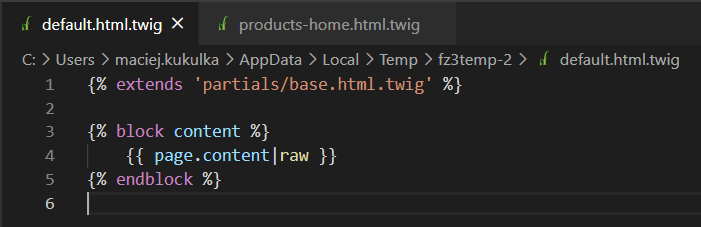
image|690x223, 75%

I created new template: "products-home.html.twig" with the same content as "default.html.twig". I want "products-home.html.twig" to be extended with modified copy of "base.html.twig" called: "base-modified.html.twig".
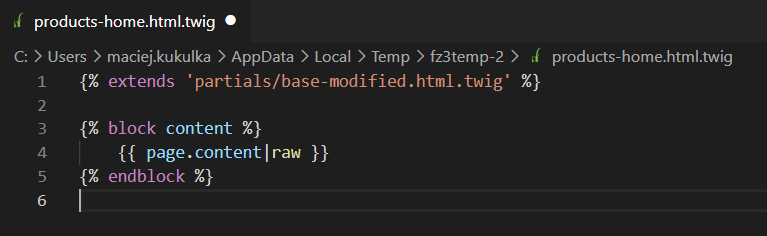
image|690x212, 75%

Unfortunately it is not working. File with template "products-home" is still extended with "base.html.twig", not the modified version called: "base-modified.html.twig".
5 years ago

Check this recipe on how to extend base template itself. I think this might give you an idea on how to approach the issue

5 years ago

@mkukulka,

Since you are working with 'modified copies', the following steps are tested and should work:

  • Using fresh copy of Grav 1.7.3, with theme Quark
  • Create an inherited theme. If not, all changes will be lost when a new version of Quark arives.
    Use the following command to create an inherited theme
    $ bin/plugin devtools new-plugin and inherit from 'Quark'.
    Let's name the new theme 'mytheme'
  • Tell Grav to use the new theme in '/user/config/system.yaml':
    YAML
    pages:
    theme: mytheme
    
  • Copy 'user/themes/quark/templates/default.html.twig' to 'user/themes/mytheme/templates/products-home.html.twig'
  • Replace the content of 'user/themes/mytheme/templates/products-home.html.twig' with:

    TWIG
    {% extends 'partials/base-modified.html.twig' %}
    
    {% block content %}
    <h4>This is from template '/mytheme/templates/products-home.html.twig'</h4>
    {{ page.content|raw }}
    {% endblock %}
    
  • Copy 'user/themes/quark/templates/partials/base.html.twig' to 'user/themes/mytheme/templates/partials/base-modified.html.twig'
  • Make any change in 'user/themes/mytheme/templates/partials/base-modified.html.twig'. For example on line 84:
    TWIG
    <h4>This is from template '/mytheme/templates/partials/base-modified.html.twig'</h4>
    {{ block('content_surround') }}
    
  • Create page 'user/pages/03.products/products-home.md'
  • Browse to '/yoursite/products'
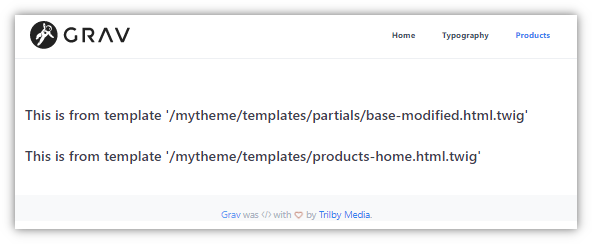
  • You should see something like:
    Untitled|592x244

Note:

  • You said:

    by default file “default.html.twig” is extended with “base.html.twig”

    It should be: by default “base.html.twig” is extended by “default.html.twig”, or even better “default.html.twig” extends “base.html.twig” as said on line 1.

last edited 02/01/21 by pamtbaau

Suggested topics

Topic Participants Replies Views Activity
General · by Jerry Hunt, 4 days ago
2 95 15 hours ago
General · by pamtbaau, 20 hours ago
1 61 19 hours ago
General · by Andy Miller, 1 day ago
0 47 1 day ago
General · by Marcel, 12 months ago
6 356 5 days ago
General · by Duc , 6 days ago
3 44 6 days ago