Skip to content
Grav 2.0 is officially stable. Read the announcement →

Community guidelines

Please keep discussions civil and on-topic. Repeated violations may lead to a temporary ban.

General

How to create a collection from a node js array, JSON to page.md?

Solved by pamtbaau View solution

Started by Filippo Masoni 4 years ago · 10 replies · 844 views
4 years ago

Hello,
I need to build a section on a site that showcases a few news that I'm scraping from another site (including a link to the source of course)
I've already built the nodejs scraper that I plan on running with a cron job every morning and hopefully integrate it into the Grav scheduler (I've never done it but should be simple).

What's the best way to pass the data I have from node to Grav?
I was thinking of writing the array to a JSON and then somehow read that from Grav and build the collection. Maybe use flex objects? Or maybe even writing a text file from node and renaming it to .md, I'm sure that's also possible but not very elegant.

I would greatly appreciate some advice. Thank you
4 years ago

I'm stuck understanding the structure of what you are pulling in from your scrape. You say an array. Is it JSON? Can you provide a sample or a dummy sample?

4 years ago

Sorry if I haven't been clear. I thought the structure was not important, I was looking at how to bring any data into Garv.

I'll be scraping a news site and getting the title, URL, and short description of only a handful of articles based on a logic I still have to make. The JSON that I saved from an early test looks something like this (with a dummy text to make it readable):

TXT
[
  {
    "title": "Lorem ipsum 1.",
    "url": "/lorem-ipsum-1",
    "description": "Lorem ipsum dolor sit amet..."
  },
  {
    "title": "Lorem ipsum 2.",
    "url": "/lorem-ipsum-2",
    "description": "Lorem ipsum dolor sit amet..."
  }
}

I have an array in my node file where I push the data I get from the craping, saving to JSON was just my first idea, if there's a way to iterate a JSON from twig that would be perfect, but if there's a better option I'm all for it.

4 years ago

@filo91, To add to the questions of @hughbris, to further narrow down the specs of your use-case:

  • Does the scraper have access to the filesystem of Grav, or can the scraper only communicate with Grav through an async http request?
  • The term 'collection' can be ambiguous, do you mean a collection of pages as defined in https://learn.getgrav.org/17/content/collections?
  • How are the news items being displayed?
    • As a simple <ul> appended to an existing page, or pages?
    • Blog style with pages as news items?
  • Should existing news items be discarded and replaced by new ones, or accumulated over time?
  • Should the visitor be able to specify a filter or sort order of news items? Or is it a fixed list?
  • ...
4 years ago

Hi @pamtbaau, you're right, being a very particular thing every detail counts toward the solution.

  • I will have node and npm installed on the server as I want them to run with cron, and I was thinking of actually having the package file on the page folder itself so that the scraper has easy access to the filesystem. If that's a bad practice and it's better to have it on a theme folder then I'll do that, but I will still have access to the filesystem so I don't need HTTP requests.
  • Yes I mean a collection of pages as I think that's a very powerful feature of Grav and easily customizable, I've used that extensively in the past. Here it will be kind of like a blog, but simpler News items without a taxonomy, ordering, pagination, none of that... Only 6 selected news from the site will be displayed.
  • The news will probably end up going in a section of the home page, which is a modular page, and I much rather have a blog style with pages as items, so that they can be edited as a normal blog page if needed and so that I can reuse parts of the template and style for an actual blog in the future. Now I'm not sure if I've had a collection of pages inside a modular page before, but I'm sure it can be done.
  • The news items will be replaced by new ones each morning as I only want 6 of them displayed and stored.
  • Simple fixed list, the user can only read and click on the link to the source.

I think I laid out everything.

While thinking about it, I found a way to write markdown files with node, so instead of writing a JSON, I can write the simple .md directly. I'm sure node can create the directories as well.

4 years ago Solution

@filo91, A few thoughts...

  • Location of node package.
    I don't think the location matters much except that it shouldn't be stripped when updating Grav and/or theme. I wouldn't go for the root folder though.
    A custom theme or inheriting/child theme might be a good place.
  • Collection of pages
    I agree page collections are powerful, but I don't see much use of its added value in your use-case.
  • Re-usability of template
    Yes, it's a good practice to create a separate partial template for the layout of the news items.

A simple approach:

  • Dump news items every morning in /user/data/news/news.json
  • In a 'news' partial template (eg. templates/partials/news.html.twig) add something like:

    TWIG
    {% set maxNews = config.theme.maxNews ?? 6 %}
    {% set news = read_file('user-data://news/news.json')|json_decode|slice(0, maxNews) %}
    
    {% if news|length > 0 %}
    <ul>
      {% for item in news %}
        <li><a href="{{ item.url }}">{{ item.title }}</a>{{ item.description }}</li>
      {% endfor %}
    </ul>
    {% endif %}
    

    Adding Edit capability:

  • Yes, using pages allows easy editing in Admin.
  • Create a page with a collection definition: /user/pages/news/blog.md containing:
    YAML
    ---
    content:
    items: '[email protected]'
    limit: 6
    ---
    
  • Have you node app add news items as pages below eg user/pages/news, like /user/pages/news/item1/item.md
  • In your Twig partial you could use:

    TWIG
    {% set news = page.find('/news').collection() %}
    
    {% if news|length > 0 %}
    <ul>
      {% for item in news %}
        <li><a href="{{ item.header.url }}">{{ item.title }}</a>{{ item.content|raw }}</li>
      {% endfor %}
    </ul>
    {% endif %}
    

    Flex-Objects:
    Also Flex provides editing from within Admin, You might take a look at Flex-Objects and explore and update the Contacts demo, which provides Edit capabilities.

👍 1
last edited 03/24/22 by pamtbaau
4 years ago

Thank you, that's very helpful information.

Regarding the location I agree and since I have a custom theme for all my sass compiling, js etc, I'll put in there.

The "simple approach" looks very clean and easy, that's what I'll try first so that I can quickly set it up and test it properly.
I didn't know it was that easy to read JSON files from twig, that will be very helpful on other projects as well. I never came across documentation about that, I'll do a more in depth research, but you're suggestion is already perfect for my current application.

Regarding the second suggestions for editing capabilities, I understand the structure, it's like I've always done collections, but I didn't get how to pass data to the items, were you suggesting to create item.md from node?

Flex-objects is something I've been looking forward to learn, but never really dived in. I might just quickly set up this project with the first simple solution and then when I have time learn flex-objects and implement that later on for the editing functionality.

Thanks for now, I'll let you know how it goes

4 years ago

@filo91,

[..] were you suggesting to create item.md from node?

Yes. I've update my post to add it explicitely.

Flex-objects is something I’ve been looking forward to learn, but never really dived in.

Haven't used it myself either. I've looked at it a few times but it doesn't appeal to me (yet). Looks cumbersome. It seem to draw a lot of attention though. A simple json or yaml file works fine for my use-case.

Please don't forget to mark the post as solved by ticking the 'solution' icon in the lower right corner of the reply that lead you to the solution.

👍 1
4 years ago

I managed to complete the project with the editing capability as suggested by @pamtbaau and also used the JSON approach to save a file with data and time to display on top of the news.
Everything works except the scheduling functionality.

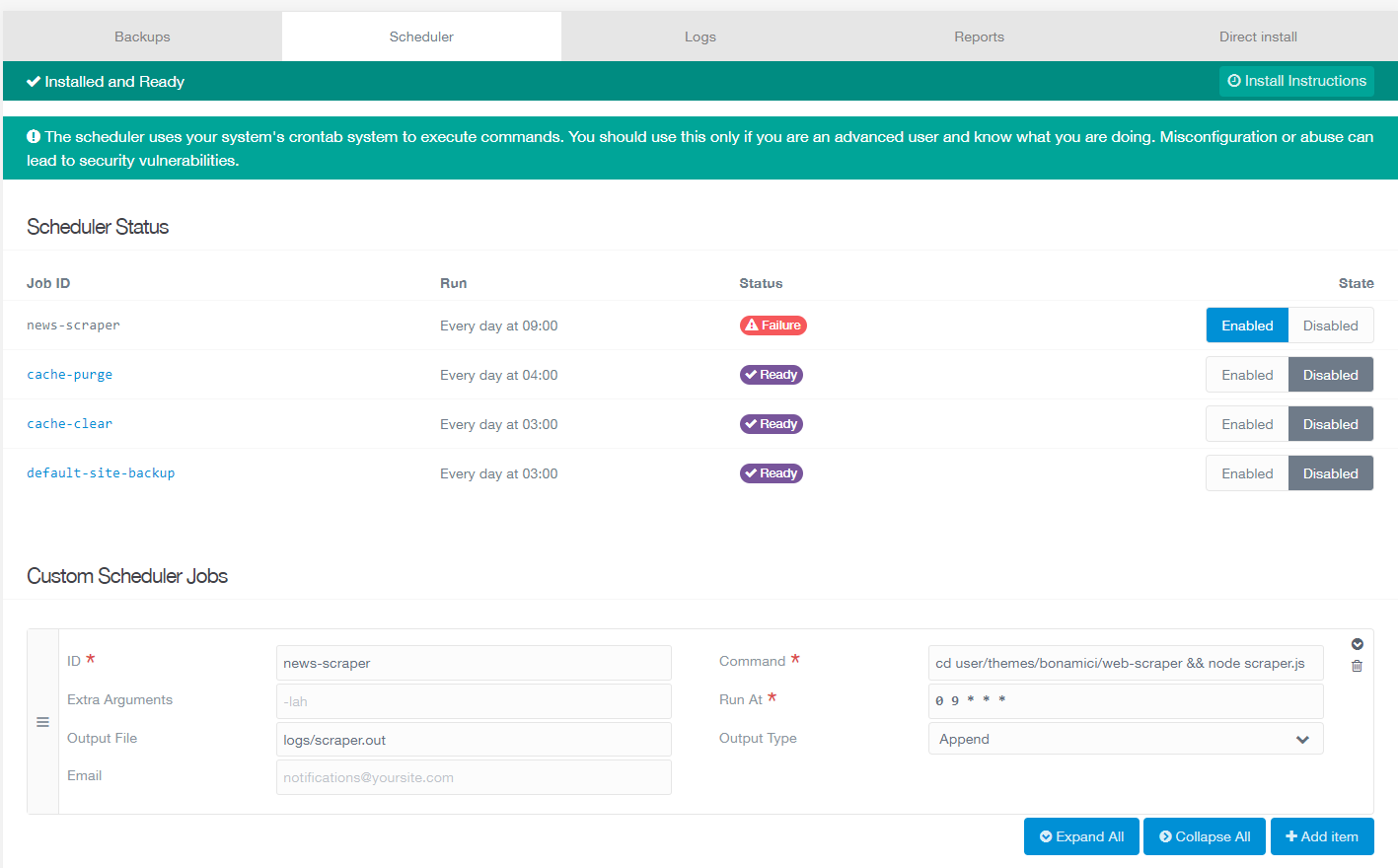
I set up the scheduler as explained in the docs and if I run the command from the Grav folder on the server it works, but seems like the scheduler is not.

Screenshot 2022-03-30 181628|690x428

Here's the error I get from running this on the server: php bin/grav scheduler -d

TXT
sh: 1: exec: cd user/themes/bonamici/web-scraper && node scraper.js: not found
4 years ago

@filo91, I have not experience with crontab and Grav's scheduler. I wonder though why you need Grav's scheduler when all you do is running a node script. You're not using any Grav functionality.

4 years ago

I was trying to have more control over it from the CMS, but you are right, not much point there. I set up a simple cron job and it works great, forget about grav scheduler.

Suggested topics

Topic Participants Replies Views Activity
General · by Jerry Hunt, 4 days ago
2 80 10 hours ago
General · by pamtbaau, 15 hours ago
1 51 15 hours ago
General · by Andy Miller, 1 day ago
0 45 1 day ago
General · by Marcel, 12 months ago
6 346 5 days ago
General · by Duc , 5 days ago
3 40 5 days ago