Skip to content
Grav 2.0 is officially stable. Read the announcement →

Community guidelines

Please keep discussions civil and on-topic. Repeated violations may lead to a temporary ban.

General

Help with checkbox

Started by Thomas Green 7 years ago · 6 replies · 1056 views
7 years ago

I have a blueprint that includes a checkbox field:

YAML
    header.box:
         type: checkbox
              label: to be tested

But when I make a page in the Admin panel, although the checkbox is displayed, it is always unset when I press Save.

What have I left out?

7 years ago

Did you mean to write "when I press save"? This implies to me you check the checkbox but it's unset when you go to save the page.

If you mean you want it to default to checked for new pages, use the default field value property. You probably want to set it to 'checked' or true, not sure which one works.

6 years ago

Same problem here…
Add type: checkbox to page blueprint.
In Admin select checkbox.
Press save
Page reload
=> checkbox is unset.

6 years ago

@ThosGreen:

YAML
header.box: 
  type: checkbox 
    label: to be tested

Is it a typo ?
Because it should be:

YAML
header.box: 
  type: checkbox 
  label: to be tested
6 years ago

@seb3000, I cannot reproduce your issue...

I did the following:

  • Create file 'user/blueprints/pages/default.yaml'
  • I copied the first page blueprint example from the docs Example: Page Blueprints into above file
  • Copied the code from OP (and correctly indented it) below the existing field from the example resulting in the following (partial) blueprint:

    YAML
    [stuff deleted]
    
    fields:
    header.an_example_text_field:
      type: text
      label: Add a number
      default: 5
      validate:
        required: true
        type: int
    header.box:
      type: checkbox
      label: to be tested
    
  • The page editor on tab 'Advanced' and below section 'Overrides' will look like:
    image|672x85
  • I checked the box and saved. The saved and refeshed page looks like:
    image|674x85
  • The content of the page's frontmatter:
    YAML
    ---
    title: Home
    body_classes: 'title-center title-h1h2'
    an_example_text_field: 5
    box: '1'
    ---
    

@seb3000, would you mind sharing a reproducible case showing the issue?

By the way, the following definition will yield a value of false/true in frontmatter:

YAML
header.box:
  type: checkbox
  label: to be tested
  validate:
    type: bool

@AmauryH, I don't think the indentation used by OP is actually in the code, because that indentation makes the yaml invalid and causes Grav to throw an Exception 'Unable to parse at line ...'

last edited 03/05/20 by pamtbaau
6 years ago

Thanks for your answer. It seems like checkboxes are working fine when using standalone, but not if used inside a list.

Have a look at my blueprint snippet

YAML
  fields:
    content:
      unset@: true
      type: tab
      title: Liste mit Bild
      fields:

        header.title:
          type: text
          label: Titel
          validate:
            required: true

        header.list:
          type: list
          label: Liste
          fields:

            .title:
              type: text
              label: Überschrift

           .agree_to_terms:
              type: checkbox
              label: "Agree to the terms and conditions"
              validate:
                required: true

My workaround was using the toggle field, which is working inside nested lists.

YAML
  .plain:
    type: toggle
    label: "Als Überschrift anzeigen?"
    highlight: 1
    help: PLUGIN_ADMIN.ENABLED_HELP
    options:
      1: PLUGIN_ADMIN.YES
      0: PLUGIN_ADMIN.NO
    validate:
      type: bool
6 years ago

@seb3000,

  • I have added you checkbox snippet to Quark's 'blueprints/default.yaml'
  • Fixed indentation on line .agree_to_terms:
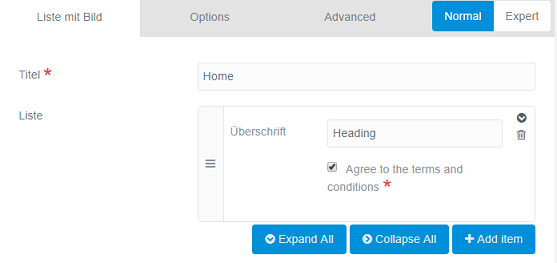
  • Admin page now looks like the following after adding a row into the list:
    image|557x263, 100%
  • Saved page
  • Header of 'default.md' has the following list added:
    YAML
    list:
    -
      title: Heading
      agree_to_terms: '1'
    
  • Adding multiple rows is working fine too.

What am I doing wrong?

Note

  • Adding validate: type: bool would store values true/false in the header of the page, which seems more appropriate for a checkbox.

Suggested topics

Topic Participants Replies Views Activity
General · by Jerry Hunt, 4 days ago
2 80 10 hours ago
General · by pamtbaau, 15 hours ago
1 51 15 hours ago
General · by Andy Miller, 1 day ago
0 45 1 day ago
General · by Marcel, 12 months ago
6 346 5 days ago
General · by Duc , 5 days ago
3 40 5 days ago