Skip to content
Grav 2.0 is officially stable. Read the announcement →

Community guidelines

Please keep discussions civil and on-topic. Repeated violations may lead to a temporary ban.

General

Grav Quark: How to enable "Continue Reading" button for blog?

Solved by pamtbaau View solution

Started by Bouke J. Henstra 4 years ago · 11 replies · 933 views
4 years ago

Hello,

I did notice the "Continue Reading" links aren't present in my home page (blog). I am using the Quark theme. I did find the feature in the version history on GitHub but I failed to figure out how to enable this feature.

My goal is to have a "Continue Reading" link or button after the excerpt, so a reader can click the button and read the blog post in full.

Thanks.
4 years ago

@bouke:
My goal is to have a “Continue Reading” link or button after the excerpt, so a reader can click the button and read the blog post in full.

Is the title clickable? If so, you just need to add a button after the excerpt in the template that will direct to the same url.

4 years ago

Hi, Thanks. Yes, the title is clickable. What's the best way to add such a link or button?

4 years ago

If you look in partials/blog-list-item.html.twig you will see this line...

{% include 'partials/blog/title.html.twig' with {title_level: 'h5'} %}

So, look in partials/blog/title.html.twig and you will find this...

<a href="{{ page.header.link }}" class="u-url">{{ page.title }}</a>

which I'm assuming is the link to the page. So, go back to the list page and below the summary div add a new div with that link and maybe add class="button" as well.

I am guessing here because I haven't tried it, but play around and see what happens.

4 years ago

Thank you. Very much appreciated 👍 I will try to add the link when I am back from work.

👍 1
4 years ago

The nice thing about Grav is that you can look into the code and it's fairly easy to see what's going on. Let us know how it goes.

4 years ago

<a href="{{ page.header.link }}" class="u-url">{{ page.title }}</a>
which I’m assuming is the link to the page

Not quite... page.header.link is a variable in the frontmatter of the page pointing to an external url. For internal pages, the url is page.url.

👍 2
4 years ago

Ah... right, thanks. So @bouke the link we need is...
<a href="{{ page.url }}" class="u-url">{{ page.title }}</a>

Well, I did say I was guessing. 😉

Also keep in mind that any changes will be lost if the theme is updated, so you should look into setting up theme inheritance.

👍 1
4 years ago Solution

My suggestion would be:

  • Create an inheriting theme as @ozfiddler noted correctly.
  • Copy file /user/themes/quark/templates/partials/blog-list-item.html.twig into folder /user/themes/mytheme/templates/partials
  • In the copied file, alter the footer as follows:
    TWIG
    <div class="card-footer">
     <a href="{{ page.url }}">Continue Reading</a>
     {% include 'partials/blog/taxonomy.html.twig' %}
    </div>
    
  • Create file /user/themes/mytheme/css/custom.css and add:
    CSS
    .card-footer {
    display: flex;
    justify-content: space-between;
    }
    
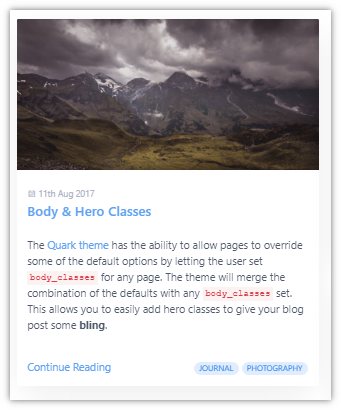
  • You should now get the following blog-list-item:
    Untitled|341x410

Note:

  • You might want to add some extra css to change the look-and-feel of the link.
  • You should add some logic in the footer, if you have blog items that link to external pages.
  • In case your site is multi-lingual, use:
    TWIG
    <a href="{{ page.url }}">
    {{ 'THEME_QUARK.BLOG.ITEM.CONTINUE_READING'|t }}
    </a>
    
👍 2
last edited 01/18/22 by pamtbaau
4 years ago

Excellent! There's your answer.

(From someone who isn't guessing 😁)

👍 1
4 years ago

Thank you very much!!

Your help is very much appreciated. Everything works great now.

### file: ### nano blog-list-item.html.twig

TWIG
<div class="card">
    {% set image = page.media.images|first %}
    {% if image %}
    <div class="card-image">
        <a href="{{ page.url }}">{{ image.cropZoom(800,400).html|raw }}</a>
    </div>
    {% endif %}
    <div class="card-header">
        <div class="card-subtitle text-gray">
            {% include 'partials/blog/date.html.twig' %}
    </div>
        <div class="card-title">
        {% include 'partials/blog/title.html.twig' with {title_level: 'h5'} %}
        </div>
    </div>
    <div class="card-body">
        {% if page.summary != page.content %}
            {{ page.summary|raw }}
        {% else %}
            {{ page.content|raw }}
        {% endif %}
        <div class="mmmore">        
           <a class="label label-rounded label-secondary p-category" href="{{ page.url }}"> 
           &#9863; {{ 'THEME_QUARK.BLOG.ITEM.CONTINUE_READING'|t }}
           </a>
        </div>
    </div>
    <div class="card-footer">
         {% include 'partials/blog/taxonomy.html.twig' %}
    </div>
</div>

### file: ### custom.css

CSS
div.mmmore {
 display: flex;
 flex-direction: row-reverse;
 float:right;
 width: auto;
 margin-top: -10px; 
 padding-right: 0px;
 padding-bottom: 2px;
 border: none;
}

Suggested topics

Topic Participants Replies Views Activity
General · by Jerry Hunt, 4 days ago
2 91 14 hours ago
General · by pamtbaau, 19 hours ago
1 61 18 hours ago
General · by Andy Miller, 1 day ago
0 47 1 day ago
General · by Marcel, 12 months ago
6 354 5 days ago
General · by Duc , 6 days ago
3 44 6 days ago