Skip to content
Grav 2.0 is officially stable. Read the announcement →

Community guidelines

Please keep discussions civil and on-topic. Repeated violations may lead to a temporary ban.

General

Blog page Drop-down menu missing tag

Started by Fernando Pizzamiglio 5 years ago · 13 replies · 619 views
5 years ago

HI, I have an issue with taxonomies tag.
The problem is that when I create a new blog item page under Taxonomies field I found the right Category (blog) but some tags are missing form drop-down menu. I mean that totally I have 6 tags defined but when I create a new blog item page on 4 are showed in the drop-down menu
If I create a new tag and add it apparently works BUT this is missing again in the drop-down menu on the next blog item creation.
Any ideas?
Grav version 1.7.9
Taxonomi List plugin 1.3.5
Theme: Quark Open Publishing 2.2.7
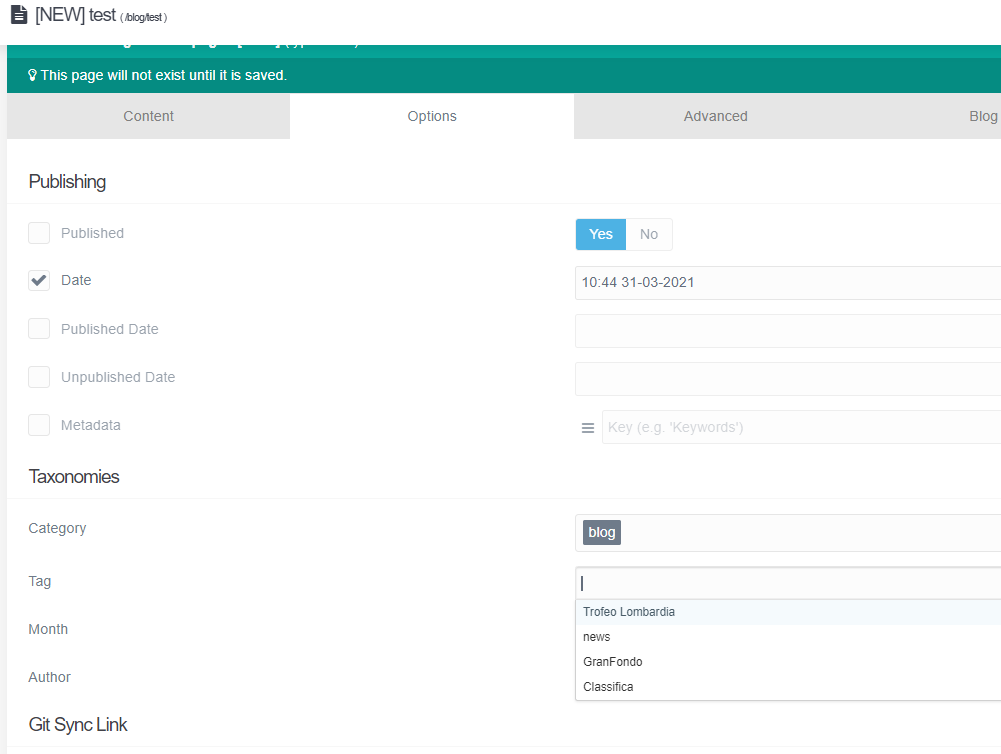
image|663x500

last edited 03/31/21 by Fernando Pizzamiglio
5 years ago

@Nando, I'm sorry, but I cannot reproduce the issue on both theme 'Quark' and 'Quark Open Publishing'.

When creating a new blog item in Admin and adding a new Tag, the new Tag is shown in the list when creating a new blog item.

If you open the newly created file item.md using an editor, does it show the new tag?

last edited 03/31/21 by pamtbaau
5 years ago

Actually tags not appearing in dropdown was also briefly noted on Discord and I can reproduce it. My tags are not showing at all in a dropdown.

5 years ago

Thank youthe answer is Yes. If i creat a tag named NEWTAG it is show in the blog item when I open it.The issue is that if I create another Blog item the tag created (NEWTAG) in the previuos blog item is not show in the drop down menu. How the drop down menu' is created? Can I manually populate the dorop down menu?

regards

5 years ago

@Nando, Maybe I wasn't clear enough when I said:

@pamtbaau:
When creating a new blog item in Admin and adding a new Tag, the new Tag is shown in the list when creating a new blog item.

Maybe I should have said:

When creating a new blog item in Admin and adding a new Tag, the new Tag is shown in the list when creating another new blog item.

If others can reproduce the issue, you might consider creating an issue on Github. I'm not sure whether it is Admin or Grav core related though. I think I would start with Admin...

5 years ago

you are right. i've just done another test. A fresh installation of Open Publishing Space skeleton and the new tag works well. May be related to my environment and I'm not able to understand where is my issue. regards

👍 1
5 years ago

HI, I found the issue.
I've customized supported Languages. In the system configuration I've add "it" and "en".
When I create a new blog Item a new folder is created. Inside this folder you can find item.it.md. I've understand that tag is visible (from drop down menu) only for item.md and not for all element item.en.md or item.it.md

5 years ago

Sounds like a newly introduced bug. Would need to test it with some older version, but I'm pretty sure it worked a few versions ago

5 years ago

@Nando, To me, it seems to be the right behaviour that Italian tags created while editing an Italian page (default.it.md) do not show up while creating an English page (default.en.md). A native English speaker shouldn't be bothered with tags written in Italian and vice versa...

Imagine the mess in the dropdown for tags/categories if a site supports 10 languages...

@Karmalakas, Wouldn't you agree?

5 years ago

Agreed, but even on same language I don't get a suggestion

Page with saved category:
Screenshot 2021-04-06 at 13.34.03|690x355, 75%

Another page on same language, but no suggestions:
Screenshot 2021-04-06 at 13.35.21|690x347, 75%

I'm pretty sure when I created this category and was adding it to my pages, I had suggestions

5 years ago

verify file named item.language.md inside blog item directory
Copy this file in the same dir and rename it to item.md
With both file you should have drop-down menu populated

5 years ago

@pamtbaau. the drop down menu is never populated in italian language but only with default language. There is not different list for different language. My experience is that item.it.md is never check to create drop down but item.md is always check for all languages

5 years ago

@Nando, I'm afraid I got lost in translation, but here are some tests, of which one isn't working as expected...

Test1: Fresh Grav 1.7.9, no language support

  • Open Admin
  • Goto to '/admin/pages', click 'Add' page,
    • Name: 'page1', leave rest as is.
  • In 'admin/pages/page1/:add', add 'cat1' to field 'Category' and click 'Save'
  • Go back to '/admin/pages', click 'Add' page,
    • Name: 'page2, leave rest as is.
  • In 'admin/pages/page2/:add', click in field 'Category'
    • Dropdown contains 'cat1'
    • This works as expected.

Test2: Fresh Grav 1.7.9, with language support [en, it]

  • In 'user/config/system.yaml' add:
    YAML
    languages:
    supported: [en, it]
    
  • Open Admin
  • Goto to '/en/admin/pages', click 'Add' page,
    • Name: 'page1', leave rest as is.
  • In '/en/admin/pages/page1/:add', add 'cat1' to field 'Category' and click 'Save'
  • Go back to '/en/admin/pages', click 'Add' page,
    • Name: 'page2, leave rest as is.
  • In '/en/admin/pages/page2/:add', click in field 'Category'.
    • Dropdown does not contain 'cat1'
    • This is not as expected...

I would think Test2 shows a glitch in Admin and warrants the creation of an issue in the repo of Admin...

Suggested topics

Topic Participants Replies Views Activity
General · by Jerry Hunt, 4 days ago
2 91 14 hours ago
General · by pamtbaau, 19 hours ago
1 61 19 hours ago
General · by Andy Miller, 1 day ago
0 47 1 day ago
General · by Marcel, 12 months ago
6 354 5 days ago
General · by Duc , 6 days ago
3 44 6 days ago