Skip to content
Grav 2.0 is officially stable. Read the announcement →

Community guidelines

Please keep discussions civil and on-topic. Repeated violations may lead to a temporary ban.

General

Blog category page doesn't work if category has special characters

Started by Rferreira 2 years ago · 21 replies · 618 views
2 years ago

Hello everyone,

I have a category called Segurança.

Using the Quark theme, the default URL to see all posts with that category is ..../comunicacao/noticias/category:Segurança, which doesn't work (redirects to home page).

If I try to name it Seguranca it works, so I'm guessing it has something to do with the special character.

How can I fix this?

Thanks in advance!

👍 1
2 years ago

I didn't test, but assume you'd need to URL encode the category name maybe 🤔
Try it in the /comunicacao/noticias page Twig template and see if it works. Even if it does, I'm not sure if that would be the correct solution

2 years ago

Hi @Karmalakas, thanks for your suggestion.

I actually tried that before posting (notice the category|e part):

TWIG
<a href="{{ blog.url|rtrim('/') }}/category{{ config.system.param_sep }}{{ category|e }}">
    {{ category }}
</a>

I've also tried category|url_encode, but not sure if it's correct, I'm very new to Twig.

2 years ago

Doing it like this doesn't help:

TWIG
<a href="{{ blog.url|rtrim('/') }}/category{{ config.system.param_sep }}{{ category|url_encode }}">
    {{ category }}
</a>

Maybe I have to url_encode the whole URL, not just that part?
I wanted to try to build the URL into a variable using {% set %) first, to then call url_encode, but it's giving me all sorts of errors that I don't understand.

2 years ago

@rferreira, I'm sorry but given the limited information you've provided, I cannot reproduce the issue.

Using a fresh install of skeleton 'Blog Site':

  • Add the following to page user/pages/01.blog/hero-classes/item.md

    YAML
    taxonomy:
    category: blog
    tag: [journal, photography, Segurança]
    
  • Browse to the blog page (that's the home page in the skeleton)

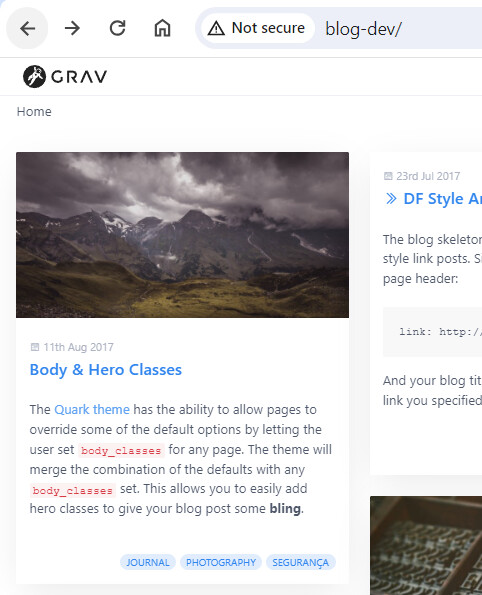
  • Blog item with tag: [journal, photography, Segurança] is shown correctly.
    image|405x500

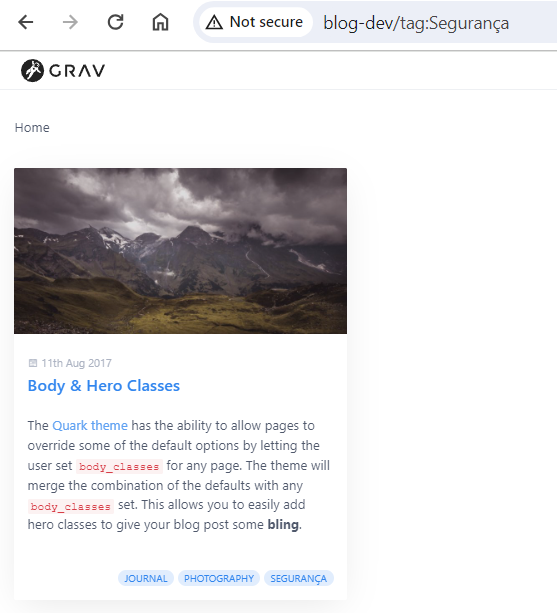
  • Browsing to a url with the tag and value as parameter shows the blog item correctly in the blog list: http://blog-dev/tag:Segurança
    image|454x500

Notes:

  • Using the Quark theme, the default URL to see all posts with that category is …/comunicacao/noticias/category:Segurança , which doesn’t work

    • It seems to be working in the skeleton. Please tell me what i'm doing wrong...
  • (redirects to home page)

    • This is very unexpected behaviour which I wouldn't expect from Grav.
      Why would Grav redirect to the Home page if a taxonomy is not found? Showing an empty blog list is understandable, but redirecting...???
  • You've been editing at least one Quark template, what else have you changed?
    • Please test on the Blog Site skeleton.
    • If that works:
    • Go through your customisations of the Quark theme: Configs, templates, etc.
    • Have you created you own redirects? Eg. from 404 page to /home?
    • Inspect the collection definition in the blog listing page (blog.md)
    • Any errors in Grav's logfile?
last edited 01/10/24 by pamtbaau
2 years ago

Hi @pamtbaau thank you for helping out.

I'm most surely doing something wrong, but why does this work: /comunicacao/noticias/category:Comunicados

And this doesn't:
/comunicacao/noticias/category:Segurança

It doesn't seem to be the code, or none would work, right?

If I try a category that doesn't exist, it shows the blog page with 0 posts (which is the expected behaviour):
/comunicacao/noticias/category:blah

I have nothing in Grav logs, and in the debugger only says this:
Routed to page /home (type: default)

The blog listing page has this:

YAML
---
title: Notícias
show_sidebar: false
content:
    items:
        - '@self.children'
    limit: 8
    order:
        by: date
        dir: desc
    pagination: true
    url_taxonomy_filters: true
---

Any further info I can provide to help you?
2 years ago

@rferreira, Please reproduce the issue in a minimal site, like the Blog Site.

  • We can then rule out that the issue is caused by customisations.
  • If the error does not occur in the skeleton, customisations can be added step by step until the issue occurs.
2 years ago

Now I'm curious what happens with other than Segurança categories with special symbols. Do you have any? Could you try? Will it also redirect home?

2 years ago

@Karmalakas, tag: [journal, photography, aäáeëécç] with url http://blog-dev/tag:aäáeëécç is working fine in the 'Blog Site' skeleton...

2 years ago

Yes, everytime I use a category with special characters it sends me to the homepage.
If I don't, everything works as expected.

2 years ago

@pamtbaau So I've been looking at the code in the Blog template you mentioned, and so far I've changed the templates\partials\blog\taxonomy.html.twig from this:

TWIG
{% if page.taxonomy.tag %}
<span class="tags">
    {% for tag in page.taxonomy.tag %}
    <a class="label label-rounded {{ label_style ?: 'label-secondary' }} p-category" href="{{ blog.url|rtrim('/') }}/tag{{ config.system.param_sep }}{{ tag }}#body-wrapper">{{ tag }}</a>
    {% endfor %}
</span>
{% endif %}

To this:

TWIG
{% if page.taxonomy.category %}
<span class="tags">
    {% for category in page.taxonomy.category %}
        <a class="label label-rounded {{ label_style ?: 'label-secondary' }} p-category" href="{{ blog.url|rtrim('/') }}/category{{ config.system.param_sep }}{{ category }}">{{ category }}</a>
    {% endfor %}
</span>
{% endif %}

I had to change because I couldn't find a way of showing categories.

Also in the post yaml I have this:

YAML
taxonomy:
    category:
        - Segurança

I've also tried to undo everything and use tags instead of categories, same behaviour.

2 years ago

@pamtbaau Update:

If I copy the generated URL to filter by category I get this:
/comunicacao/noticias/category:Seguran%C3%A7a

%C3%A7 is the correct encoding of the 'ç' character in URLs, so maybe the issue happening after clicking the link (the weird redirection) ?

2 years ago

@rferreira, In skeleton 'Blog Site', I changed the following:

  • Edit user/pages/01.blog/hero-classes/item.md and changed taxonomy to:
    YAML
    taxonomy:
    category:
      - Segurança
    tag: [journal, photography, Segurança]
    
  • Edit /user/themes/quark/templates/partials/blog/taxonomy.html.twig and copied your code at the bottom:

    TWIG
    {% if page.taxonomy.tag %}
    <span class="tags">
        {% for tag in page.taxonomy.tag %}
        <a class="label label-rounded {{ label_style ?: 'label-secondary' }} p-category" href="{{ blog.url|rtrim('/') }}/tag{{ config.system.param_sep }}{{ tag }}#body-wrapper">{{ tag }}</a>
        {% endfor %}
    </span>
    {% endif %}
    
    {% if page.taxonomy.category %}
    <span class="tags">
        {% for category in page.taxonomy.category %}
            <a class="label label-rounded {{ label_style ?: 'label-secondary' }} p-category" href="{{ blog.url|rtrim('/') }}/category{{ config.system.param_sep }}{{ category }}">{{ category }}</a>
        {% endfor %}
    </span>
    {% endif %}
    

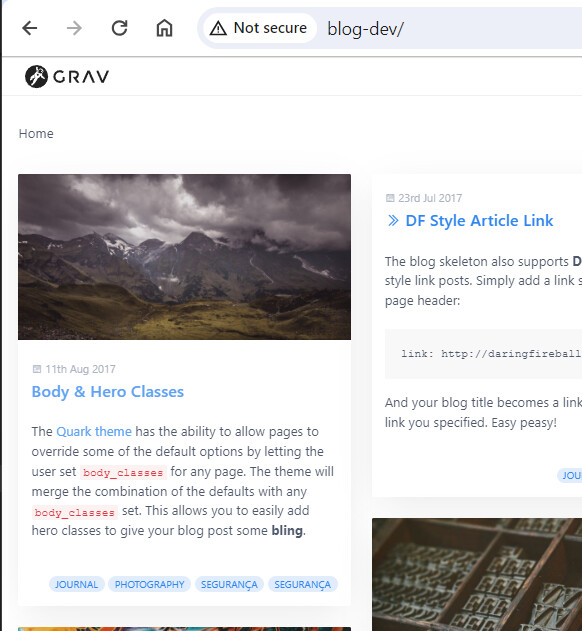
Resulting Blog list:
image|461x500

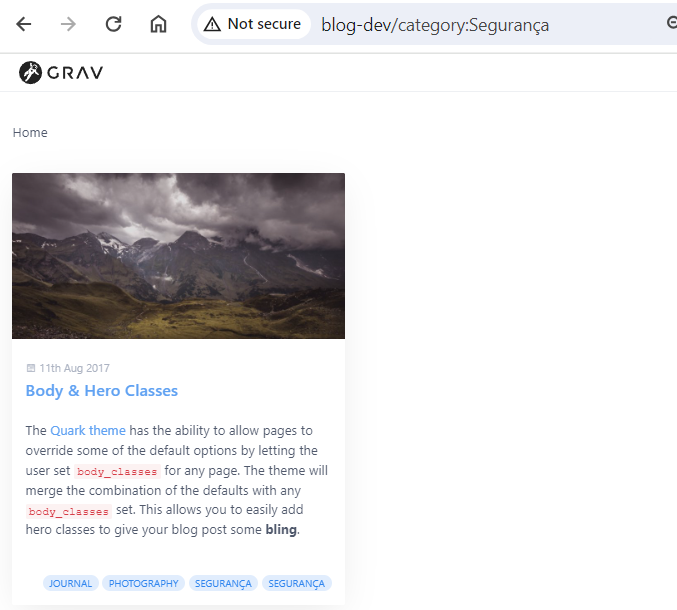
When clicking on either Segurança links in "Body & Hero Classes" (http://blog-dev/tag:Segurança#body-wrapper resp. http://blog-dev/category:Segurança) the correct blog item is shown in the blog list.

Below is showing the result of the your category based link:
image|554x500

Again: I cannot reproduce the issue.

2 years ago

@rferreira, could you try creating just a regular blog post with the title containing special chars? Would that open a blog post page or redirect? For me it sounds like some misconfig maybe somewhere where redirects are managed.. Maybe server, maybe htaccess, or maybe somewhere in Admin. I wonder if it redirects any page with special chars or if it's an issue only for taxonomies

2 years ago

@pamtbaau Thanks for your hard work reproducing, I've tried with the skeleton as well and it works. My problem is that the website is in an advanced stage of development so I can't roll back and start from scratch.

@Karmalakas I have lots of post titles with special characters, but Grav automatically removes them when it builds the slug. But anyway I went and changed one slug and, yes, that post also starts redirecting to homepage.

I have to use IIS so I'm using the default Grav web.config:

TXT
<?xml version="1.0" encoding="UTF-8"?>
<configuration>
    <system.webServer>
        <defaultDocument>
            <files>
                <remove value="index.php" />
                <add value="index.php" />
            </files>
        </defaultDocument>
        <rewrite>
            <rules>
                <rule name="request_filename" stopProcessing="true">
                    <match url="." ignoreCase="false" />
                    <conditions logicalGrouping="MatchAll">
                        <add input="{REQUEST_FILENAME}" matchType="IsFile" ignoreCase="false" negate="true" />
                        <add input="{REQUEST_FILENAME}" matchType="IsDirectory" ignoreCase="false" negate="true" />
                    </conditions>
                    <action type="Rewrite" url="index.php" />
                </rule>
                <rule name="user_error_redirect" stopProcessing="true">
                    <match url="^(user)/(.*)\.(txt|md|json|yaml|yml|php|pl|py|cgi|twig|sh|bat)$" ignoreCase="false" />
                    <action type="Redirect" url="error" redirectType="Permanent" />
                </rule>
                <rule name="ignore_folders" stopProcessing="true">
                    <match url="^(\.git|cache|bin|logs|backup|webserver-configs|tests)/(.*)" ignoreCase="false" />
                    <action type="Redirect" url="error" redirectType="Permanent" />
                </rule>
                <rule name="system" stopProcessing="true">
                    <match url="^system/(.*)\.(txt|md|html|json|yaml|yml|php|twig|sh|bat)$" ignoreCase="false" />
                    <action type="Redirect" url="error" redirectType="Permanent" />
                </rule>
                <rule name="vendor" stopProcessing="true">
                    <match url="^vendor/(.*)\.(txt|md|html|json|yaml|yml|php|twig|sh|bat)$" ignoreCase="false" />
                    <action type="Redirect" url="error" redirectType="Permanent" />
                </rule>
            </rules>
        </rewrite>
    </system.webServer>
    <system.web>
        <httpRuntime requestPathInvalidCharacters="&lt;,&gt;,*,%,&amp;,\,?" />
    </system.web>
</configuration>

Where should I look up in Admin for possible misconfigurations?
Thanks for helping out :)

2 years ago

As a possible workaround, is there any way of specifying the category Segurança in the admin but then slugify it (like other cms like wordpress do) ?

2 years ago

@pamtbaau it's already configurated for high-bit characters.

2 years ago

Just to close the issue, I ended up changing the category to a new name with no special characters, will investigate this further down the road.

@pamtbaau and @Karmalakas thank you very much for your help 🙂

Suggested topics

Topic Participants Replies Views Activity
General · by Jerry Hunt, 4 days ago
2 85 13 hours ago
General · by pamtbaau, 18 hours ago
1 60 18 hours ago
General · by Andy Miller, 1 day ago
0 47 1 day ago
General · by Marcel, 12 months ago
6 350 5 days ago
General · by Duc , 6 days ago
3 44 5 days ago