
Admin 2.0 shipped as the default admin in Grav 2.0, and everything since has been bug fixes and polish. Admin 2.1 is the first release that adds something new, and it is a feature I have wanted in the admin for years: a proper editor for every translation string your site displays.
The Problem With Changing a Word
Say your theme's sidebar has a heading that reads "Search", and you want it to read "Find Anything". You have three options today, and none of them are good.
You can edit the theme's own language file, which works right up until the next theme update overwrites it. You can copy the whole language file into your own theme override, which means inheriting every future change to it by hand. Or you can install the Translation Strings plugin and paste a YAML snippet into its config.
That last one is what most people did, and it is the one I wrote. It works. It merges your snippet over whatever the theme or plugin provides, it survives updates, and it has been quietly doing its job for years. But it gives you nothing back. There is no way to tell which strings your site actually has. There is no way to know whether the key you typed exists. A typo made in 2021 sits in that config doing absolutely nothing, forever, and nothing tells you. And if you paste something wrong, there is no way back except remembering what was there before.
The information to fix all of that was always available. Grav knows exactly which file every string came from. Nothing was ever asking it.
Translations
Admin 2.1 adds a Translations section to the sidebar, sitting between Themes and Tools. It lists every string your site loads, from Grav core, from every enabled plugin, and from your active theme, and lets you change any of them.

Each row is one string. Every language you open becomes a line inside that row, with the source language first and the rest below it, and each value is editable in place. Click, type, Enter to save, Escape to cancel.
Languages stack down the row rather than spreading across it, which is a deliberate choice I got wrong the first time. My first attempt made each language a column, and it fell apart at two: with French and German open, the text was already wrapping mid-phrase and the German column was clipped at the edge of the screen. The language picker offers 76 codes. Stacking means the line length stays readable no matter how many you open. The row simply gets taller, and nothing ever scrolls sideways.
Search for the Words, Not the Key
Nobody knows that the word "Search" in their sidebar lives at THEME_TYPHOON.SIDEBAR.SIMPLE_SEARCH.HEADLINE. People know the words on the screen.
So the search box matches both. Type what you see and it finds the key behind it.

This turns out to be more useful than I expected, because the same phrase often comes from several places at once. Searching "Continue reading" here turns up four separate keys, one for every theme on this site that happens to ship that phrase, each with its own translations. If you had gone hunting through language files by hand, you would very likely have changed one of them and wondered why the site still said the old thing on half its pages.
If you have no search term at all, the tree on the left is the other way in: Grav core, then every plugin, then every theme, each expandable into the namespaces it contributes. That covers the case of "I just installed this theme and want to reword five things", where you do not know what you are looking for yet, you just want to see what is changeable.
Where Every String Came From
This is the part that makes it a diagnostic tool rather than a text box. Every value tells you its origin:
| State | Meaning |
|---|---|
| Shipped | The value comes from the plugin's or theme's own language file. Your site has not touched it. |
| Overridden | You changed it here. The original is kept, and one click puts it back. |
| Missing | There is no value in this language at all, so visitors are really seeing the fallback language. |
Filter to Missing in a language and you have a translation to-do list for it. Filter to Overridden and you get a review of everything your site has customized, which is the list you want when something reads oddly and you are trying to work out whether it was you. And there is an Unknown filter for the opposite problem: overrides naming keys that nothing on the site provides any more. That is the 2021 typo, finally visible.
Your changes are stored as ordinary Grav language files under user/languages/, one per language. Plain YAML, diffable, commit them to git if you want. Nothing is ever written into a plugin or theme's own directory, so an update cannot wipe your wording.
There is one small rule worth knowing about, because it will look like a bug the first time you hit it. If you set a string to exactly what the plugin already ships, it is not stored. Keeping it would silently pin your site to today's wording and stop tracking any future correction the plugin makes, which is not what anyone wants from typing the same words back in. So it is treated as a revert instead.
Note
A finding from building this that surprised me: theme language files are not part of Grav's compile-time language scan at all. They get merged in later, at theme-init, which means a theme's own strings beat user/languages. Since theme strings are exactly what most people want to reword, the API plugin now re-applies your overrides once more after the theme has had its say. Without that, overriding a theme string would have silently done nothing.
AI-Assisted Translation
If you have the AI Translate plugin installed and configured, every value gets a translate button, and there are three ways to use it. On a target language it fills that one string. On the source value it fills every open language for that row at once. And Translate missing in the toolbar does the whole visible page.
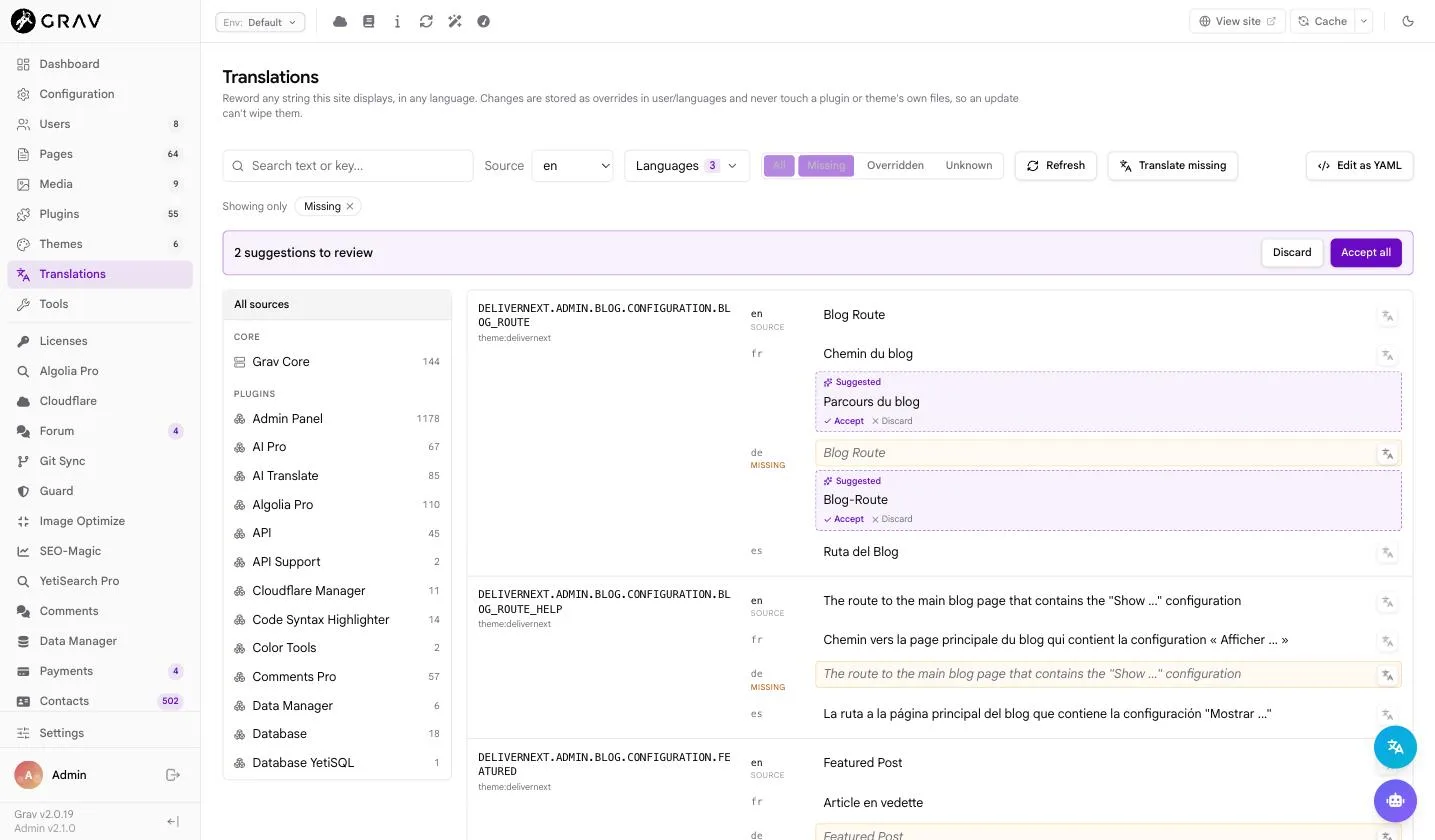
Nothing is written to disk. Suggestions stage in the cells and in a review bar at the top, and you accept or discard them individually or all at once. Bulk machine translation is exactly where an unreviewed write does real damage, so there is deliberately no path from the translate button straight to a saved file.
Placeholders are protected. Before a string goes to the translation provider, every %1$s, every {count}, and every HTML tag is masked out and replaced afterwards, then verified. If a translation comes back having lost or mangled one of them, it is refused rather than saved. ICU plural and select messages are always left for a person, because the number of plural categories a language needs is not something a translation engine can work out from an English sentence.
If you do not have AI Translate, the buttons are still there, greyed. Clicking one tells you what you are missing and offers to take you to it. I went back and forth on this and landed on showing them, because a capability nobody knows exists cannot be wanted, and hiding the controls entirely also hid the far more common case of the plugin being installed but simply switched off or missing a provider key. That reads as the feature being broken rather than absent.
Bulk Editing
For pasting a batch of translations, or reviewing a lot at once, Edit as YAML swaps the grid for a text view of the same data.

If you have a source selected in the tree, the save is scoped to that namespace and leaves the rest of the file alone. That detail matters more than it sounds: without it, saving a filtered view showing one theme's strings would silently delete every override for every other source on the site. It is the sort of thing that only bites someone once, and by then their overrides are gone.
Coming From the Translation Strings Plugin
If you are one of the people using Translation Strings, Admin 2.1 will notice and offer to bring everything across.

Before you commit to anything it breaks the import down per language: how many strings are new, how many disagree with something already in user/languages, how many are already there, how many match what the plugin or theme ships anyway, and how many name keys nothing on your site provides. There is a command line equivalent too, bin/plugin api i18n:migrate --dry-run, which prints the same report.
Where both stores name the same key with different wording, the plugin's version wins, because that is what your site is currently rendering and an import that changed what visitors see would be the surprise. Overrides you wrote by hand that the plugin knows nothing about are left completely alone.
Important
Import first, then disable the plugin, and never the other way round. Translation Strings applies its strings after the built-in editor does, so while it is enabled it silently overrides anything you change in Translations. Disabling it before importing would drop every override off your site in the gap. The screen enforces that order and only offers the Disable the plugin button once there is nothing left to import.
Nothing is deleted. The plugin keeps its config, so if you want to go back it is a matter of switching it on again.
Translation Strings stays supported on Grav 1.7, where it is still the right answer. On Grav 2.0 it is now superseded, and the migration wizard will tell you so during a 1.7 upgrade rather than letting you find out later.
Also in 2.1
The Twig in Content report can now show the effective sandbox policy, listing the built-in defaults alongside anything your site has added or restricted. If you have ever wondered exactly what is allowed through when content Twig is enabled, that report now answers it directly instead of sending you to the docs.
On the fix side, remote collaborators' cursors and selections now stay visible and correctly positioned while co-editing, and stop vanishing right after a save. Messages that quote a name back at you show the name rather than a literal {name}. And the French Canadian page-loading counter no longer displays its own template text at you.
Getting It
Admin 2.1 needs the API plugin at 1.0.19 or newer, which is where all of this actually lives. Update both through GPM or the Plugins screen in the admin, API first.
bin/gpm update api admin2
Everything described here is free and part of the default admin. AI Translate is a premium plugin, and the Translations section works perfectly well without it: you just do the translating yourself, which is what most people were doing anyway.
I would genuinely like to hear how this holds up on sites with a lot more languages than my test installs have. Six is the most I have had open at once. If you are running twelve, I want to know what breaks.
— Andy