Skip to content
Grav 2.0 is officially stable. Read the announcement →

Community guidelines

Please keep discussions civil and on-topic. Repeated violations may lead to a temporary ban.

Themes & Styling

Pinpress Theme: Missing sidebar. How to activate?

first-time theme

Solved by pamtbaau View solution

Started by Roger 5 years ago · 5 replies · 725 views
5 years ago

Hello, I am trying out Grav. So far I am pleased with the admin interface and the usability. But what puzzles me is, that if I select the theme "pinpress" the sidebar containing the about, follow us, search and tag stuff is not appearing.
How can that be activated?
Did I muss a button inside the admin panel?
Or do my articles how to have a certain tag or something?
Picture shows what is missing (green circle)
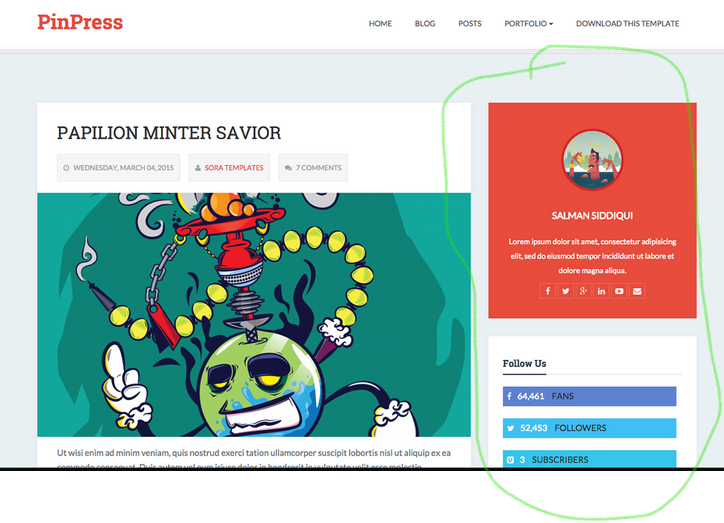
Screenshot 2021-11-26 094304|690x498

Thx in advance.
Roger

5 years ago

@RogerCharner, You forgot to share the setup of your site:

  • Are you running theme Pinpress on the default site?
  • Or are you running the Pinpress skeleton?
  • Some other site you are running?

Lacking above information makes it hard to provide an answer. I can only share some general info.

Each theme may target different site purposes (blog, portfolio, etc.) and therefor comes with its own templates and expects a certain content (pages, config). The theme therefor expects a certain folder structure for folder /page and page names (which equal template names).

Switching a theme might therefor not show up as expected.

Having said that...

  • The sidebar shows up correctly on the skeleton without any activation.
👍 1
last edited 11/26/21 by pamtbaau
5 years ago

I have just been puzzling over this too. The link to the skeleton version doesn't work on the pinpress theme page, but you need to go here:

https://getgrav.org/downloads/skeletons#extras

Download the skeleton for pinpress. This includes a full grav install so you will need to unzip this in a fresh folder. It will give you the pinpress theme and all the sample data. I just did this and I got the sidebars as shown in the demo.

👍 1
5 years ago

Thanks to you all. I am a newbie. I didn´t know about those "skeletons". So when using a theme it often comes along with a skeleton that has to be installed aswell? Guess this has to be done via ftp then? I know about ftp, but have only used the admin tool in grav so far.

5 years ago Solution

@RogerCharner,

So when using a theme it often comes along with a skeleton that has to be installed aswell?

A theme is separate from a skeleton.

  • A theme can be installed in any site, but does expect some configuration, plugins and pages.
    Hence it might not display its full potential on every site.
  • A skeleton is a bundle of Grav with demo data in folder /user and consists of: configs, pages, plugins and the theme.

Unfortunately, a skeleton cannot be installed through Admin.

I suspect you are running the default Grav installation on your remote hosted website. In that case, you might need to install plugins which are required by Pinpress else the sidebar will remain empty:

  • simplesearch:
  • feed:
  • relatedpages:
  • pagination:
  • taxonomylist:
  • comments:
  • archives:

That's why I asked about your site in my first reply.

If things are not working out-of-box you might need to set some configurations. You also might need to create the proper pages.

You can peek on the repo of the skeleton what kind of pages it uses and its configs.

A suggestion: Create a local development environment...

👍 2
5 years ago

The logic about the skeletons was not clear to me. Thx. The explainations where very helpful.

Suggested topics

Topic Participants Replies Views Activity
Themes & Styling · by Pedro M, 2 months ago
4 198 2 months ago
Themes & Styling · by Ian, 2 months ago
3 94 2 months ago
Themes & Styling · by Norbert, 2 years ago
11 456 3 months ago
Themes & Styling · by Lukáš Findeis, 3 months ago
0 48 3 months ago
Themes & Styling · by Sebadamus, 4 months ago
5 128 3 months ago