Skip to content
Grav 2.0 is officially stable. Read the announcement →

Community guidelines

Please keep discussions civil and on-topic. Repeated violations may lead to a temporary ban.

Themes & Styling

Issues with menu in modular page

first-time

Started by Karmalakas 5 years ago · 11 replies · 1347 views
5 years ago

Playing around with Admin created a modular home page with all 3 default modules (1 each). It appears there are multiple issues.

Order
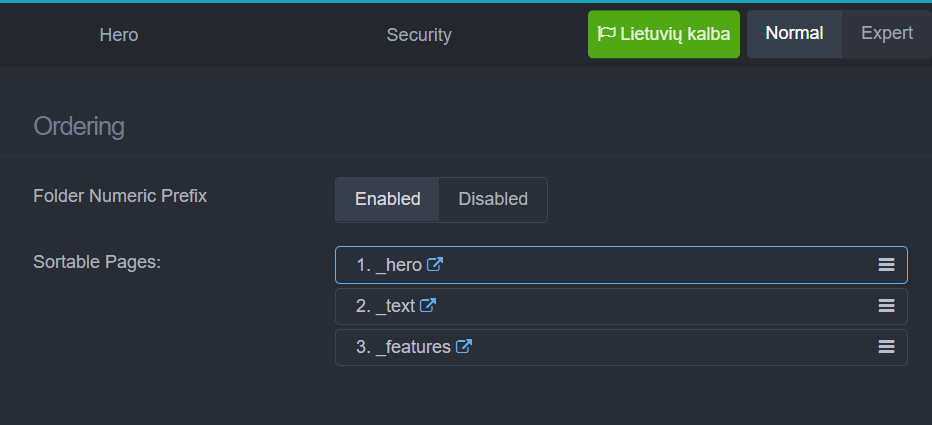
I made all three modal folders numeric prefixed so that I could sort them and then it seems like menu order on a home page changes, but I have no idea how. I mean menu was in one order, I reordered modules and order changed, but not as ordered in Admin. Then unpublished one module, it disappeared from menu, published it again and order of menu items changed again even if I wasn't changing modules order

Slug
If my modular title is something like Fyčerai, the hash for the link becomes #fy-erai and I can't find a way to make it #fycerai. Changing page slug completely removes module from the page (I guess because it's actually not a slug)

Any ideas how to make menu items in order and how to change module hashes?
Using 1.7 RC2 and Quark theme
5 years ago

Just noticed one more thing. The menu of this modular home page consists of module hash links, but if you resize the window and menu contracts to burger menu, when expanded, it shows only Home link. So not sure if it's a Grav bug or a theme

5 years ago

@Karmalakas,

Ordering:
Would you mind providing a bit more context info?

The ordering of modules (or collections in general) can be derived in several ways:

  • the ordering of files,
  • it can be set in the frontmatter of a page,
  • and in a template.

Showing the ordering of your files, the frontmatter of 'modular.md and the resulting ordering in the menu might be useful. I presume the template is Quarks modular.html.twig?

Anchors
The anchors used in a modular page are 'created' using the filter |hyphenize, which does the following:

PHP
  $regex1 = preg_replace('/([A-Z]+)([A-Z][a-z])/', '\1-\2', $word);
  $regex2 = preg_replace('/([a-z])([A-Z])/', '\1-\2', $regex1);
  $regex3 = preg_replace('/([0-9])([A-Z])/', '\1-\2', $regex2);
  $regex4 = preg_replace('/[^A-Z^a-z^0-9]+/', '-', $regex3);

  $regex4 = trim($regex4, '-');

  return strtolower($regex4);

Off course, you can replace the |hyphenize filter with your own logic.
Would you mind explaining why the name of the internal anchor should include diacritics?

Menu on mobile
I'm afraid the menu shown on mobile is not the strongest point of Quark... I'm only using my own homegrown themes, so I never really looked for a solution.

Maybe you can open a new issue and ask others for their solution(s).

5 years ago

I did everything in Admin, so didn't even check files Frontmatter. I'll do it after work.

Any tip where to look on how to extend |hyphenize? I guess it's on Grav Learn page, but I'm only half way through (getting to know before I jump into Grav fully). I want these diacritics also replaced (ąčėū... >> aceu...)

I was thinking of extending Quark and changing some stuff, so will see how it goes 🙂 Maybe also will end up with my own theme

5 years ago

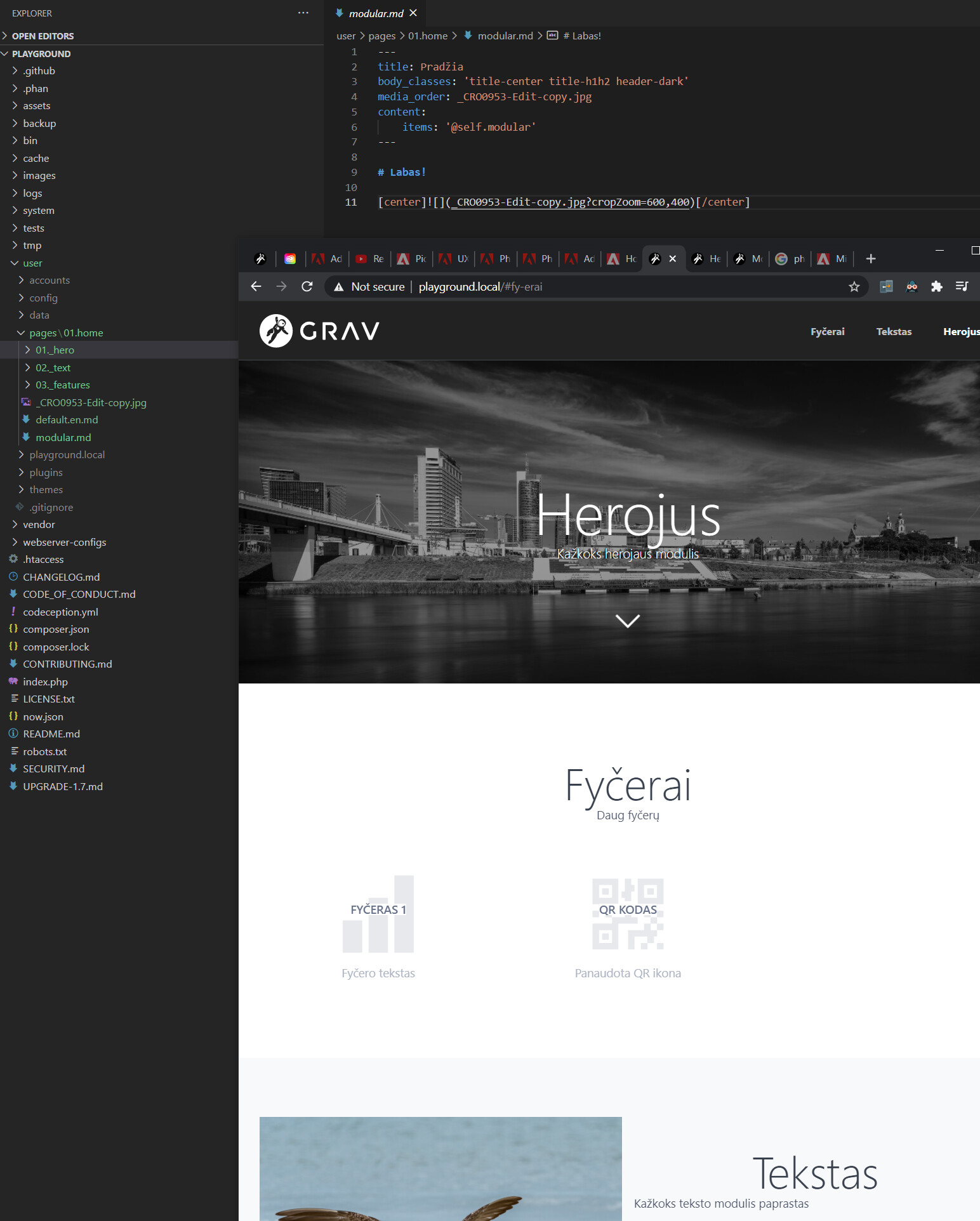
Here's how everything looks. And even after clearing the cache modules are in wrong order. Menu is reversed in screenshot, but sometimes it completely messes up after some modules edits in Admin

image|690x314

image|401x500

Just finished reading about modular pages. It looks like ordering modules in Admin doesn't update modular page Frontmatter with custom order. It updates folder structure with numbers though.

last edited 12/22/20 by Karmalakas
5 years ago

@Karmalakas, Not sure how I should relate both images with each other...

A few remarks:

  • In the folder /pages/01.home your have both a modular.md and a default.en.md. Not sure if that might byte in some way, but I would remove default.en.md anyway.
  • The order of child modules in the folder view seems to correspond with the order shown in the Admin page: hero, text, features.
  • The page in the browser shows a different order, but I cannot tell if Gravs cache and/or the browsers cache have been re-freshed and in-sync with the folder structure.
  • The page in the browser
    • The order of the menu is features, text, hero while the module order in the page is hero, features, text.
      This is as expected, because the template user/themes/quark/templates/modular.html.twig makes sure that the 'hero' template (hero.md) is always inserted at the top of the page. Then the other modules follow in order of the collection.
  • You say you are using Grav 1.7 RC2. Is that correct or are you using 1.7.0-rc.20.

This is all I can say at the moment based on the images. I cannot reproduce your issue of ordering. Shuffling the pages in Admin and saving the changes lead to a correct order on the filesystem and in the browser menu.

  • It is easy to forget a 'Save' in Admin
  • Has the browser cache been refreshed?
  • Do all images represent the same state?

If you can create a clear step-by-step script that reproduces the issue, I will be happy to look at it. It's best to create such script based on a fresh install of Grav 1.7.0-rc.20 to prevent clutter.

5 years ago

@pamtbaau:
Not sure how I should relate both images with each other

First one - modules ordered in Admin
Second - folder structure, modular.md and frontend


@pamtbaau:
I would remove default.en.md anyway

Didn't change anything when removed


@pamtbaau:
The order of child modules in the folder view seems to correspond with the order shown in the Admin page

Yes, as I said it updates on save in Admin


@pamtbaau:
I cannot tell if Gravs cache and/or the browsers cache have been re-freshed

Cleared all caches via Admin and in Chrome did Clear cache and hard reload - still same result


@pamtbaau:
The order of the menu is features , text , hero while the module order in the page is hero , features , text .
This is as expected

But shouldn't it be hero, text, features? Both menu and page layout


@pamtbaau:
If you can create a clear step-by-step script that reproduces the issue, I will be happy to look at it. It’s best to create such script based on a fresh install of Grav 1.7.0-rc.20 to prevent clutter.

I'll try this maybe some day later. I have my hands full for now :)


Thanks for all the insight though. Learned some stuff while trying to figure out 😃

5 years ago

@Karmalakas, There are several places where the ordering of the collection may be influenced:

  • folder ordering (which is the default ordering)
  • collection definition (e.g. in modular.md)
  • template (e.g. modular.html.twig

You have shown the folder structure and the collection definition in modular.md. How do the for-loops for the navigation and page layout in modular.html.twig look like? Did you perhaps experiment with these and forgot to reverse the changes?

Also, the values of menu or title in the frontmatter of the child modules may have been set incorrect by mistake. This may lead to a seemingly incorrect menu ordering.

The above may seem far-fetched, but I have seen (costly) stranger things being done and overlooked... That's why I advice to start with a fresh One-Page Site (download) skeleton to do the test with.

Have fun with it... ;-)

5 years ago

I know what you mean :) But I didn't touch files directly at all. Everything was done in Admin and definitely didn't even open any of theme files :) For now, reading the docs and finding out stuff :) Will get to developing when I'm done reading about Forms (saw on GitHub some open issues on forms docs) I guess (currently on Themes)

5 years ago

@pamtbaau:
you have another post open: Extend plugin languages

I didn't forget about it :) Was tempted accepting your answer as a solution, because checking the code it looks fine, but want to test it still :)

5 years ago

Testing is also good...

Suggested topics

Topic Participants Replies Views Activity
Themes & Styling · by Pedro M, 2 months ago
4 193 2 months ago
Themes & Styling · by Ian, 2 months ago
3 91 2 months ago
Themes & Styling · by Norbert, 2 years ago
11 451 3 months ago
Themes & Styling · by Lukáš Findeis, 3 months ago
0 45 3 months ago
Themes & Styling · by Sebadamus, 4 months ago
5 125 3 months ago