I upgrade grav to v1.6.30,
-
add page on admin are blank/black.
-
has
—-▸ (typography) Typographyon every select form
anyone having this problems?
Solved by Peter Fuchs View solution
I upgrade grav to v1.6.30,
add page on admin are blank/black.
has —-▸ (typography) Typography on every select form
anyone having this problems?
I just got the same problem. But to me, it only showed on a new project I created with v1.6.30. The old websites that I just upgraded to v1.6.30 are displaying the arrows as expected. Very weird, I'd like to know what's causing it. It seems like it's only a style thing, but still annoying.
Me too - here's a screenshot.
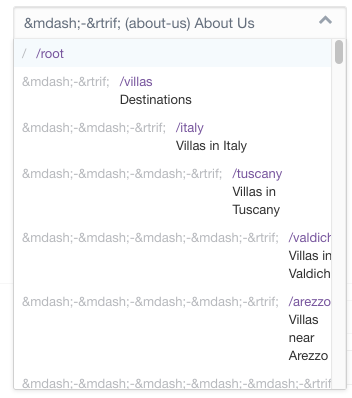
Anybody know how to fix this?
I think this issue is related to needing to escape TWIG now. I'm still working through how this works but there are some details here on the Learn site here under Auto-Escaping
If that's the issue why did that come up now and not after 1.6 release? Also, I have another site upgraded to 1.6.30 and the problem does not appear, but on a new project created fresh from 1.6.30 it does.
There are some new fields in the admin panel, I think its related to those.

Where do I find those? I can't seem to locate them even searching config files.
I anyway checked all of the settings, not from admin but comparing all of the system config files and everything's the same between my two grav installations, one has the problem and one doesn't, both on 1.6.30
I'm on 1.7 so maybe that's the cause of the difference. Those fields are from system.yaml right at the bottom in the admin panel.
Edit: I think this github issue is also related: https://github.com/getgrav/grav/issues/3091
hi, have you found a solution ? I still have the same display issue in the Admin. I tried to adjust my settings.yaml as suggested but no luck. Thank you.
Hey,
I had the same problem and therefore I created an issue on GitHub : https://github.com/getgrav/grav-plugin-admin/issues/1990.
Meanwhile the bug has been fixed in the repository and the fix will be installed with the next update.
If you do not want to wait you can change line 13 in /user/plugins/admin/themes/grav/templates/forms/fields/pages/pages.html.twig from
<option {% if page_route == value or (field.multiple and page_route in value) %}selected="selected"{% endif %} value="{{ page_route }}">{{ option }}</option>
to
<option {% if page_route == value or (field.multiple and page_route in value) %}selected="selected"{% endif %} value="{{ page_route }}">{{ option|raw }}</option>
and add the raw filter to the option variable again.
Guys, thanks for the respond.
@renards thanks for the fix.
But, there is also another problem, i got this modal blanket on many act.
what causing this?
@tacoen:
But, there is also another problem, i got this modal blanket on many act.
- add page
- theme activations
I found it!
This is a problem with adblock, after entering the site address into the whitelist. this problem no longer exists.
Thanks in advance.
Log in to reply.
| Topic | Participants | Replies | Views | Activity |
|---|---|---|---|---|
| 4 | 244 | 2 weeks ago | ||
| 2 | 211 | 2 weeks ago | ||
| 5 | 457 | 3 weeks ago | ||
| 5 | 636 | 3 weeks ago | ||
| 6 | 429 | 4 weeks ago |