Skip to content
Grav 2.0 is officially stable. Read the announcement →

Community guidelines

Please keep discussions civil and on-topic. Repeated violations may lead to a temporary ban.

Support

Quark modular: First module not overlaying hero image

theme

Solved by Delo View solution

Started by Delo 1 year ago · 4 replies · 79 views
1 year ago

Hello,
I'm using the quark theme and I've worked with the Quark One-Page site” skeleton to make my home page look good. here is the website i'm working on : https://walbike.omlet.ovh/

I'm trying to understand but can't figurate out how do you make the first modular content to stand out on the hero image ?
Just like on that screenshot :
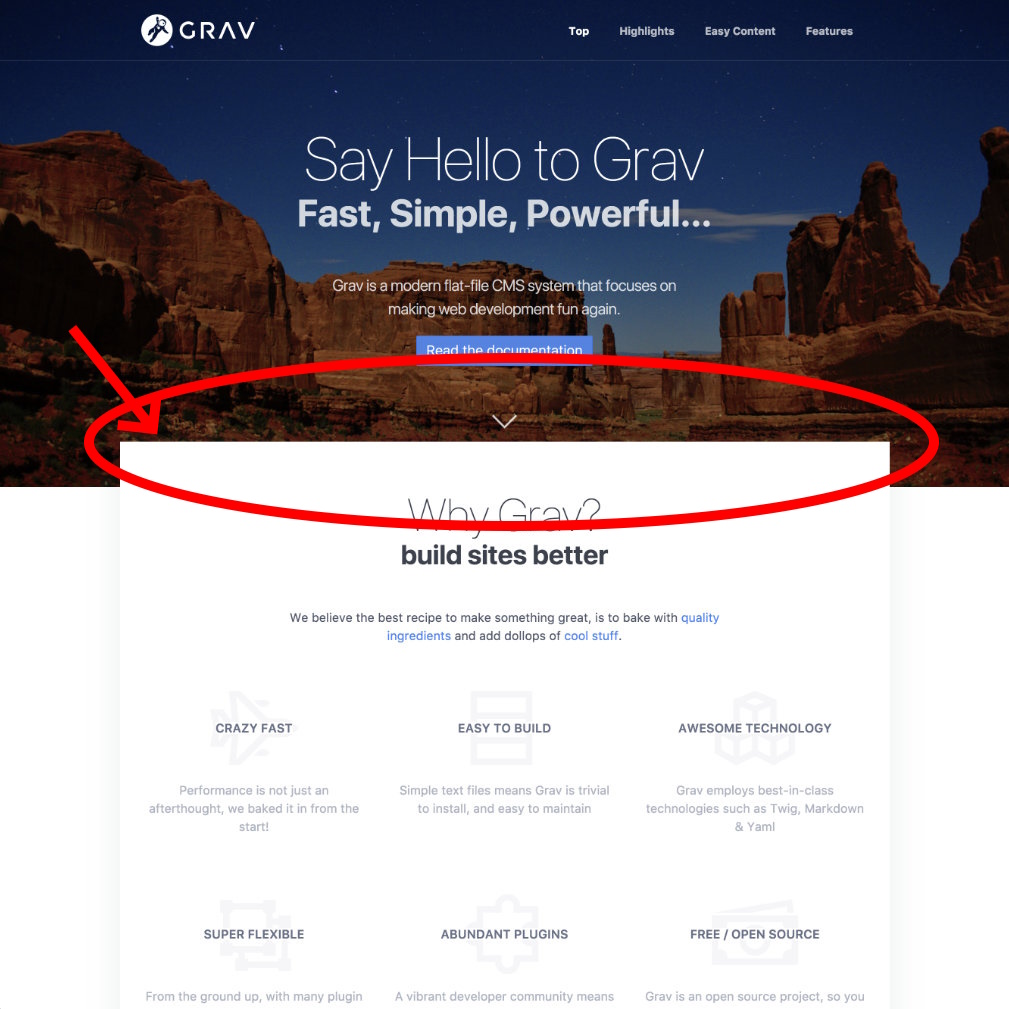
screenshot|500x500

Also, do you know why my hero image has so low quality? It's litterally a professional picture..

Thank you for your help,

1 year ago

@Delo,

Two remarks first:

  • Please keep your title succinct. I've taken the liberty to alter it.
  • Your second question is not related to the post's title and will be buried.

No overlap of hero and first module:
The problem can be found between your chair and keyboard. When using Quark out of the box, it is working just fine. But when you start removing required css classes from elements, things might brake. Start comparing the DOM of the original Quark skeleton and your site to find the differences.

It’s litterally a professional picture

The picture might be shot by a professional, but the size of the version used on your site is only 800x533 pixels. That is no "professional" grade in itself. Also, the device you are using might need way more pixels to fill the screen what degrades the quality even further.

1 year ago

@pamtbaau thank you for answering. Sorry for my english, it is not my main language.

1) The overlap disapear when I remove the features on the _highlight from one page quark skeleton. It doesn't happen when I remove some CSS. That's why i don't understand how removing them influences the overlap

2) The picture is 5472x3648 pixels and 14,9mb. When I upload it the quality automaticaly reduces. It looks like something is resizing it. Any idea where i could disable that?

Thank you for taking the time to understand me

1 year ago Solution

Found the solution :
The class on the highlight page changed from class: offset-box to class: small
I fixed it.

1 year ago

@Delo:
The picture is 5472x3648 pixels and 14,9mb. When I upload it the quality automaticaly reduces. It looks like something is resizing it. Any idea where i could disable that?

Once again, please do not ask two unrelated questions in the same topic.

Suggested topics

Topic Participants Replies Views Activity
Support · by Thomas, 1 week ago
2 54 12 hours ago
Support · by Anna, 3 days ago
2 60 15 hours ago
Support · by Justin Young, 15 hours ago
1 30 15 hours ago
Support · by Duc , 1 week ago
2 65 5 days ago
Support · by Colin Hume, 1 week ago
2 57 5 days ago