Skip to content
Grav 2.0 is officially stable. Read the announcement →

Community guidelines

Please keep discussions civil and on-topic. Repeated violations may lead to a temporary ban.

Support

Multiple Flex Objects in the same Admin Panel page

admin

Solved by Ionut Cicio View solution

Started by Ionut Cicio 3 years ago · 1 replies · 429 views
3 years ago

The problem

Hey guys! I'm working on a website for an association, and I have a few small enough flex-objects which are related to each other, that's why I would like to group them under the same page.

Let me give you an example: there is a flex-object to select in which days/times the association will be closed for special events (and people cannot book that day), and there is a flex-object to set the regular schedule (at which times the association is normally open) and I'd like to put them together in the same page.

Example solution

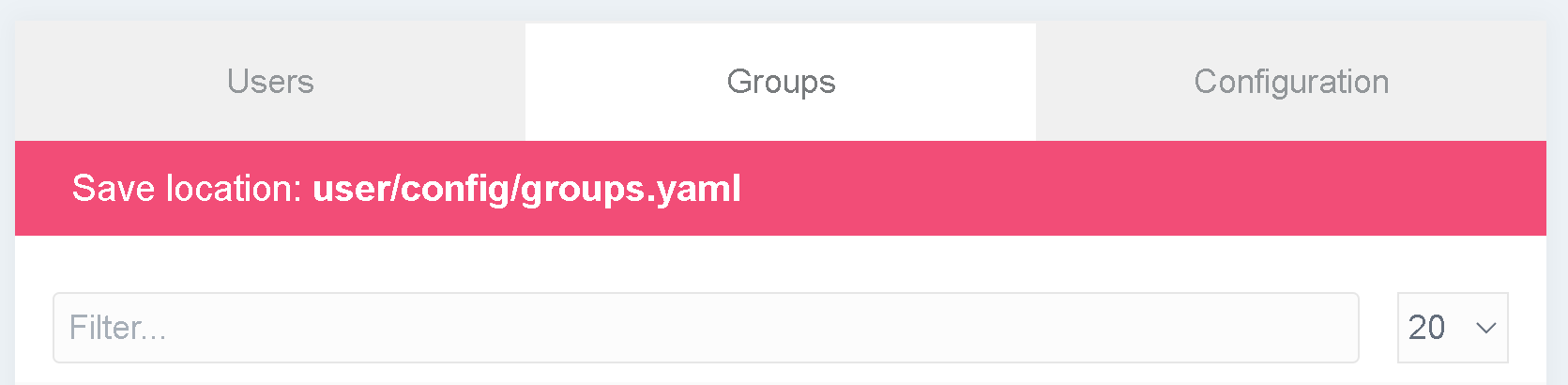
I'd like to do the same thing that already happens with user-accounts and user-groups, which are flex-objects grouped in the same page (picture below for reference)
groups|690x169

What I've tried to do

I tried to look up how the .yaml file for user-accounts and user-groups is made, but there isn't much information inside it:

YAML
title: User Accounts (Admin)
description: ...
type: flex-objects

extends@:
    type: user-accounts
    context: blueprints://flex

I still don't understand which file is being extended here? I tried to look up the structure, and my guess is that I should add to my theme's templates a folder called ./admin/{name-of-flex-objects-grouping} with the necessary .html.twig files. My other question is: can I solve it with some trick in the .yaml configuration of the flex objects? I see there's a config.admin.router attribute, but I'm not sure how to work with it, and how work with actions (I tried to look at the documentation, but I didn't understand much Flex Objects Config Admin - router)

I think I almost figured it out, but I'm making this post anyway, in case someone already has the solution, or in future someone wants to do something similar 😀

3 years ago Solution

Solution Found! 😀

It was relatively simple.

  1. In my own theme I created a admin/templates/flex-objects folder so I can add templates that flex-objects can use in their configuration. To choose which template is viewed in the admin section of flex-objects you just have to use the config.admin.template field in the blueprint (https://learn.getgrav.org/17/advanced/flex/custom-types/blueprint#config-admin).

For example, if config.admin.template = mytemplate, you have to make sure there is a user/themes/mytheme/admin/templates/flex-objects/types/mytemplate folder in your project.

  1. Next, I created a admin/template/flex-objects/layouts/mylayout/partials folder, with inside a file called top.html.twig (I guess you don't need as many nested subdirectories, I just did what the flex-objects Plugin does).

This is the content of top.html.twig:

TWIG
{% set active_html = 'class="active"' %}

<div class="form-tabs">
    <div class="tabs-nav">
        {% for name, title in {'flexobject1': 'Title1', 'flexobject2': 'Title2'} %}
            {% set current = flex.directory(name) %}
            {% if current and current.isAuthorized('list', 'admin', user) %}
                {% set active = nav_route|starts_with(flex.adminRoute(current)|trim('/') ~ '/' %}
                <a {{ active ? active_html|raw }} href="{{ admin_route(flex.adminRoute(current)) }}">
                    <span>{{ title|tu }}</span>
                </a>
            {% endif %}
        {% endfor %}
    </div>
</div>
  1. The last step is to setup the routes in the blueprint of the objects:
YAML
# flexobject1

config:
    admin:
        router:
            path: /mytemplate/flexobject1
            redirects:
                '/mytemplate': '/mytemplate/flexobject1'

        menu:
            list:
                hidden: false # This has to be visible in the menu
                route: mytemplate # Important: it doesn't have to be /mytemplate/flexobject1
                # etc...

        template: mytemplate

flexobject1 is the only visible one in the left menu in the admin panel. All the other ones are hidden and accessible by the tab view (picture in my original post).

YAML
# flexobject2

config:
    admin:
        router:
            path: /mytemplate/flexobject2

        menu:
            list:
                hidden: true # THIS HAS TO BE HIDDEN!
                route: mytemplate # Important: it doesn't have to be /mytemplate/flexobject1
                # etc...

        template: mytemplate
  1. Add a list view to admin/templates/flex-objects/types/mytemplate by adding a list.html.twig file:
TWIG
{% extends 'flex-bojects/types/default/list.html.twig' %}

{% block content_top %}
    {% include 'flex-objects/layouts/mylayout/partials/top.html.twig' %}
    {{ parent() }}
{% endblock %}

And it should work like a charm 😉

last edited 06/16/23 by Ionut Cicio

Suggested topics

Topic Participants Replies Views Activity
Support · by Thomas, 1 week ago
2 60 16 hours ago
Support · by Anna, 3 days ago
2 66 19 hours ago
Support · by Justin Young, 20 hours ago
1 34 19 hours ago
Support · by Duc , 1 week ago
2 70 6 days ago
Support · by Colin Hume, 1 week ago
2 61 6 days ago