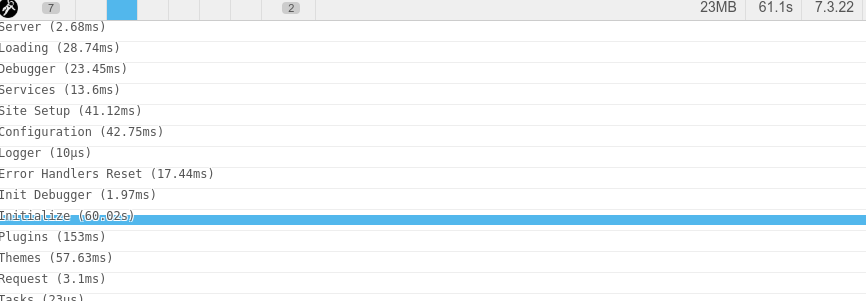
I developed a site for a client on one of my own servers and everything worked out pretty well. Frontend is crazy fast, Backend is crazy fast - everything as expected.
So now I deployed the page on the webspace of my client, that is hosted by a big provider and is even more powerfull than mine. But unfortunately the whole site got really slow (espacially the backend).
I enabled the debugger and tried to look up the problem and saw that the duration of the "Initialize"-Phase was the only thing that took very long.
Has anyone ever had such a problem before? I believe there could be something wrong with the curl-requests, but I can't look up the server logs.
Update:
I figured out why it's always so slow. As I expected earlier it has something to do with the requests made by the server. The above mentioned 60 seconds stayed the same all the time I analyzed the problem inside the backend.
So after trying a lot of system configuration stuff and found myself in the admin plugin configuration. I disabled the automatic check for updates and suddenly everything was fricking fast. The processing time dropped from 60 seconds to 493ms - only the overview page was still pretty slow. After disabling the news feed the overview was also very fast.
Has someone an idea how I can configure grav to run the automatic checks and still run fast? This would be the perfect solution.
(Anybody knows the requests urls which are called during the automatic checks?)
Update 30.10.2020
I'll close this thread. The reason for this problem is a 60 second timeout while grav is checking for plugin updates. I disabled the automatic check and the page runs fine. Unfortunately the support doesn't want to help me to analyze the problem and I have not enough rights on the server to do it myself.