Skip to content
Grav 2.0 is officially stable. Read the announcement →

Community guidelines

Please keep discussions civil and on-topic. Repeated violations may lead to a temporary ban.

Support

Images blurry after resize or cropResize

Started by Nils 6 years ago · 6 replies · 967 views
6 years ago

Is there any way to configure the quality of the images that Grav resizes / crops? I have tried this with png and jpg so far and though I am just resizing the images by less than 20%, they all get a bit blurry. Any workarounds for that apart from saving images in different sizes from the start (but then why have resize)?

Regards
Nils

6 years ago

@vfor, I haven't noticed a blurry result before.

Would you mind sharing your resizing/crop commands and before/after images?

6 years ago

There is not much happening there. Basically I am using the default Quark base.html.twig for general layout (loading css & js as well as defining navigation). And this is what I am using inside my template:

HTML
<div class="box">
  <div class="scroll-pane">
    <div class="scroll-content">
      <div class="padding">
        {{ page.content|raw }}
        <p><a href="#" class="button5">More info</a></p>
      </div>
    </div>
  </div>
</div>

Plus this piece of Markdown as content:

TXT
![](portrait.png?classes=float-right&resize=261,197)
# About me

Firstname Lastname  
Artist & Psychologist

I have a high resolution display but if I resize the image with other online-tools (even tried with ImageMagick) the result is always good and not blurry. So I assume there must be some kind of setting. If it helps I can post the results here as well as images. And it does not only happen with png but also jpg.

Any help/hint is highly appreciated.
6 years ago

@vfor,
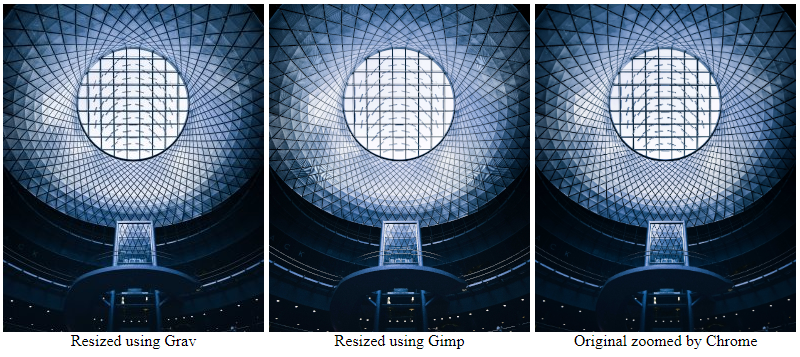
I did some comparison using a download of the following image: https://unsplash.com/photos/_NNsOxgemgg (5866x7370).

default.md:

TXT
![](willie-fineberg-_NNsOxgemgg-unsplash.jpg?resize=261,328)
Resized using Grav

![](/user/pages/02.typography/willie-fineberg-_NNsOxgemgg-unsplash-gimp.jpg)
Resized using Gimp

![](/user/pages/02.typography/willie-fineberg-_NNsOxgemgg-unsplash.jpg)
Original
  • All resizing (factor ~ 1/20) is with keeping aspect ratio, using Grav and Gimp.
  • Used fresh installation of Grav 1.6.23 + Quark
  • Used browser Chrome
  • To exclude any effect of Quark's css/js I used a bare template only containing {{ page.content|raw }}
  • The following image is a screenshot of the resulting page.

scaling|690x307

  • Yes, there is some blur and loss of quality, which is acceptable to me, but whether the loss is acceptable depends on the use-case I guess.
  • I would say that Gimp, using default settings, shows most artefacts and loss of quality. Something I did not expect...
👍 1
6 years ago

I have absolutely no idea what I am talking about : Does it make a difference if ImageMagick is installed vs. using the GD library ?

6 years ago

@pamtbaau Thank you for this particular interesting comparison. I am not surprised to see Gimp struggling with this task. It seems that the problem only occurs when using PNG-24 that have been compressed already and then using Grav to resize the pictures. And it seems that it is only really visible with faces. So I stick with resizing the images in an external graphics tool and then uploading them to Grav. But I will keep an eye on it throughout my next projects.

6 years ago

@vfor, Normally I always crop, resize and compress images outside of Grav using Gimp. But for a responses masonry with many images and multiple sizes, it felt too much work to do it manually, so I used the 'derivatives' function to create a srcset. I didn't notice any image degradation. Maybe I should have a closer look...

Thanks for the feedback on your experience with PNG-24. Have you tried webp? The latest release candidate of Grav 1.7 has added support for webp.

Suggested topics

Topic Participants Replies Views Activity
Support · by Thomas, 1 week ago
2 56 13 hours ago
Support · by Anna, 3 days ago
2 61 16 hours ago
Support · by Justin Young, 17 hours ago
1 32 17 hours ago
Support · by Duc , 1 week ago
2 66 5 days ago
Support · by Colin Hume, 1 week ago
2 59 5 days ago