Skip to content
Grav 2.0 is officially stable. Read the announcement →

Community guidelines

Please keep discussions civil and on-topic. Repeated violations may lead to a temporary ban.

Support

How to redirect old website URLs to the new URLs on new Grav website

Solved by pamtbaau View solution

Started by Jose 3 years ago · 2 replies · 759 views
3 years ago

Hello

  1. I finished a new Grav site and got the old website URLs that were indexed by Google. Normally, I do in the .htaccess a redirect in this way:

Redirect 301 old_URL new_URL

But I was not able to make it work

  1. I read the documentation and some forum posts:
    https://learn.getgrav.org/17/content/routing

2.1 /forum/support/redirect-returns-404-t8894

I was not able to do the redirect in site.yaml, unfortunately I can not go back to the old website, and Google search positions are in danger now.

TXT
redirects:
  '/Articulos.php?articulo_no=134&': /blog/concentrador-de-oxigeno-portatiles[301]

3 I also tried via the Grav Admin Plugin in configuration site using redirects, then routes, then both, impossible to me to make it work, I do not know what am I doing wrong. Please see the screen capture.
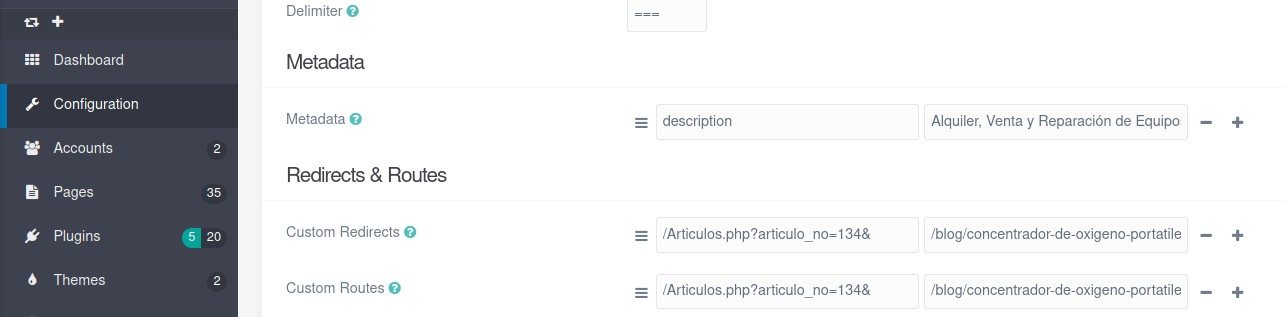
RedirectionAttemptViaAdminPlugin|690x170

In any case I always get the Grav 404 page when I enter the old URL on the browser.

Can somebody please be so kind to show me the right way to redirect old URLs to their corresponding Grav URL?
Thanks in advance.
Regards

last edited 02/14/23 by Jose
3 years ago Solution

@joejac,

  1. I read the documentation and some forum posts:
    Routing | Grav Documentation

Did you also pay attention to the following note:

You must escape certain characters in any routes that you want to match. This is especially important to know if you are migrating an old site that used links containing legacy file extensions (e.g. .php ) or URL parameters (?foo=bar ). In these examples, the period and question mark must be escaped like /index\.php\?foo=bar: '/new/location' .

On a fresh Grav installation using the following redirect in /user/config/site.yaml...

TXT
redirects:
  /old_url?id=11: /typography[301]

... the url http://dev-dev/old_url?id=11 will throw a 404

When using... (note the \?)

TXT
redirects:
  /old_url\?id=11: /typography[301]

...the browser is redirected to http://dev-dev/typography

Note: You may ommit the [301] and set the default redirect code in /user/config/system.yaml:

TXT
redirect_default_code: 301     # Default code to use for redirects: 301|302|303

Note: There is more to do than setting Grav's redirects. Here is a document on moving sites and/or changing urls: https://developers.google.com/search/docs/crawling-indexing/site-move-with-url-changes#prepare-url-mapping.

👍 1
3 years ago

Thanks @pamtbaau your posts are always a good lesson.
You pointed the solution:

@pamtbaau:

TXT
redirects:
  /old_url\?id=11: /typography[301]

I did in /user/domain.com/config/site.yaml:

TXT
redirects:
'/index\.php\?categoria_no=8': /contacto

and the redirection worked fine.

Sorry, my mistake, I missed this part of the documentation, that you make reference:

the period and question mark must be escaped like /index\.php\?foo=bar: '/new/location'

Thanks and regards

last edited 02/14/23 by Jose

Suggested topics

Topic Participants Replies Views Activity
Support · by Thomas, 1 week ago
2 66 18 hours ago
Support · by Anna, 3 days ago
2 72 21 hours ago
Support · by Justin Young, 22 hours ago
1 40 22 hours ago
Support · by Duc , 1 week ago
2 76 6 days ago
Support · by Colin Hume, 1 week ago
2 70 6 days ago