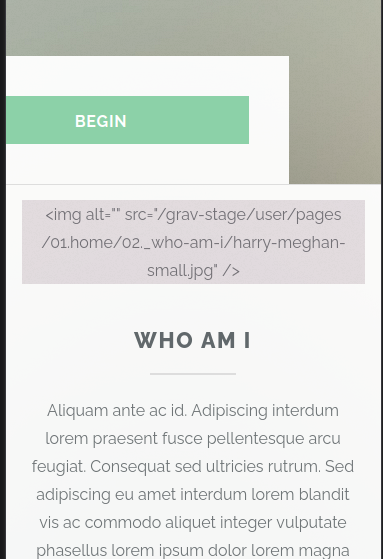
I.e <img alt="", src="whatever.png"....> as well as the image.
This only happens on tablets and phones, not computers. The image displays correctly. I have the issue with a fresh install of Grav and highlights theme, as well a this site
Solved by pamtbaau View solution
I.e <img alt="", src="whatever.png"....> as well as the image.
This only happens on tablets and phones, not computers. The image displays correctly. I have the issue with a fresh install of Grav and highlights theme, as well a this site
@hsweet, You probably forgot Twig filter | raw. Without the raw filter the output will be escaped. It is a security measure to prevent malicious content being injected into the page.
<section id="_about" class="main special">
<div class="container">
<span class="image fit primary"><img alt="" src="/user/pages/01.home/02._about/pic01.jpg" /></span>
... etc.
By the way, it has got nothing to do with the size of the device. The escaping happens on every device. It's just that a media query hides the image on larger devices and shows it on smaller ones.
Thanks so much!
I'm still a bit confused. (This is new to me, esp twig). I see now that the problem shows up in the html output where you pointed, and that to fix it I need to add a raw twig filter. {% autoescape %} {{ var|raw }} {# var won't be escaped #} {% endautoescape %}
Is it a specific var, or just the string var?
Does it get inserted in default.html.twig?
Are these the right questions?
{% extends 'partials/base.html.twig' %}

{% block content %}

{% include 'partials/navigation.html.twig' %}

<section id="{{ page.slug }}" class="main">
    <div class="container">
        <div class="content">
            <header class="major">
                <h2>{{ header.title }}</h2>
            </header>
            {{ page.content }}
        </div>
    </div>
</section>
{% endblock %}
I tried '{{ page.content }} ==> {{ page.content | raw }}' in default.html.twig. no change yet.
@hsweet, By default Twig escapes everything.
For every output {{ ... }} that might contain HTML (or javascript) and can be regarded as safe, the raw filter should be used.
In your example the raw filter should be used to output the content of the page.
{{ page.content | raw}}
The theme you've chosen is broken with respect to using the raw filter in templates default.html.twig and error.html.twig.
You might want to notify the developer of the theme...
In the mean time...
OK. thanks.
I was thinking that should not be happening with a unmodified installation. I'll post a bug report and go with a working theme until I can resolve it. It's a small site, at least : )
Log in to reply.
| Topic | Participants | Replies | Views | Activity |
|---|---|---|---|---|
| 4 | 151 | 6 days ago | ||
| 2 | 131 | 1 week ago | ||
| 5 | 364 | 2 weeks ago | ||
| 5 | 556 | 2 weeks ago | ||
| 6 | 344 | 3 weeks ago |