Skip to content
● Grav 2.2 is out: 2x faster cold starts and 96% less memory on big sites. Read the announcement →

Grav scheduler is not working

Started by alex_u13 5 years ago · 1 replies · 867 views
5 years ago

Hello everyone The scheduler does not work on my site.

On the web I have this picture:
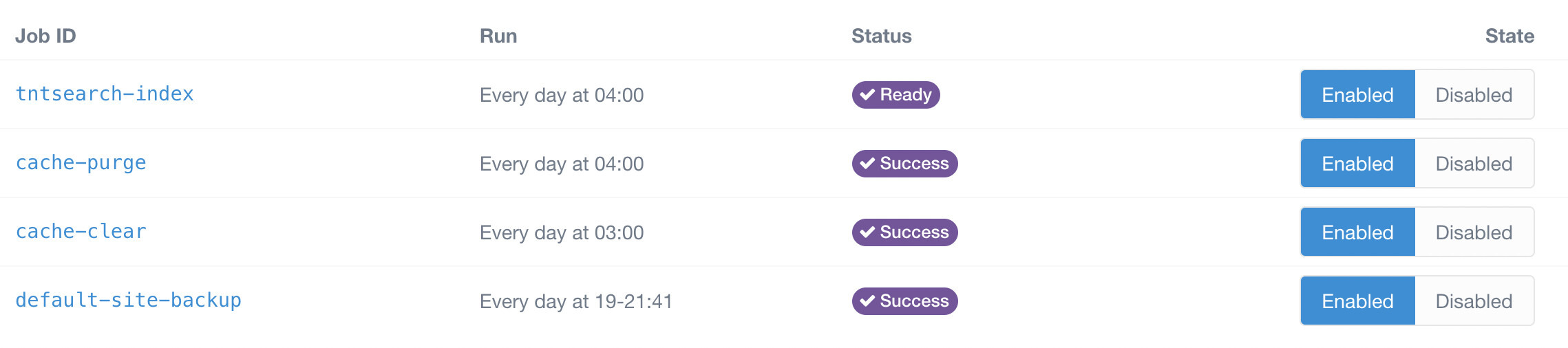
image|690x153

In the console so:

JS
user@server:/root_directory $ php8.0 bin/grav scheduler -d

Job Details
===========

┌─────────────────────┬──────────────────┬──────────────────┬────────┐
│ Job ID              │ Last Run         │ Next Run         │ Errors │
├─────────────────────┼──────────────────┼──────────────────┼────────┤
│ default-site-backup │ 2020-12-19 03:00 │ 2022-01-27 20:06 │ None   │
└─────────────────────┴──────────────────┴──────────────────┴────────┘

And in the files so:

YAML
user@server:/root_directory $ cat user/config/scheduler.yaml
status:
cache-purge: enabled
cache-clear: enabled
default-site-backup: enabled

The crown works correctly:

TXT
user@server:/root_directory $ tail -1 /var/log/cron.log

Jan 27 20:26:01 server CRON[01]: (www-data) CMD (cd /root_directory;/usr/bin/php8.0 bin/grav scheduler >> /dev/null 2>&1)

The command is also executed correctly, which means the problem is on the Grav side.

Please tell me where to dig

5 years ago

There are two reasons coming to my mind that can cause this issue:

  1. I am citing the documentation on this: "You need to be logged in to the shell with the same user as your webserver. This is to ensure that the user that runs the schdeduler commands matches the webserver user that needs to interact with those files. If you install the crontab entry with another user (e.g. root ) any files created will be created as that root user and not the webserver user which can lead to problems." (see https://learn.getgrav.org/17/advanced/scheduler#installation)
  2. There is a configuration "gotcha", that I run into myself several times. You can configure grav based on the url it is accessed. That means your website is reachable calling example.com, all configuration is tied to this url. The cron job on the other side uses localhost when calling the scheduler job, so the configuration bound to example.com will not apply! (see https://learn.getgrav.org/17/advanced/environment-config#automatic-environment-con)

Suggested topics

Topic Participants Replies Views Activity
Support · by gravinator, 1 month ago
5 452 1 hour ago
Support · by stell, 7 days ago
4 238 5 days ago
Support · by Gravver, 2 weeks ago
6 279 1 week ago
Support · by Marcel, 4 weeks ago
2 338 1 week ago
Support · by blu3prince, 2 weeks ago
1 254 2 weeks ago